Best Sales Call Tracking Software in 2026 (Tested by Real Teams)




We compared 10 sales call tracking tools using G2 ratings, Capterra reviews, Reddit threads, and sales forum discussions, then checked each one against three questions: does it auto-log calls, does it fit your CRM, and is the pricing honest?
Your reps made 200 calls last week. How many made it into the CRM? If you are not sure, you are not alone. The most common reason sales call tracking software gets bought is that manual logging quietly stopped working.
Sales call tracking is the practice of recording what happens on every sales call: who called, when, how long it lasted, what was said, and what happened next. A good sales call tracker captures that data automatically and puts it where your team already works, usually HubSpot or Salesforce.
There are two very different kinds of tools sold under this label. Attribution tracking tells marketing which ad, keyword, or campaign made the phone ring. Activity tracking tells sales managers how many calls each rep made, how those calls went, and what follow-up happened. Buying the wrong type is the most expensive mistake in this category.
Many teams start with a sales call log in Excel or Google Sheets. That works for one rep. It breaks the moment you need team visibility, because reps skip the admin work. As one dealership manager put it on the DealerRefresh forum, the problem is rarely the tool. It is getting reps to log calls at all.
This guide covers both types, tags every tool clearly, and shows you what real users say, including the complaints product pages leave out.
Quick comparison: best sales call tracking software at a glance
Use this table to shortlist. G2 ratings were checked in November 2026 and change often, so confirm before you buy. Prices are entry-level list prices and usually exclude usage fees and add-ons.
Want to see how Salesmsg handles call tracking and texting together? Start a free trial.
Attribution tracking vs. activity tracking: which type do you need?
Most comparison articles skip this step. It matters more than any feature list, because the two types solve different problems for different buyers.
Attribution tracking: where did the call come from?
Attribution tools assign a unique phone number to each ad, landing page, or keyword. This is called dynamic number insertion. When someone calls, the tool knows which campaign drove it and passes that data to Google Ads or your CRM.
Example: a home services company spends $10,000 a month on Google and Facebook ads. Attribution tracking shows that Google search drove 70% of booked jobs, so they shift budget. The buyer is usually a marketing lead or agency.
Activity tracking: what happened on the call?
Activity tools track your reps, not your ads. They log every inbound and outbound call to the contact record, record and transcribe it, and report on volume, outcomes, and follow-up. This is what most people mean by a sales call tracker.
Example: a mortgage team of 12 reps needs to know who is actually calling new leads within five minutes. Activity tracking shows calls per rep, connect rates, and which deals went quiet. The buyer is usually a sales manager or RevOps lead.
Quick rule: if your question is "which campaign is working?" you need attribution. If your question is "what are my reps doing?" you need activity tracking. Some teams need both, and a few tools cover both.
Best sales call tracking software (detailed reviews)
Each review follows the same format: who it is for, what it does well, pricing, CRM fit, and what real users say on G2, Capterra, Reddit, and forums. We paraphrased feedback rather than quoting product pages.
1. Salesmsg
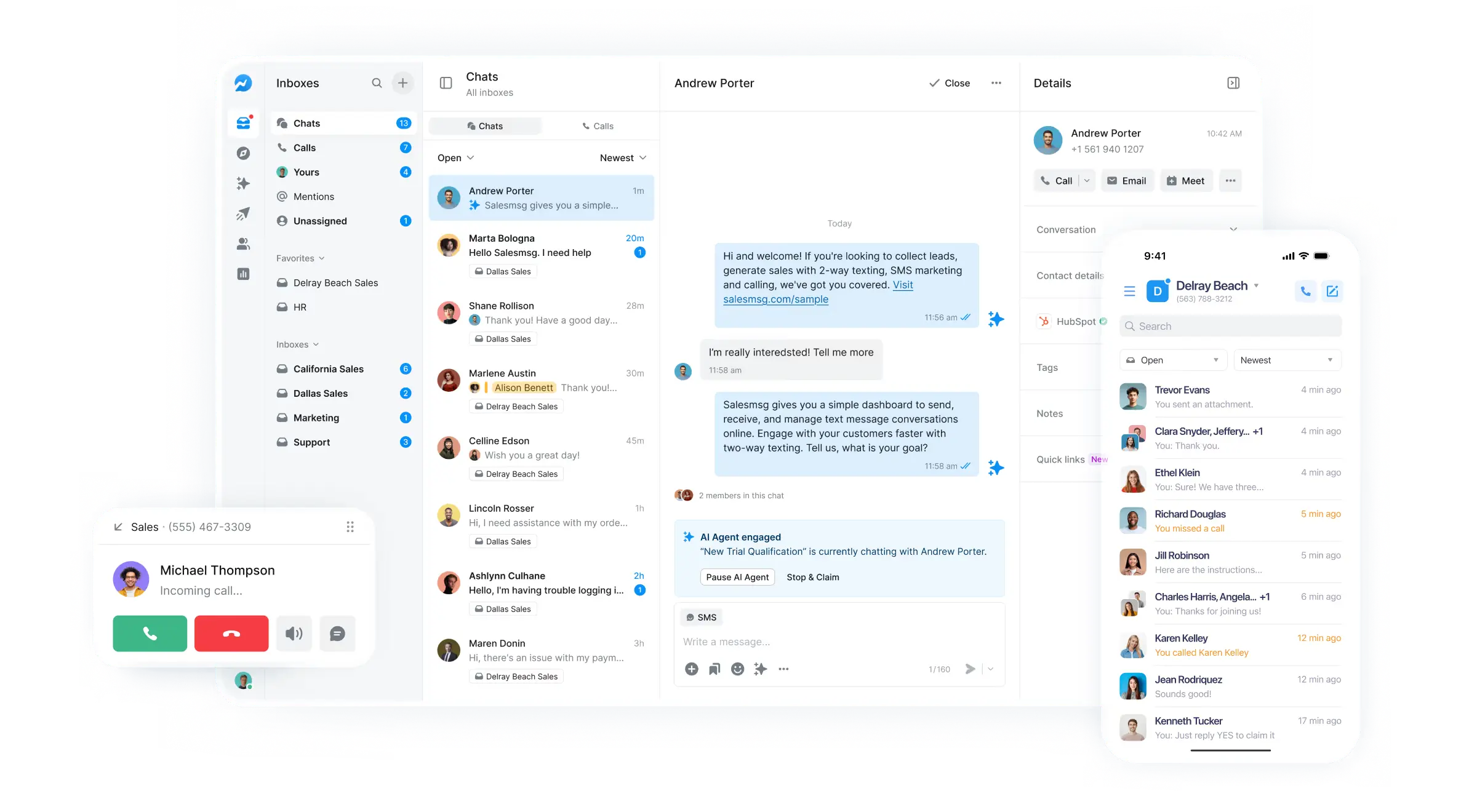
Best for: sales teams that call and text from one platform, inside HubSpot or Salesforce. Type: Activity tracking.
Salesmsg is a calling and two-way texting platform built for revenue teams. Every call and text from a rep's business number logs to the CRM contact record automatically, so managers see the whole conversation, not just the call. It is not a marketing attribution tool, so if you need to track which ad drove a call, pair it with CallRail or WhatConverts.
Key features:
- Auto-log every call and text to HubSpot or Salesforce records
- Record, transcribe, and summarize calls with AI
- Power dial lists and drop ringless voicemails
- Follow up by text from the same number
- Trigger texts and tasks from CRM workflows
Pricing: plans start at $25/month, with a 14-day free trial. Calling is billed in credits, so check how your call volume maps to plan credits.
CRM integrations: native HubSpot and Salesforce integrations, plus Pipedrive, ActiveCampaign, and others. See our guides to the best HubSpot SMS integrations and Salesforce SMS integration.
What real users say:
G2 reviewers most often praise the HubSpot integration and the fact that conversations show up on the contact record without extra steps. Many reviews name individual support reps, which is rare for software.
On the downside, some reviewers describe the interface as plain, and several want deeper analytics and reporting. A few mention compliance setup for broadcasts taking longer than expected.
Honest take: Salesmsg is not the best pick if you only need ad attribution. It is the strongest pick if your reps call and text the same leads and you want both channels tracked in your CRM. Learn more about calling with Salesmsg.
Try Salesmsg free: calling and texting in one inbox, with native HubSpot and Salesforce integration. Start your 14-day trial
2. CallRail
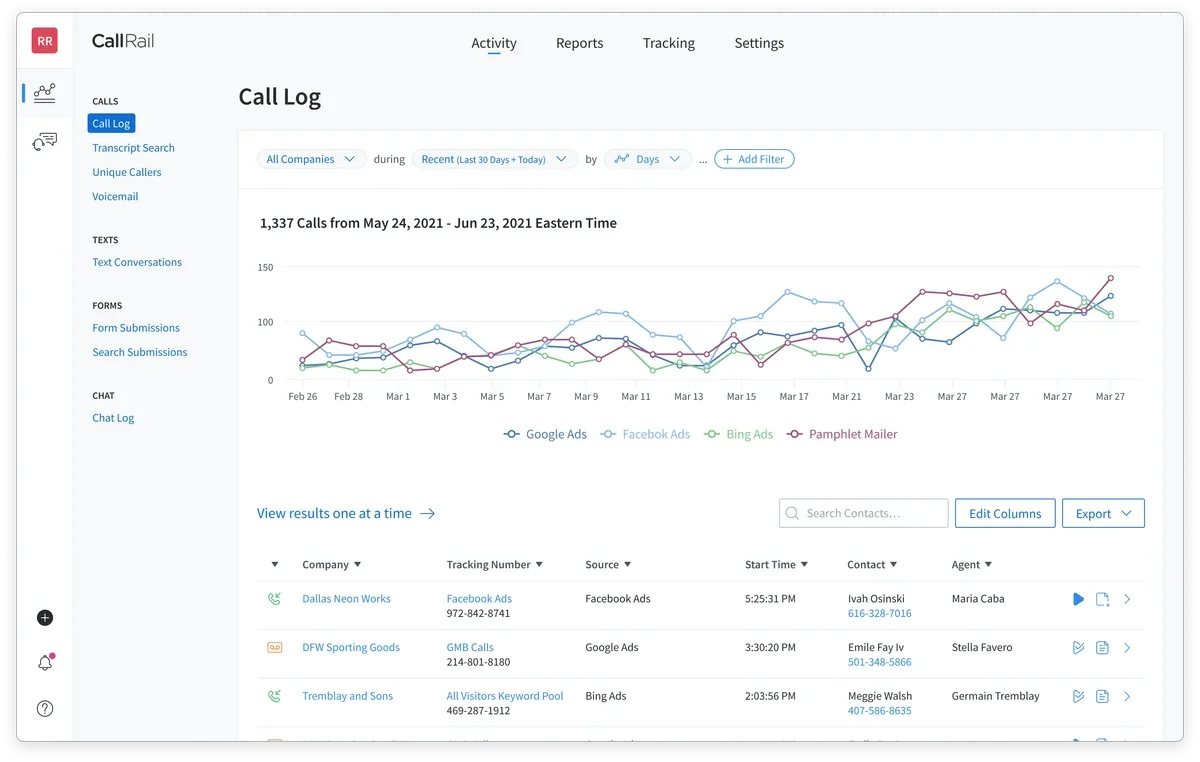
Best for: marketing attribution tracking. Type: Attribution.
CallRail is the most widely known call attribution tool. It shows marketing teams and agencies which campaigns, keywords, and pages drive phone calls, then feeds that data back into ad platforms.
Key features:
- Assign tracking numbers per campaign or keyword
- Track form fills alongside calls
- Score and tag calls with conversation intelligence
- Send conversions back to Google Ads
Pricing: starts at about $55/month for call tracking, with usage-based charges for extra numbers and minutes. Conversation intelligence and form tracking cost more.
CRM integrations: HubSpot, Salesforce, Google Ads, Google Analytics, and many marketing tools.
What real users say:
Ease of use is the top praise on G2, cited in more than 100 reviews. Users say it makes managing call data simple even for non-technical marketers.
Cost is the most common complaint, especially for agencies managing smaller clients that need advanced features. Reviewers also flag missing integrations and AI voice quality. Capterra users call the mobile app clunky, with too many taps to place a call.
Honest take: CallRail is excellent at telling marketing what works. It does little to help sales managers coach reps or manage follow-up.
3. HubSpot Sales Hub
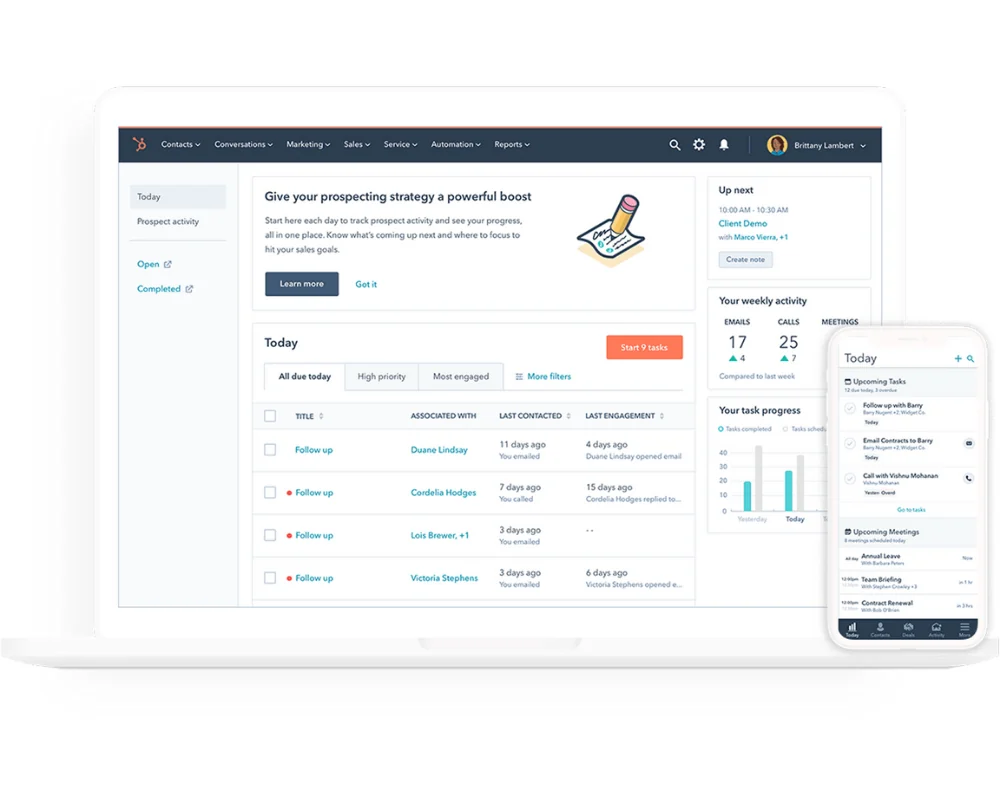
Best for: teams already running HubSpot CRM. Type: Activity tracking.
If your team lives in HubSpot, its built-in calling is the shortest path to tracked calls. Calls placed from HubSpot log to the contact, deal, and timeline automatically.
Key features:
- Call from contact records inside the browser
- Log outcomes and notes automatically
- Record and transcribe calls on paid tiers
- Report on calls by rep and pipeline
Pricing: free CRM tools include limited calling minutes. Starter seats begin around $20/month, with Professional at about $90 to $100 per seat. Many teams find the features they actually want sit in Professional.
CRM integrations: native to HubSpot. Not a fit if your CRM is Salesforce.
What real users say:
G2 reviewers like how quickly small teams can get set up without deep technical skills, and they rate the interface and automation highly.
The most repeated complaint is that custom reporting, multiple pipelines, and automation workflows are locked behind higher tiers. Missing and limited features are among the top complaint themes on G2.
Honest take: great for HubSpot shops that mainly call. If your reps also text, you will need an add-on. Compare options in our list of HubSpot SMS integrations.
4. Salesforce Sales Cloud
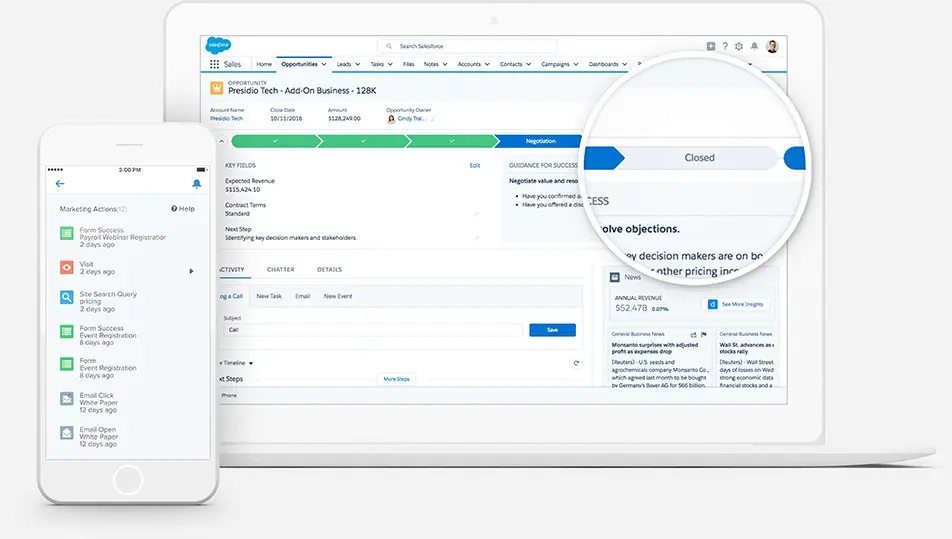
Best for: enterprise teams with complex pipelines. Type: Activity tracking.
Salesforce is the CRM of record for many larger sales orgs. With Sales Cloud and its dialer or a connected telephony partner, calls log to leads, contacts, and opportunities with detailed reporting.
Key features:
- Log calls to leads, contacts, and opportunities
- Build custom call reports and dashboards
- Add AI call insights with Einstein features
- Connect telephony partners through Open CTI
Pricing: Starter Suite is about $25/user/month, with Pro Suite around $100/user/month. The Salesforce dialer and AI features are often add-ons, so confirm the full quote.
CRM integrations: native to Salesforce, with a large partner marketplace.
What real users say:
G2 reviewers praise the depth of integrations, real-time updates, and complete lead and opportunity tracking.
A steep learning curve is the number one complaint across the category on G2, with more than 2,000 mentions. Users also report slow support, frequent sign-in friction, and costs that climb once you add the features you need.
Honest take: powerful once configured, but you will likely need an admin. Smaller teams often pay for complexity they never use.
5. Salesloft
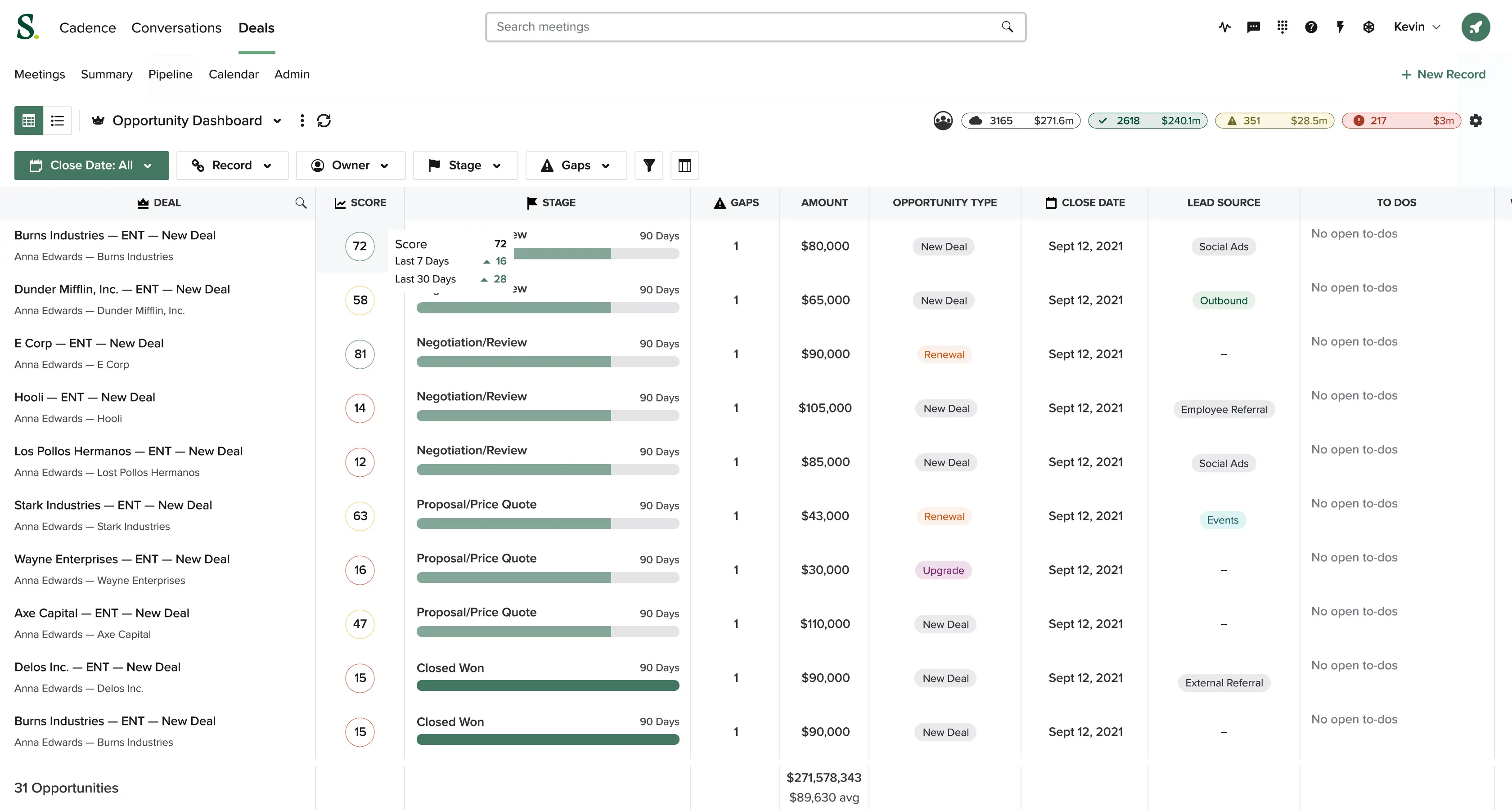
Best for: outbound sales cadences. Type: Activity tracking.
Salesloft is a sales engagement platform where calling sits inside multi-step cadences of calls, emails, and tasks. Calls log to your CRM and feed coaching analytics.
Key features:
- Run calls inside cadences with emails and tasks
- Record calls and review them for coaching
- Track rep activity against cadence goals
- Sync activity to Salesforce or HubSpot
Pricing: quote only. Third-party procurement data puts most mid-market deals around $100 to $165 per user per month, with the dialer often sold as an add-on and seat minimums common.
CRM integrations: Salesforce (strongest), HubSpot, and Microsoft Dynamics.
What real users say:
G2 reviewers rate cadence management and call analytics highly for outbound SDR teams.
One G2 reviewer notes that call logging through the Outlook integration only lets you log to the last five open deals, which slows reps down. New users frequently mention a steep learning curve.
Honest take: worth it for structured outbound teams. Overkill if your team mostly works inbound leads.
6. CallTrackingMetrics (CTM)
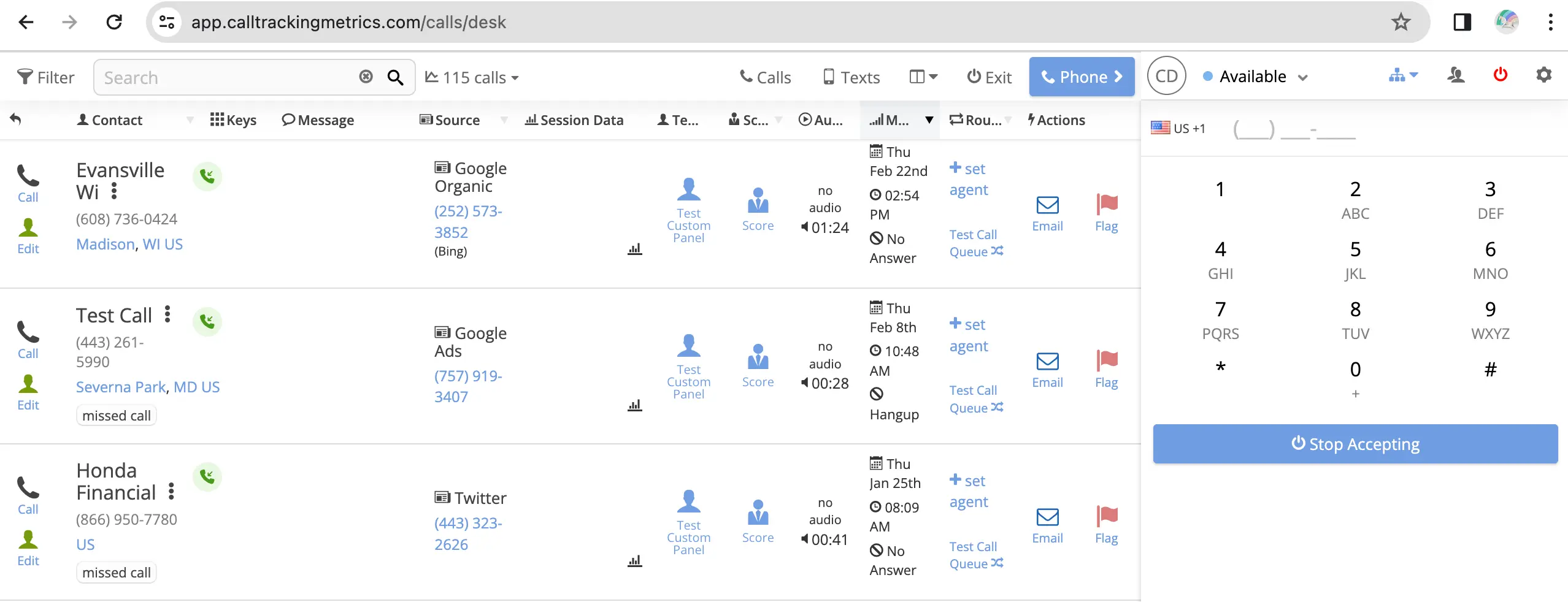
Best for: call attribution plus routing. Type: Both.
CTM combines marketing attribution with a full contact center: routing, queues, IVR, and agent tools. That makes it one of the few tools that spans both tracking types.
Key features:
- Attribute calls to campaigns and keywords
- Route calls with queues and IVR menus
- Record and score agent conversations
- Text from tracking numbers in one inbox
Pricing: starts at about $79/month (or $65/month billed annually), with numbers, minutes, and texts billed on usage.
CRM integrations: HubSpot, Salesforce, Google Ads, and others.
What real users say:
G2 users give CTM about 4.5 out of 5 across 750+ reviews, praising easy initial setup, clear attribution insights, and strong customer support.
Newcomers often find the interface overwhelming. Capterra reviewers say billing gets complicated once you use many features, and one summed it up as not intuitive, hard to find information in, and too expensive. Mobile bugs and limited templates also appear in G2 feedback.
Honest take: a strong choice if marketing and sales share one phone system. Budget time for setup and training.
7. Dialpad
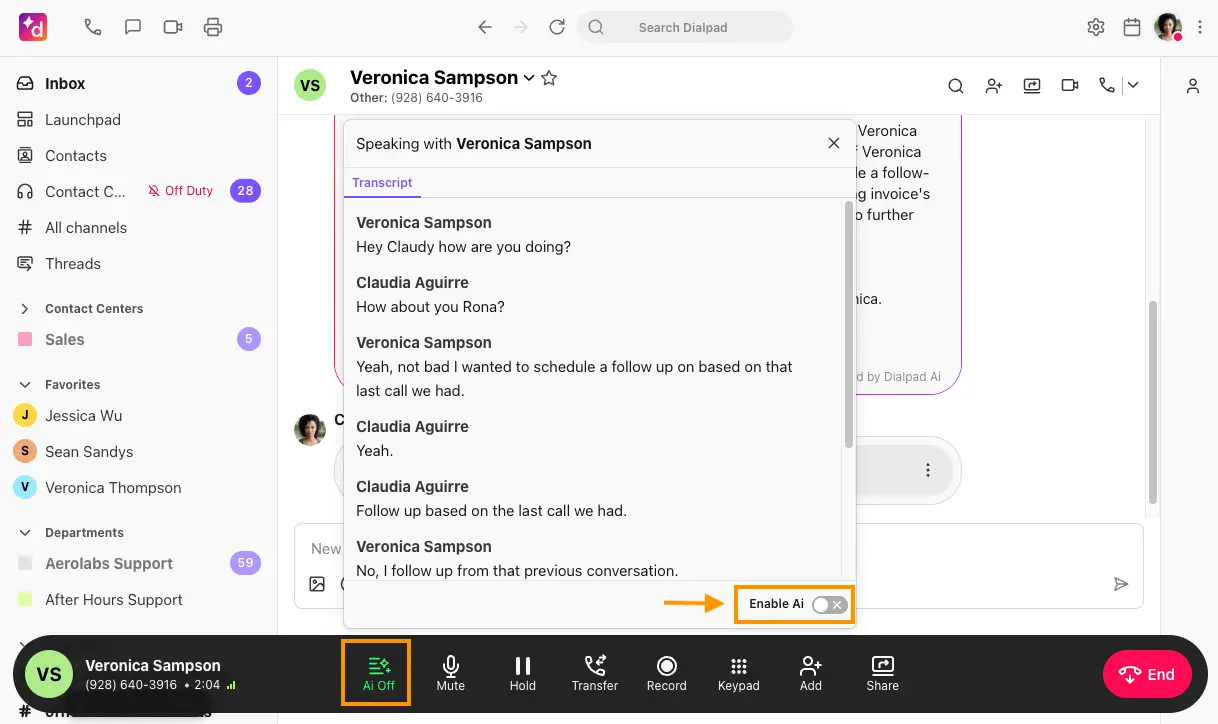
Best for: AI-powered real-time transcription. Type: Activity tracking.
Dialpad is a cloud phone system with AI built in. It transcribes calls live, surfaces talking points for reps, and logs calls to your CRM. If transcripts are your priority, see our full guide to call transcription software.
Key features:
- Transcribe calls live as reps talk
- Show reps live coaching cards during calls
- Summarize calls with action items
- Log calls to HubSpot or Salesforce
Pricing: Standard is $15/user/month billed annually, or $27 monthly. Pro is about $25 annually or $35 monthly.
CRM integrations: HubSpot, Salesforce, Zendesk, and others. Salesforce integration requires a higher tier.
What real users say:
Real-time AI transcription is the standout praise across thousands of G2 reviews.
Some users report call quality drops. The bigger complaint is the gap between Standard and Pro: many of the AI features buyers came for need an upgrade.
Honest take: excellent AI for the price, if you budget for the tier that actually includes what you need.
8. Kixie PowerCall
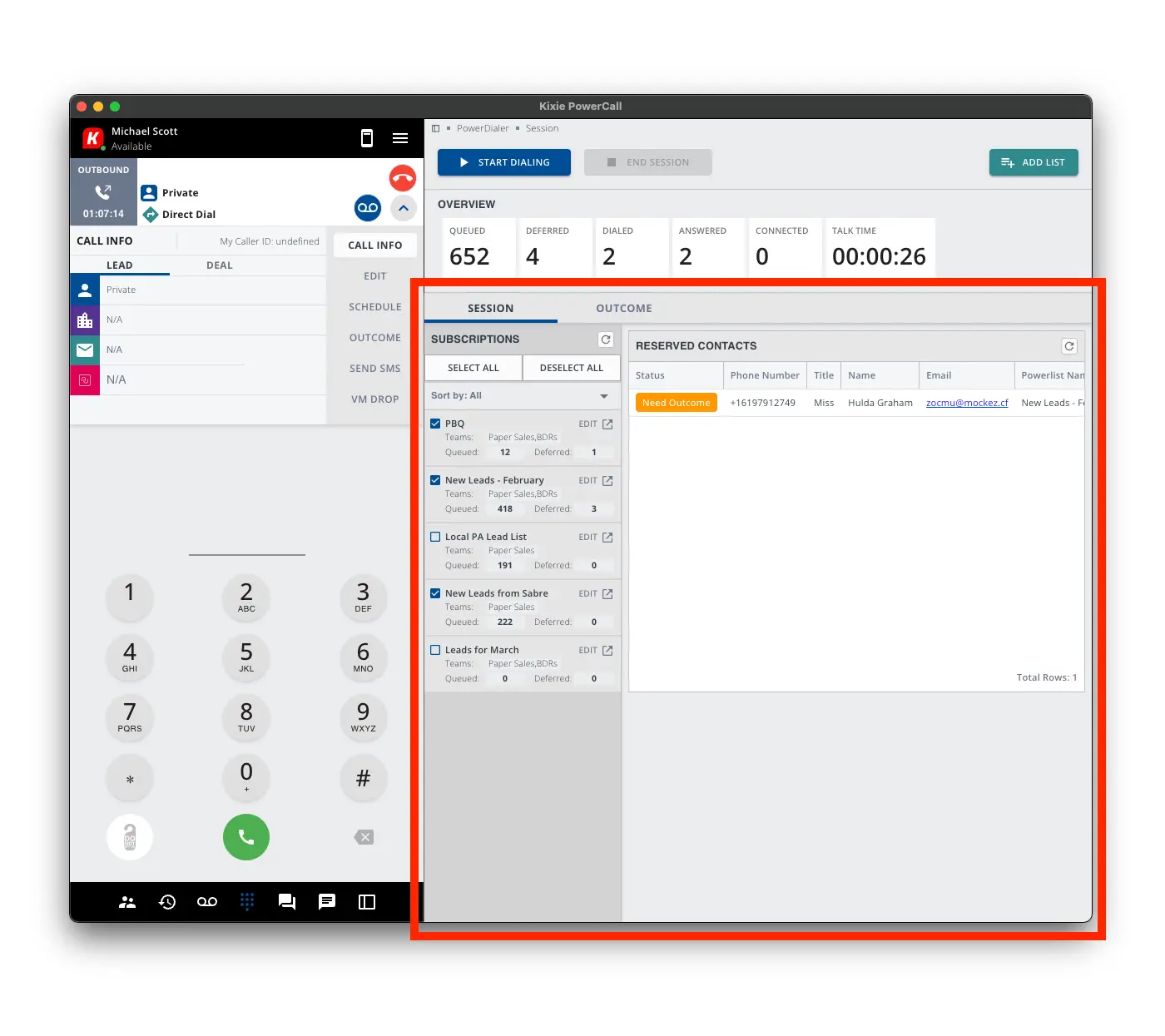
Best for: CRM-driven auto-dialing. Type: Activity tracking.
Kixie is a dialer and texting tool that runs inside your CRM. It is built for high-volume calling teams that want every dial logged without effort. For more options, see our roundup of the best power dialer software.
Key features:
- Dial multiple lines at once
- Auto-log calls and texts to the CRM
- Use local presence to lift answer rates
- Trigger dialing from CRM workflows
Pricing: Kixie no longer publishes seat prices. Third-party estimates range from about $35 to $95 per user per month for base plans, with add-ons such as conversation intelligence and DNC checks priced separately.
CRM integrations: HubSpot, Salesforce, Pipedrive, Zoho, and others.
What real users say:
Reviewers rate Kixie highly on G2, praising how fast reps can work through call lists and how cleanly activity syncs to HubSpot.
Common complaints include occasional call quality issues and a final bill that grows once you add the features high-volume teams need. Quote-only pricing frustrates smaller teams trying to compare.
Honest take: a strong fit for outbound-heavy teams. Get a full quote including add-ons before you commit.
9. Aircall
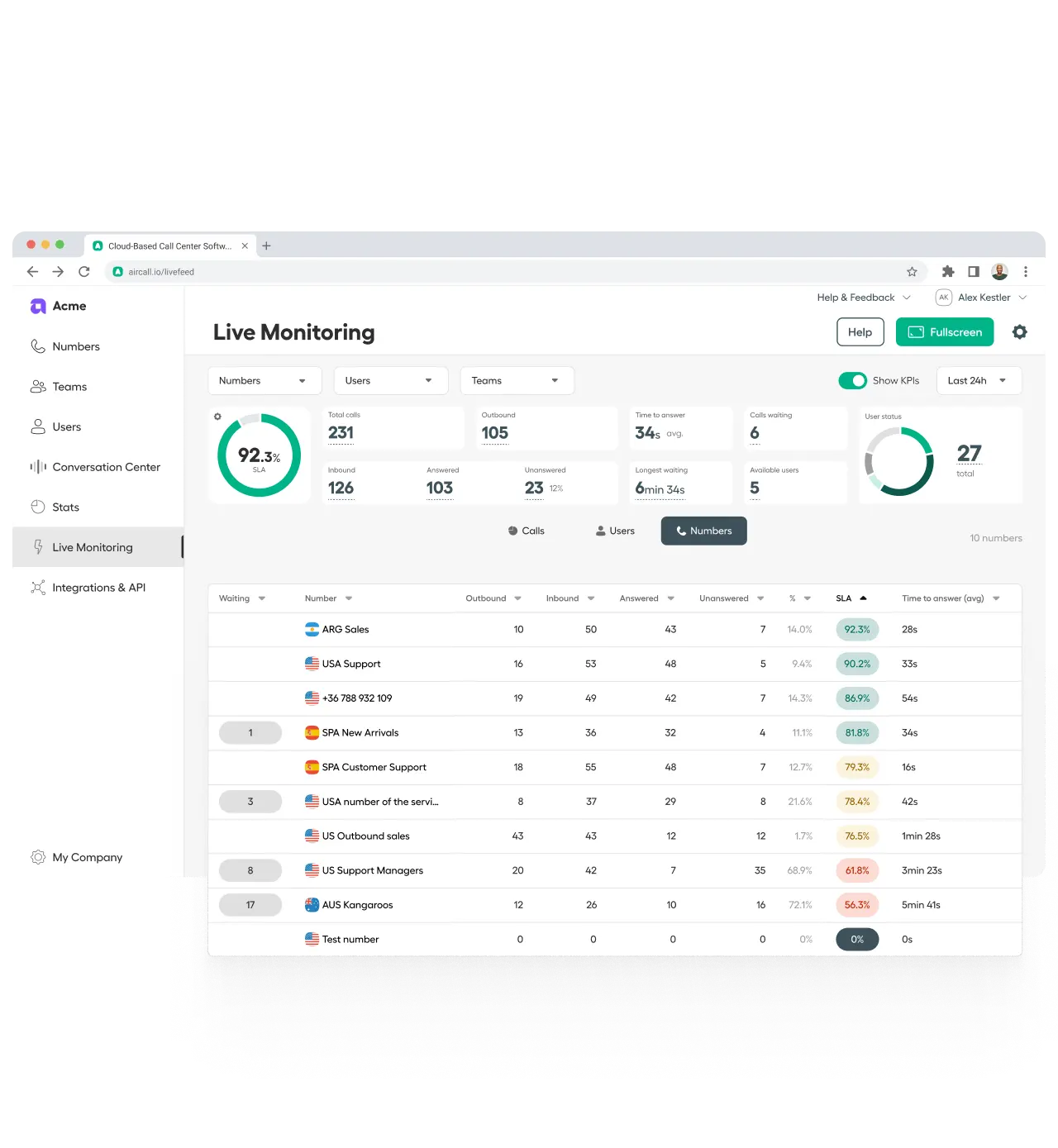
Best for: mid-market support and sales teams. Type: Activity tracking.
Aircall is a cloud phone system known for its large integration library. It works well for teams where sales and support share phone lines and need calls logged to the right tool.
Key features:
- Log calls to 100+ business tools
- Share call queues across teams
- Monitor live calls and whisper to reps
- Add AI summaries as a paid add-on
Pricing: Essentials is about $30 per license per month billed annually, with a 3-license minimum. Professional is about $50. Aircall AI and advanced analytics cost extra, and the power dialer requires Professional.
CRM integrations: HubSpot, Salesforce, Zendesk, Intercom, Pipedrive, and many more.
What real users say:
G2 reviewers like the clean interface and how quickly they can connect Aircall to the tools they already use.
Common complaints include call drops, per-license pricing that adds up as you grow, and useful features such as the power dialer and AI sitting behind upper tiers.
Honest take: a solid shared phone system. Less focused on sales-specific tracking than dedicated sales tools.
10. WhatConverts
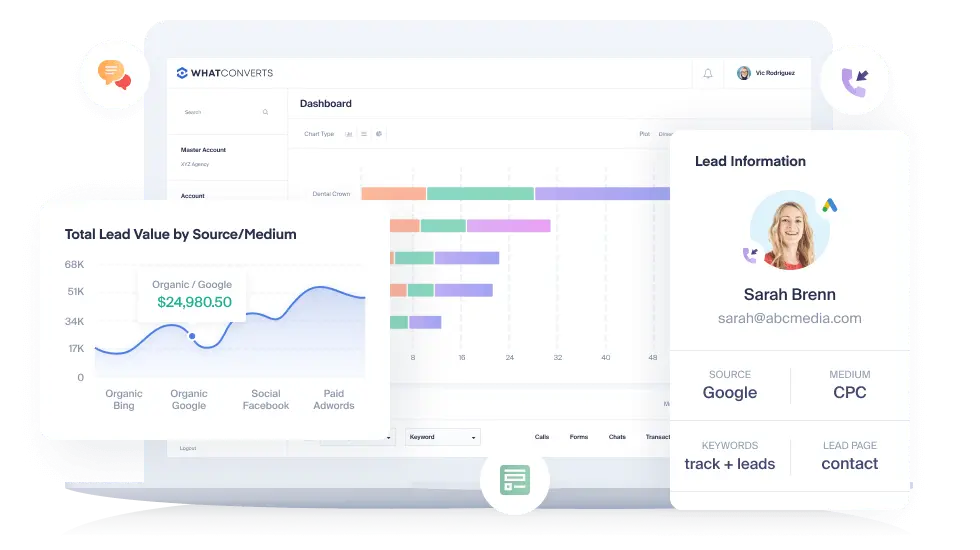
Best for: low-cost lead attribution tracking. Type: Attribution.
WhatConverts tracks calls, forms, and chats in one lead record and ties each lead to its source. It is the budget-friendly attribution pick and a favorite in Reddit's r/PPC community for newcomers and small agencies.
Key features:
- Track calls, forms, and chats in one place
- Tie leads to campaigns and keywords
- Mark leads as quotes or sales for ROI
- Send conversions to ad platforms
Pricing: starts at about $30/month, with higher tiers around $60, $100, and $160 per month.
CRM integrations: HubSpot, Salesforce, Google Ads, Google Analytics, and others.
What real users say:
WhatConverts has one of the highest G2 ratings in the category, and reviewers praise its responsive support and clear lead reporting. Reddit marketers recommend it for transparent, low entry pricing.
It is a marketing tool, not a sales tool. You will not get dialing, coaching, or rep activity tracking, and some users say the reporting takes time to set up the way they want.
Honest take: the best value for call tracking for small businesses focused on ad ROI. Pair it with an activity tool if you also manage reps.
When to upgrade from spreadsheets to call tracking software
A sales call tracking sheet is a reasonable place to start. Plenty of solo reps use a simple sales call tracking template in Excel or Google Sheets with columns for date, contact, outcome, and next step.
The problem is that a spreadsheet depends on reps typing in every call. Most do not, and the data goes stale within weeks. Here are the signs you have outgrown it:
- Track more than 2 to 3 reps in one sheet
- Notice gaps between dials and logged calls
- Lose context when a lead switches reps
- Need recordings for coaching or disputes
- Spend hours building weekly call reports
If two or more apply, sales call log software with auto-logging will pay for itself in admin time alone. Pair it with ready-made sales follow-up templates and confirmation call scripts so reps spend time selling, not typing.
Ready to move past spreadsheets? Salesmsg takes about 15 minutes to set up. Try it free
What to look for in a sales call tracker (buying guide)
Five factors decide whether a tool gets used or becomes shelfware.
1. CRM compatibility. Check whether the integration is native or runs through Zapier. Native integrations log calls to the right contact, deal, and owner without extra steps. Ask the vendor to show you a call landing in your CRM during the demo.
2. Auto-logging. This is the single most valued feature for managers in every forum we reviewed. If reps have to click to log, assume half of calls will go missing.
3. AI features. Transcripts, summaries, and next-step suggestions save real time. Check which tier includes them, since many vendors gate AI behind upgrades. Our guides to call recording software for business and the best AI tools for sales teams go deeper.
4. Pricing transparency. Expensive and missing features rank among the top G2 complaints for this category. Ask for a total cost that includes numbers, minutes, AI add-ons, and seat minimums.
5. Compliance. If your reps text as well as call, you need consent tracking, opt-out handling, and 10DLC registration. More on that below.
One more factor: tool fatigue. A G2 discussion captured it well, with a buyer asking why they need yet another tool on top of email, research, and quoting tools. Fewer tools that do more usually win adoption.
Compliance matters: TCPA and 10DLC for sales calling and texting
Call tracking tools record and log calls, but they do not make your outreach compliant on their own. The Telephone Consumer Protection Act (TCPA) requires prior express consent before you place autodialed or prerecorded calls, or send marketing texts, to mobile numbers. Violations can cost $500 to $1,500 per call or text.
If your team texts prospects, US carriers also require 10DLC registration for business texting from local numbers. Unregistered traffic gets filtered or blocked. Call recording also has its own consent rules, and some states require every party to agree.
This is where using separate tools for calls and texts creates risk: consent and opt-outs live in different systems. Salesmsg handles 10DLC registration and keeps calls, texts, and opt-outs in one record. Read our guide to TCPA compliance for text messages for the details.
Salesmsg builds 10DLC registration and TCPA tools into the platform. See how it works
FAQs about sales call tracking software
What is sales call tracking software?
Sales call tracking software records and analyzes data from your team's phone calls, including who called, when, how long the call lasted, and what was discussed. Some tools focus on marketing attribution (which campaign drove the call), while others track sales rep activity (call volume, outcomes, follow-ups). The right type depends on whether you need to optimize marketing spend or coach your sales team.
What is the best free sales call tracking tool?
HubSpot Sales Hub offers free CRM tools with basic calling and logging. For marketing attribution, WhatConverts starts at about $30/month, which is one of the lowest paid entry points. If you need calling and texting together, Salesmsg offers a 14-day free trial with call tracking and SMS from the same number.
Can I track sales calls in a spreadsheet?
You can, and many small teams start this way with Excel or Google Sheets templates. The problem is that spreadsheet tracking depends on reps manually logging every call, and most do not. Once your team grows past 2 to 3 reps or you need reliable outcomes and follow-ups, software with auto-logging saves time and gives you data you can trust.
What is the difference between call tracking and call recording?
Call tracking captures data about calls, such as who called, when, duration, and which campaign drove it. Call recording captures the actual audio of the conversation. Most call tracking software includes recording, but they serve different purposes: tracking is for metrics and attribution, recording is for coaching and compliance.
Do I need TCPA compliance for sales call tracking?
If your team makes outbound calls or sends texts to prospects, yes. The TCPA requires consent before autodialed calls and marketing texts. If your sales call tracking tool also handles texting, you will need 10DLC registration for SMS. Platforms like Salesmsg handle calling and texting compliance in one place.
Which sales call tracking software integrates with HubSpot?
HubSpot Sales Hub has built-in call tracking. For teams that want calling plus SMS, Salesmsg and Kixie both offer native HubSpot integrations that log calls directly to contact records. CallRail also integrates with HubSpot for marketing attribution tracking.
How do I get sales reps to actually log their calls?
Choose a tool with automatic call logging. Manual logging is the number one reason call tracking fails, because reps see it as admin work and skip it. Tools like Salesmsg, HubSpot Sales Hub, and Salesloft auto-log calls to your CRM, so reps never have to remember.
The bottom line
Start by naming your problem. If marketing needs to know which campaigns ring the phone, pick an attribution tool like CallRail, CTM, or WhatConverts. If you need to see what your reps are doing, pick an activity tool that auto-logs to your CRM.
If your reps call and text the same leads, keep both channels in one place. Salesmsg logs every call and text to HubSpot or Salesforce, so nothing lives on someone's personal phone. Explore more on SMS for sales outreach and AI lead qualification over SMS.
Try Salesmsg free: calling and texting in one inbox, with native HubSpot and Salesforce integration. Start your free trial