Best Power Dialer Software in 2026 (Tested and Compared)



_Best%20Power%20Dialer%20Software%20in%202026.webp)

We compared 14 power dialers on CRM integration availability and depth, their pricing model, call quality, compliance tooling, and whether the tool does more than dial.
The best power dialer software in 2026 is the one that fits how your team actually works.
For most teams, that means a dialer that lives inside the same tool you use to text leads, and logs calls to HubSpot or Salesforce. For heavy outbound call centers, it means a predictive system built for volume.
Here are the quick picks:
For a lot of businesses, calling alone isn’t enough.
Pairing calling with texting is the biggest performance lever most teams have.
Businesses that run SMS alongside calling see a median engagement rate of 24% versus 9% for text alone, according to our benchmark report.
You only get that when calls and texts run from one number, so the whole conversation stays in a single thread. A call-only dialer means a second tool and a split history.
With that said, let’s get into the best power dialer software.
All 14 power dialers at a glance
What is a power dialer?
A power dialer is software that calls through a list of contacts one after another, dialing the next number as soon as the current call ends. It keeps one live call at a time and connects a real rep to every answered call.
This helps reps, so they spend more of their day talking and less of it clicking through a list.
There's no manual dialing, no hunting for the next contact, and no copy-pasting numbers out of a spreadsheet. The rep finishes a call, the dialer queues the next one, and the conversation logs to the CRM automatically.
Power dialer vs predictive dialer vs auto dialer
These three terms get mixed up constantly, and buying the wrong category is an expensive mistake. Here’s how they stack up:
Choose a power dialer if your reps work a call list and want to talk to every person who picks up, with no dropped calls.
Go with a predictive dialer if you run a large outbound floor where squeezing every idle second matters more than the occasional dropped call.
An auto dialer is best if you just need to stop dialing by hand and aren't sure which mode you need yet. Start with power dialing and move up only if your call volume demands it.
Most small and midsize sales teams are better served by a power dialer. Predictive dialing can connect a prospect to dead air while it waits for a rep to free up, which burns trust fast.
What to look for in power dialer software
These are the five most important features to look for in a power dialer.
Supports your CRM
Does it connect natively to HubSpot or Salesforce, or does it route through Zapier?
Native means calls, notes, and outcomes log to the contact record automatically. Zapier means partial sync and manual cleanup.
For a sales team, native is the difference between a tool and a chore.
Integrated compliance
Look for built-in caller ID authentication, such as STIR/SHAKEN and CNAM support, so your calls don't get flagged as spam.
A power dialer connects a real rep to each answered call, which keeps it clear of the stricter rules that govern autodialers. Even so, consent and local regulations still apply.
Reliable call quality
A rep working a list loses time every time a call drops or the audio lags. Check reviews for connection reliability before you commit, especially on mobile.
Pricing model
Per-seat, per-minute, and per-credit billing produce very different invoices. Run the numbers on your real call volume and team size, not the sticker price.
Does it do more than dial?
A dialer that also texts, leaves voicemail drops, and logs everything to your CRM replaces three tools.
A single-purpose dialer becomes one more tab and one more bill.
The best power dialer software in 2026
Here are the top 14 power dialer software, so you can find the right tool for your business.
Salesmsg - Best for teams that text and call from one number
Best for: Sales, marketing, and support teams that want two-way texting and calling on one number, with Power Dialer included, and everything logged to HubSpot or Salesforce.
Most teams shopping for a dialer don't run a 100-seat call center. They run a list of leads they need to call, then follow up on.
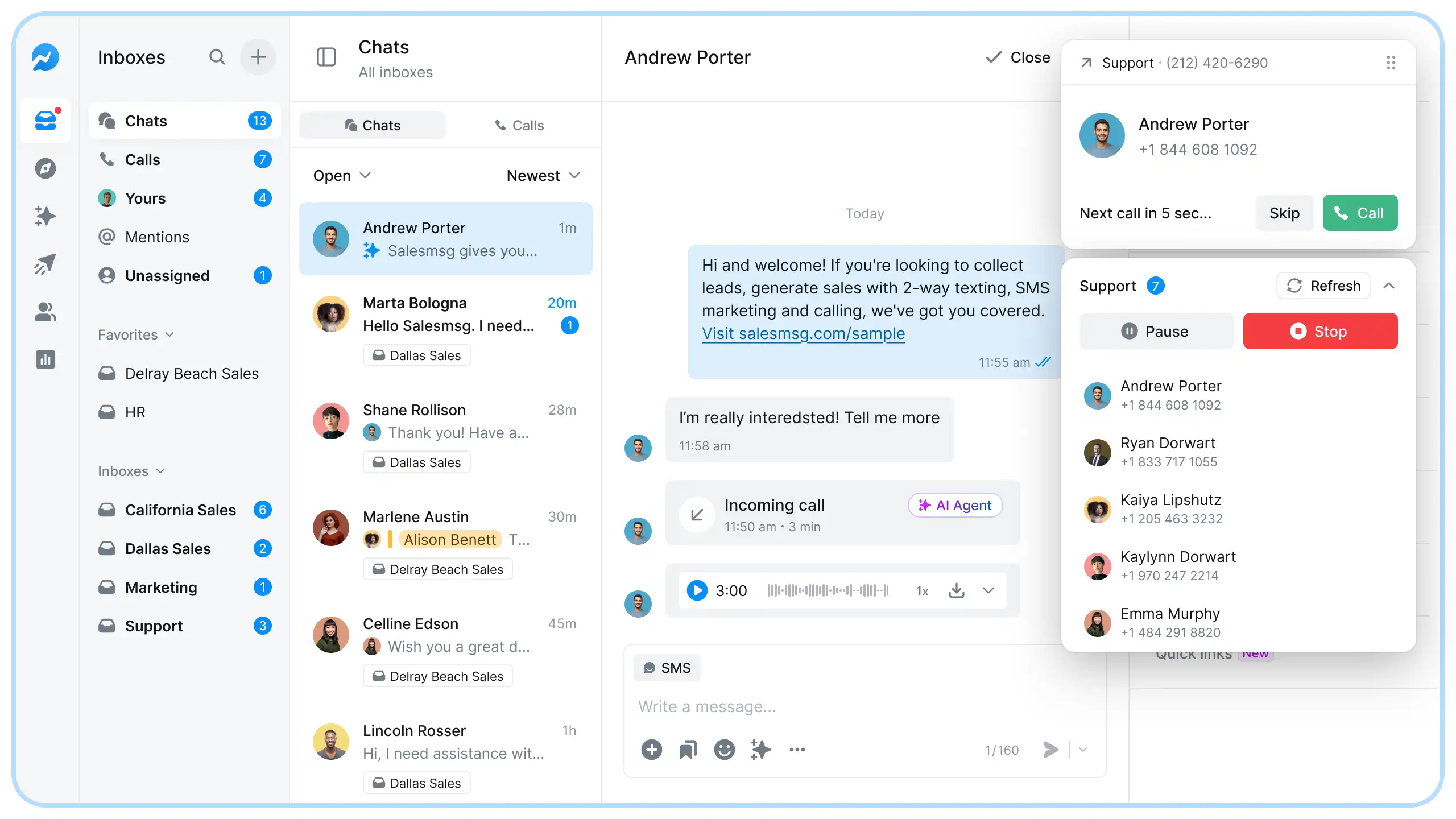
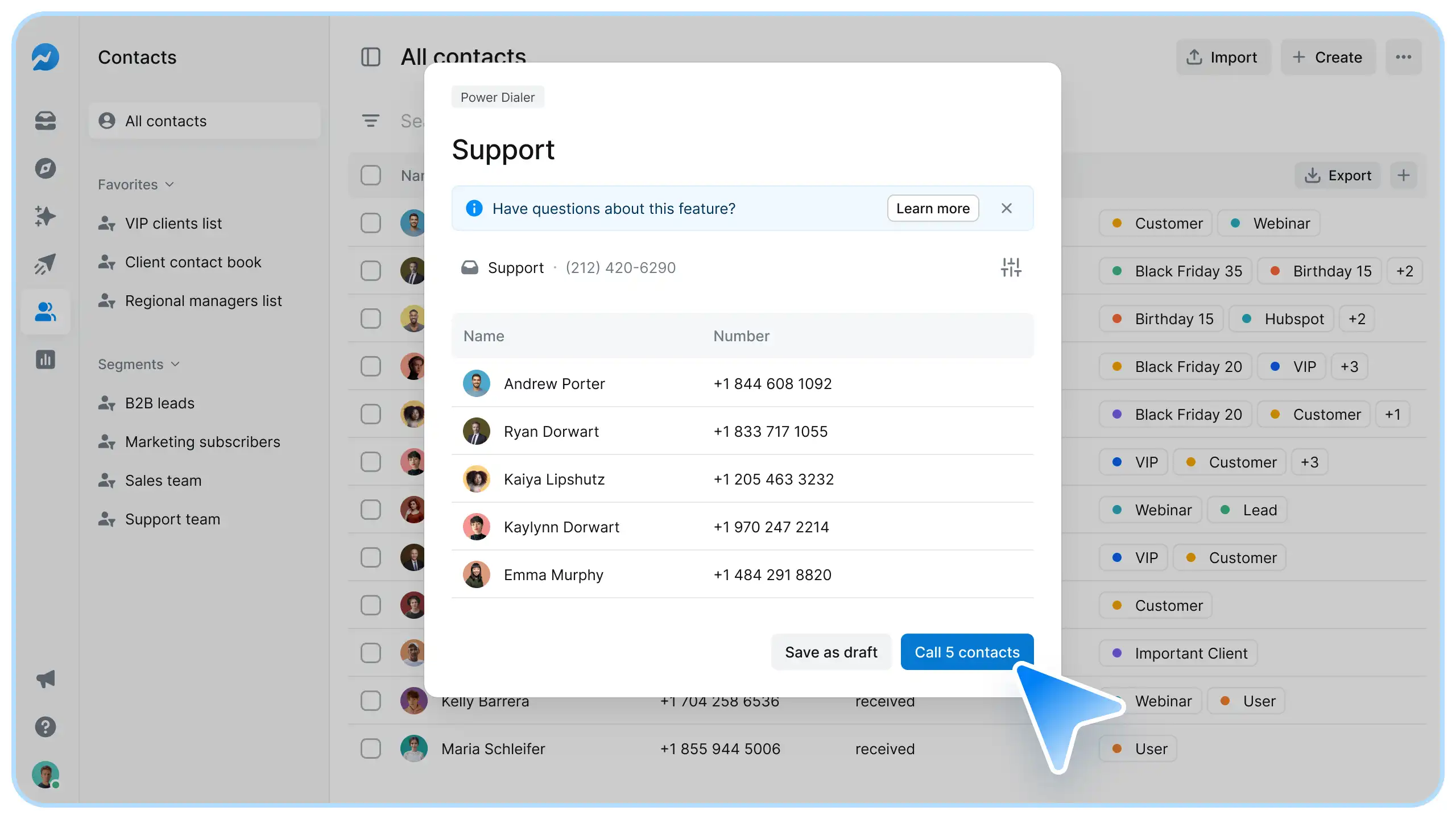
Salesmsg is built for that. Power Dialer runs your call list back-to-back, with a short cooldown between calls and the option to pause, skip, or stop at any time.
This is what sets Salesmsg apart from most of the other tools on this list.
Calling and texting share a single number and inbox. A rep can power-dial a list, leave a ringless voicemail for no-answers, then follow up by text, all from the same number, with the thread logged in the CRM.
That matters because 42% of replies come from follow-ups, not the initial message, according to benchmark data.
Key features:
- Power Dialer handles up to 100 contacts per session and can be paused or resumed as needed
- Two-way SMS and calling from one local or toll-free number
- Ringless voicemail drop and local presence caller IDs from a Smart Inbox
- Integrates natively with HubSpot, Salesforce, Pipedrive, and ActiveCampaign with auto-logging
- HubSpot workflow enrollment feeds contacts straight into a dialing session
- Built-in 10DLC registration and TCPA compliance tools
CRM integration: Native to HubSpot and Salesforce. For HubSpot teams, a workflow enrollment action can automatically add contacts to a Power Dialer session as they reach a lead status, so your CRM data drives the call queue. Calls and texts both log automatically to the contact timeline.
Pricing: Starts at $25/month for 500 credits, with one seat and one number included. Power Dialer costs nothing extra. You pay only 1 credit per minute for calling. As a rough guide, an hour of talk time runs about 60 credits.
Pros:
- The only tool here that combines SMS and calling natively on one number
- Power Dialer is included at no added cost
- Full call and text history in HubSpot or Salesforce with no manual logging
Cons:
- Built for power dialing, not predictive dialing for large call centers
- Calling features are lighter than dialer-first platforms like PhoneBurner
Here’s what one of our real users had to say, “I like Salesmsg for its ability to power dial and leave voice messages, which saves me from repeating myself. The feature to text or call several people at once is really handy. I can use it to call ringless, generating curiosity among the people I reach out to, which often prompts them to call back. Also, the initial setup of Salesmsg was pretty easy, making it convenient to start using.”
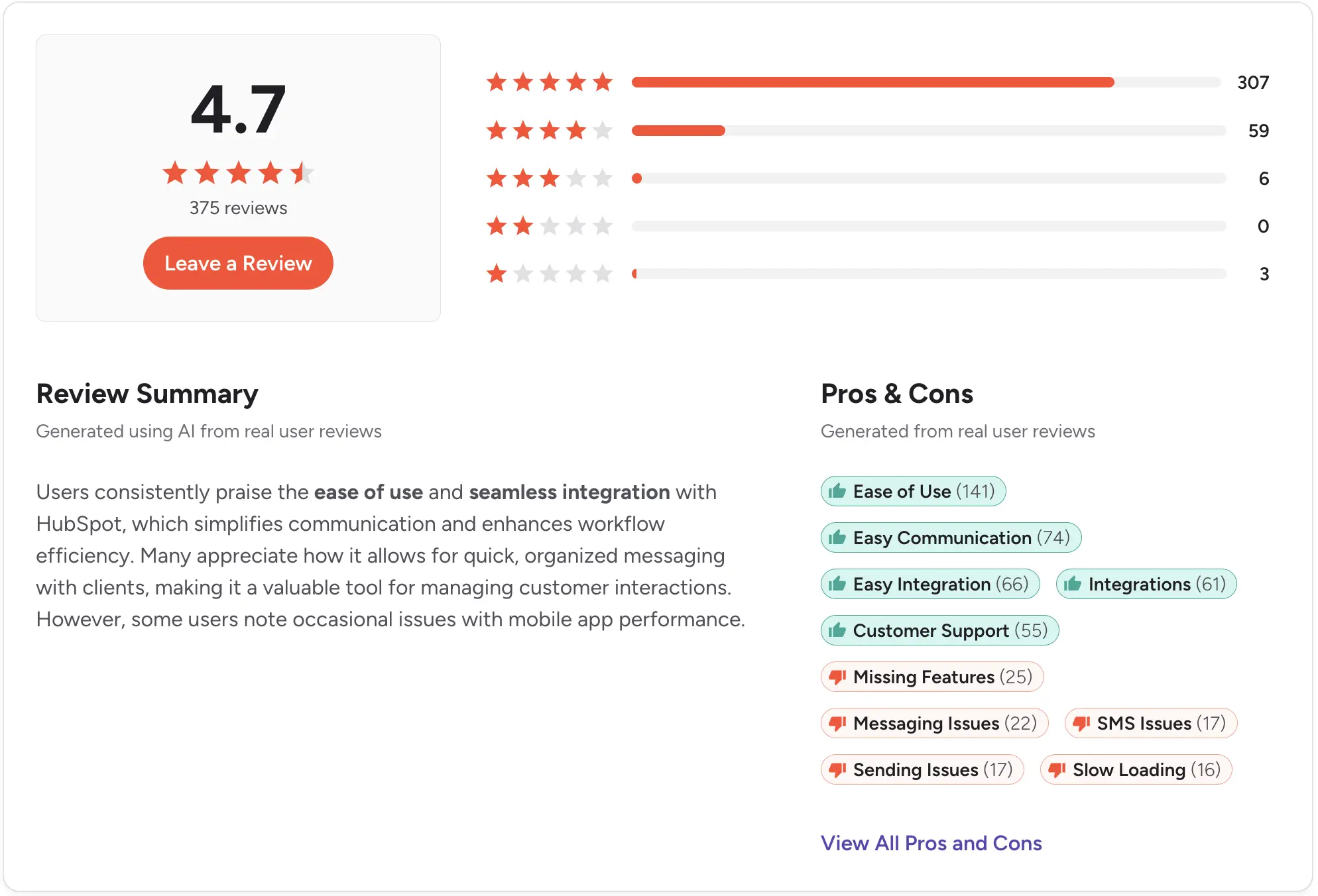
Rating: G2 4.7/5 (405+ reviews)
Start your 14-day free trial of Salesmsg and see what calling and texting look like from one number.
Kixie - Best for outbound sales teams on HubSpot
Best for: Outbound sales teams on HubSpot or Salesforce that want multi-line power dialing.
Kixie lives inside your CRM as a Chrome extension, so reps click to call and every call, text, and outcome logs back on its own.
Its multi-line PowerDialer runs up to 10 lines at once, and AI Human Voice Detection only connects reps when a real person picks up, so they skip ringing voicemails.
Key features:
- Multi-line PowerDialer, up to 10 lines, with AI live-answer detection
- Voicemail drop, SMS templates, and live call coaching
- Bi-directional CRM sync with automatic logging
CRM integration: Native, bi-directional sync with HubSpot, Salesforce, Pipedrive, and Zoho, plus 100-plus other tools.
Pricing: Kixie doesn't publish its prices. There are three tiers, Professional, Single-Line PowerDialer, and Multi-Line PowerDialer, each include unlimited US and Canada calling and a 7-day trial.
Pros:
- Deep CRM integration with automatic logging
- Multi-line dialing with AI live-answer detection
- Fast Chrome-extension setup
Cons:
- No published pricing, so you need a quote or trial to see the cost
- ConnectionBoost and live-answer detection are paid add-ons on top of the plan
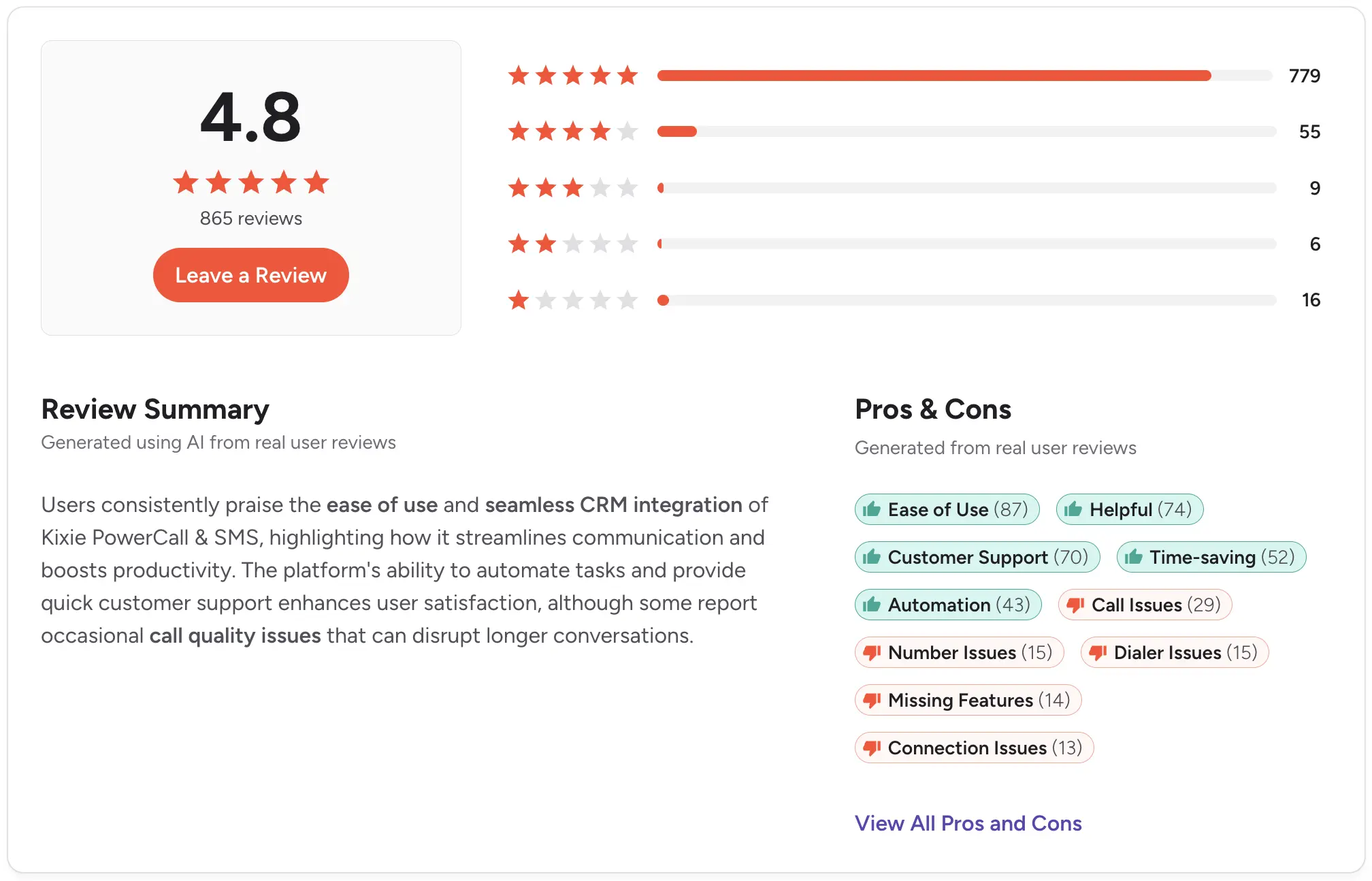
Rating: G2 4.8/5
PhoneBurner - Best dedicated power dialer
Best for: High-volume outbound teams that want unlimited dialing with no per-minute fees.
PhoneBurner does one thing and does it well. Connections are fast and delay-free on a Tier 1 carrier, with none of the telemarketer pause you get on weaker systems.
Unlimited dialing means no per-minute math, and voicemail drop, email, and SMS run from the same workflow, all logged to a built-in CRM.
Key features:
- Unlimited power dialing with no per-minute fees
- Delay-free connections on a Tier 1 carrier
- 1-click voicemail, email, and SMS, logged to a built-in CRM
CRM integration: Native Salesforce, HubSpot, Zoho, and GoHighLevel, plus 100-plus other tools and an open API on higher plans.
Pricing: Three tiers, billed monthly. Standard is $165/user/month, Professional is $195, and Premium is $215, all with unlimited dialing and no per-minute fees. SMS is Premium-only.
Pros:
- Unlimited dialing with no per-minute fees
- Delay-free connections with strong spam protection
- Free onboarding and US-based support
Cons:
- Premium entry price at $165/user/month
- SMS and the AI note-taker are limited to the top tier
- Spam monitoring (ARMOR) and number filtering cost extra
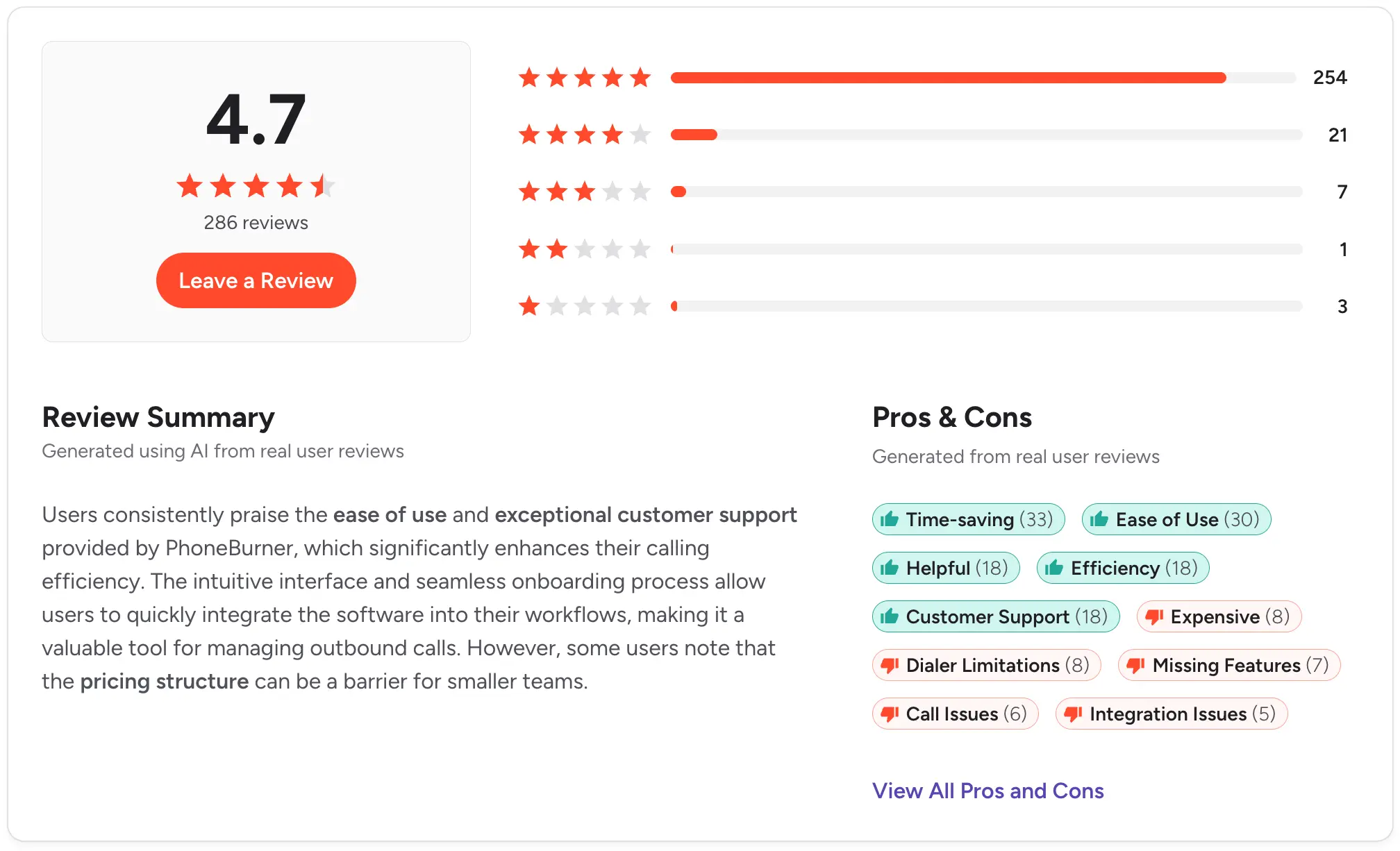
Rating: G2 4.7/5
JustCall - Best for a sales dialer with a wide integration library
Best for: Teams that want calling, SMS, and a power dialer in one platform with a deep integration library.
JustCall puts voice, SMS, and a sales dialer in one place, with 100-plus integrations and unlimited inbound and outbound minutes on every plan. The catch for outbound teams is that the power dialer and bulk SMS only start on the Pro tier, so the entry Team plan won't cut it.
If you're weighing it against other options, see our JustCall alternatives guide.
Key features:
- Power dialer and bulk SMS campaigns (Pro and up)
- Unlimited inbound and outbound minutes on every plan
- AI transcription, with note-taker and call scoring on Pro Plus
CRM integration: 100-plus CRM and data integrations on every plan, with a dedicated Salesforce CTI integration on Pro.
Pricing: Per user with a 2-user minimum. Team is $39/user/month, Pro is $69, and Pro Plus is $109. The power dialer requires Pro or higher, and a quote-based Business tier needs 10 users.
Pros:
- Calling, texting, and dialing in one platform
- Unlimited minutes on every tier
- AI coaching and call scoring on Pro Plus
Cons:
- The power dialer is gated to Pro and above
- A fair-usage policy excludes toll-free, international, and dialer traffic
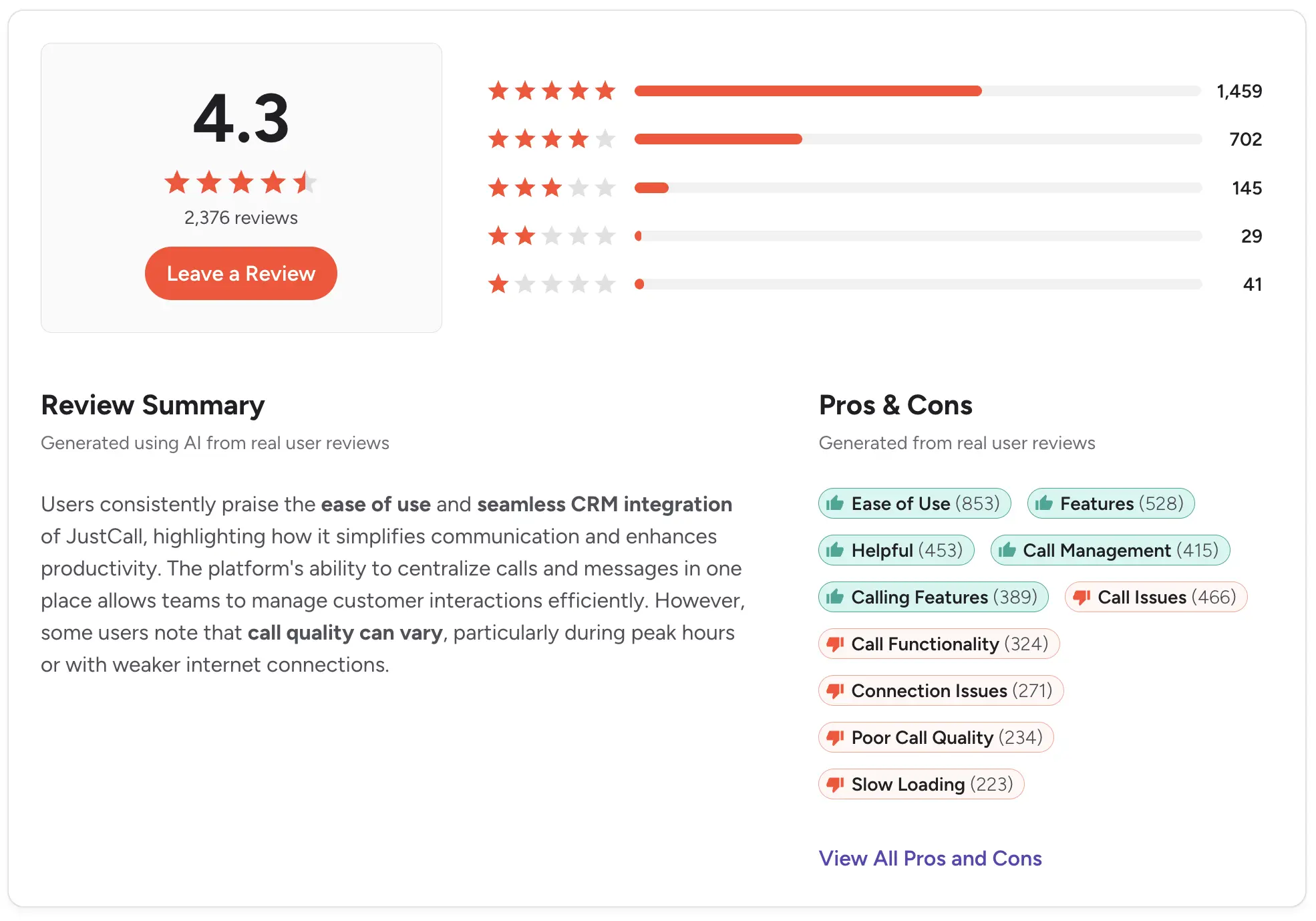
Rating: G2 4.3/5
Aircall - Best for established call workflows
Best for: Sales and support teams that want a clean cloud phone system that adds a power dialer.
Aircall is a well-known cloud phone system with a modern interface and 250-plus integrations.
Its Power Dialer builds a queue from numbers on a prospect's site or CRM, then logs every call with screen-pop context, so reps keep moving without manual entry. It’s available on the Professional plan alongside Salesforce CTI and advanced analytics.
For a closer look at trade-offs, see our Aircall alternatives guide.
Key features:
- Power Dialer with auto-logging and CRM screen pops (Professional)
- Voicemail drop, smart routing, and call recording
- 250-plus integrations and API access
CRM integration: Native Salesforce CTI on Professional, plus HubSpot, Zendesk, Zoho, Microsoft Dynamics, and Pipedrive.
Pricing: Per license with a 3-license minimum. Essentials is $40/license/month, and Professional, which includes the Power Dialer, is $70/license/month.
Pros:
- Clean interface and a large integration ecosystem
- Power Dialer logs calls with CRM context automatically
- Unlimited US and Canada calling on every plan
Cons:
- The Power Dialer requires the Professional plan
- Per-license pricing with a 3-license minimum can overshoot small teams
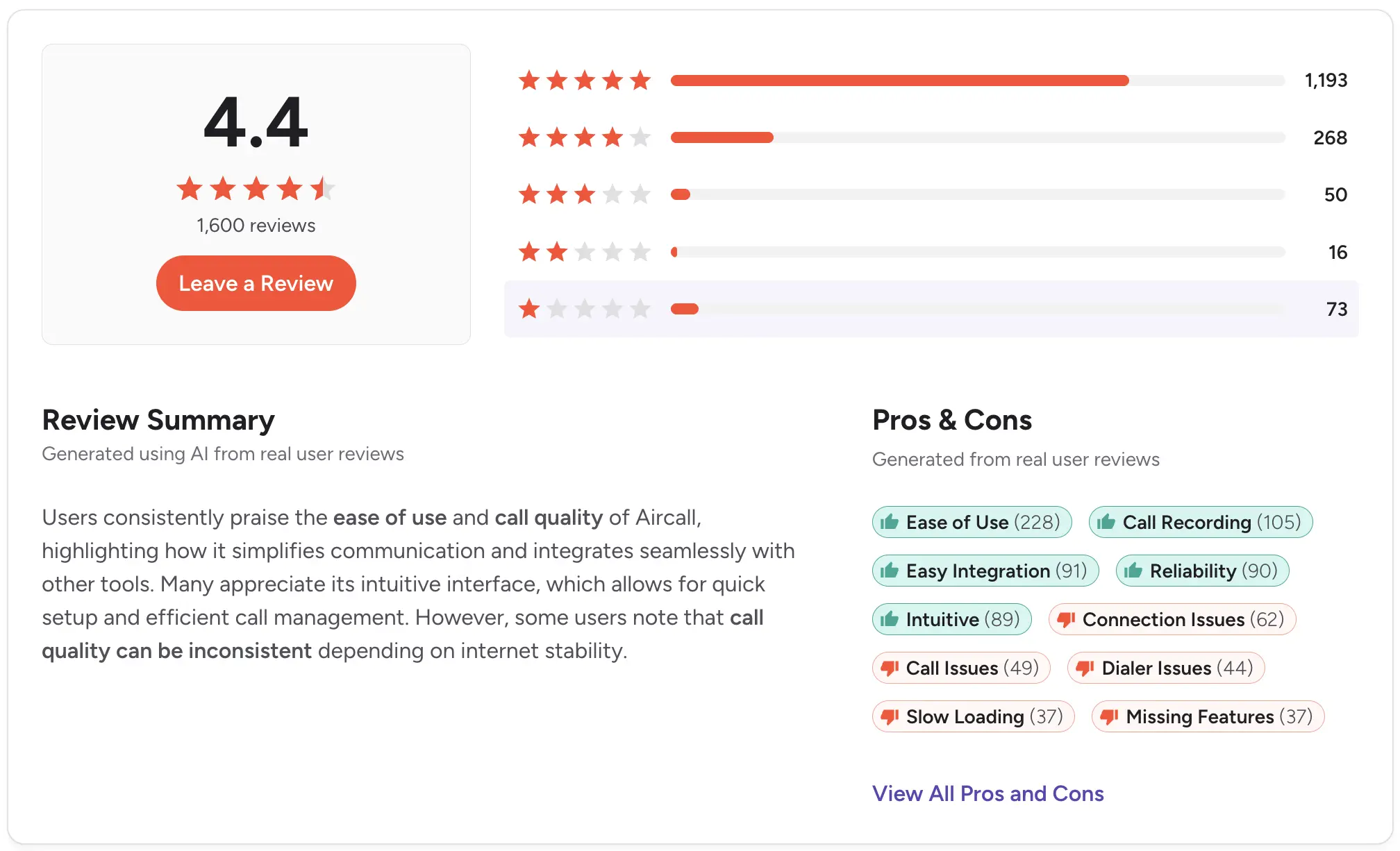
Rating: G2 4.4/5
Dialpad - Best for AI call coaching
Best for: Outbound sales teams that want real-time AI coaching on every call.
Dialpad Sell pairs a power dialer with AI that works the call live.
As reps talk, it transcribes, reads sentiment, and surfaces guidance, while managers can listen in, whisper, or barge. AI Recaps then sync the notes to your CRM on their own, so coaching and admin both get easier.
Key features:
- Power dialer with voicemail drop and local presence (higher tiers)
- Real-time AI coaching, live guidance, and sentiment analysis
- Call recording, transcription, and AI Recaps that sync to the CRM
CRM integration: Native Salesforce, with call details and AI Recaps logged automatically, plus other business-tool integrations.
Pricing: Dialpad Sell is per user, billed monthly. Essentials is $49/user/month, Advanced is $110, and Premium is $170. The power dialer comes with Sell, while voicemail drop and local presence start on Advanced.
Pros:
- Real-time AI coaching built into every call
- Power dialer plus voicemail drop and local presence
- Automatic call logging and AI Recaps
Cons:
- The dialer needs Dialpad Sell, separate from Dialpad's cheaper Connect plans
- Advanced and Premium are sales-led rather than self-serve
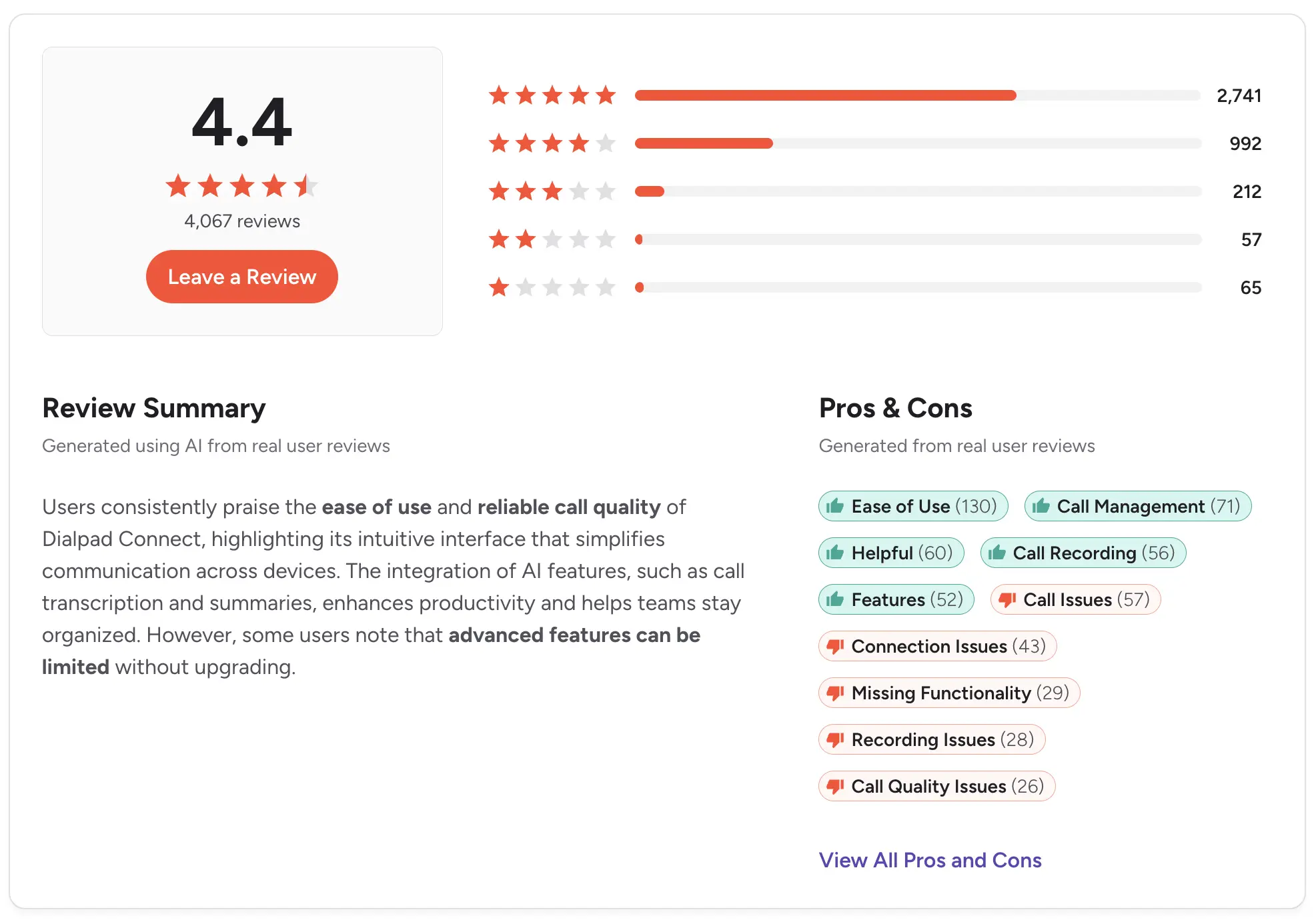
Rating: G2 4.4/5
Ringover - Best for international calling
Best for: Teams making calls across borders that want unlimited international calling at a fair base price.
Ringover includes unlimited calls to 90-plus destinations, and AI transcription, summaries, and notes come on every plan, which is rare at this price.
The power dialer is available on the Business tier, while call campaigns, parallel dialing, and local presence require the higher Advanced tier.
Key features:
- Power dialer on Business, with call campaigns and parallel dialing on Advanced
- Local presence dialing and voicemail drop (Advanced)
- AI transcription, summaries, and notes on every plan
CRM integration: 100-plus native CRM, ATS, and helpdesk integrations, starting on the Business plan.
Pricing: Talk is $24/user/month for basic telephony. Business, which adds the power dialer, is $57/user/month. The Advanced tier needs a custom quote.
Pros:
- Unlimited international calling to 90-plus destinations
- AI transcription and summaries on every plan
- Strong coaching tools like double listening and whispering
Cons:
- The power dialer requires the Business plan, not entry-level Talk
- Parallel dialing and local presence are locked to the custom-quoted Advanced tier
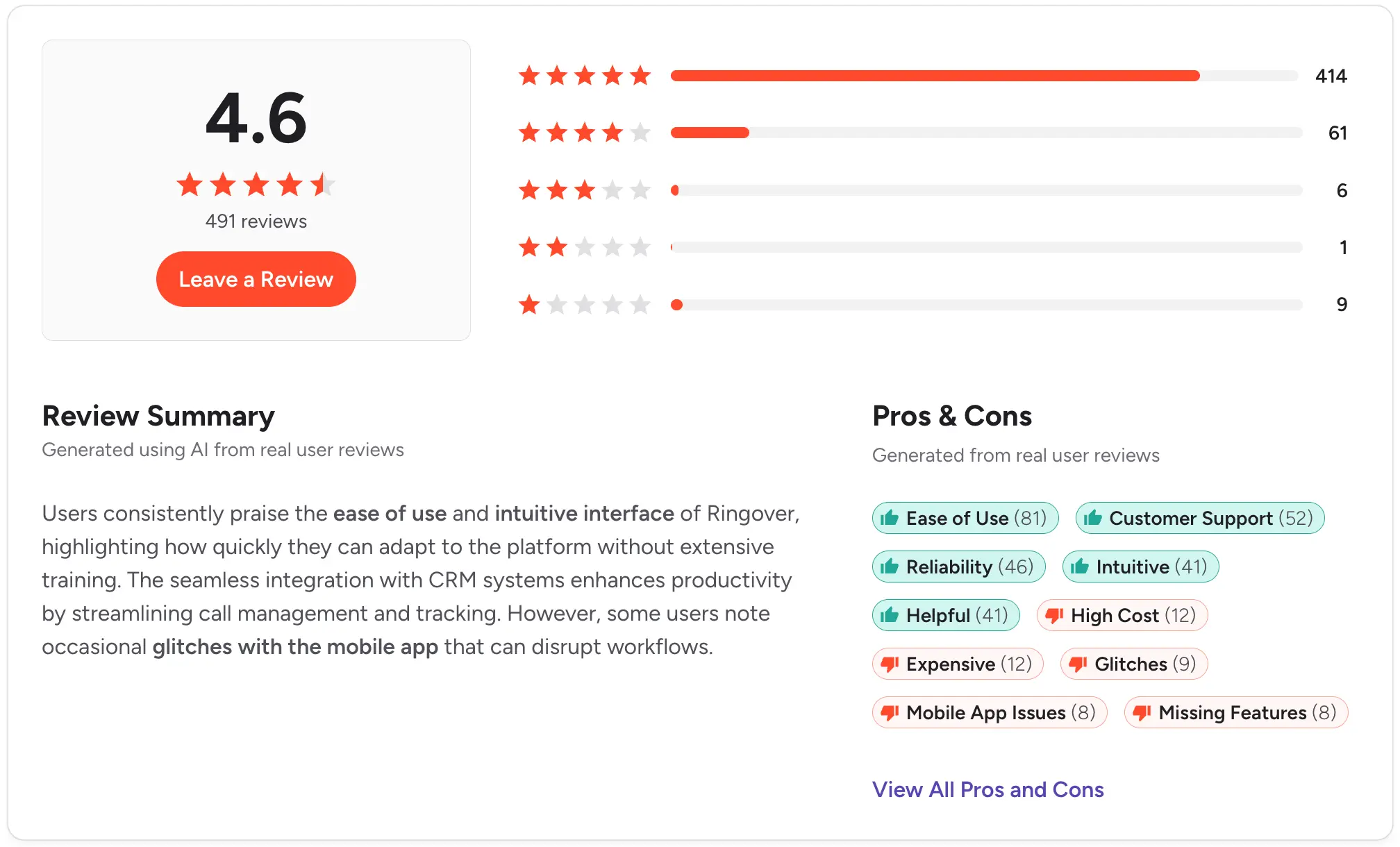
Rating: G2 4.6/5
CloudTalk - Best for support plus sales
Best for: Teams that handle both inbound support and outbound sales and want dialers plus routing in one tool.
CloudTalk covers both sides of the phone with transparent per-user pricing.
A visual call flow designer, IVR, and skill-based routing handle inbound, while a smart dialer plus add-on power and parallel dialers handle outbound. Coverage runs across 160-plus countries.
Key features:
- Power and parallel dialers (up to 10 lines), available as add-ons
- Smart dialer, click-to-call, and voicemail drop
- Visual call flow designer, IVR, and skill-based routing
CRM integration: 95-plus standard CRM, helpdesk, and ATS integrations, with the Salesforce ecosystem on the Expert plan.
Pricing: Per user, billed monthly. Lite is $27/user/month, Essential is $39, and Expert is $69. The power dialer is included on Expert, or an add-on on lower plans. The parallel dialer and AI Conversation Intelligence cost extra.
Pros:
- Transparent per-user pricing
- Strong inbound routing and call flow tools
- Wide international coverage
Cons:
- Power dialing needs the Expert plan or a paid add-on on lower tiers
- The parallel dialer and AI features cost extra on top of the plan
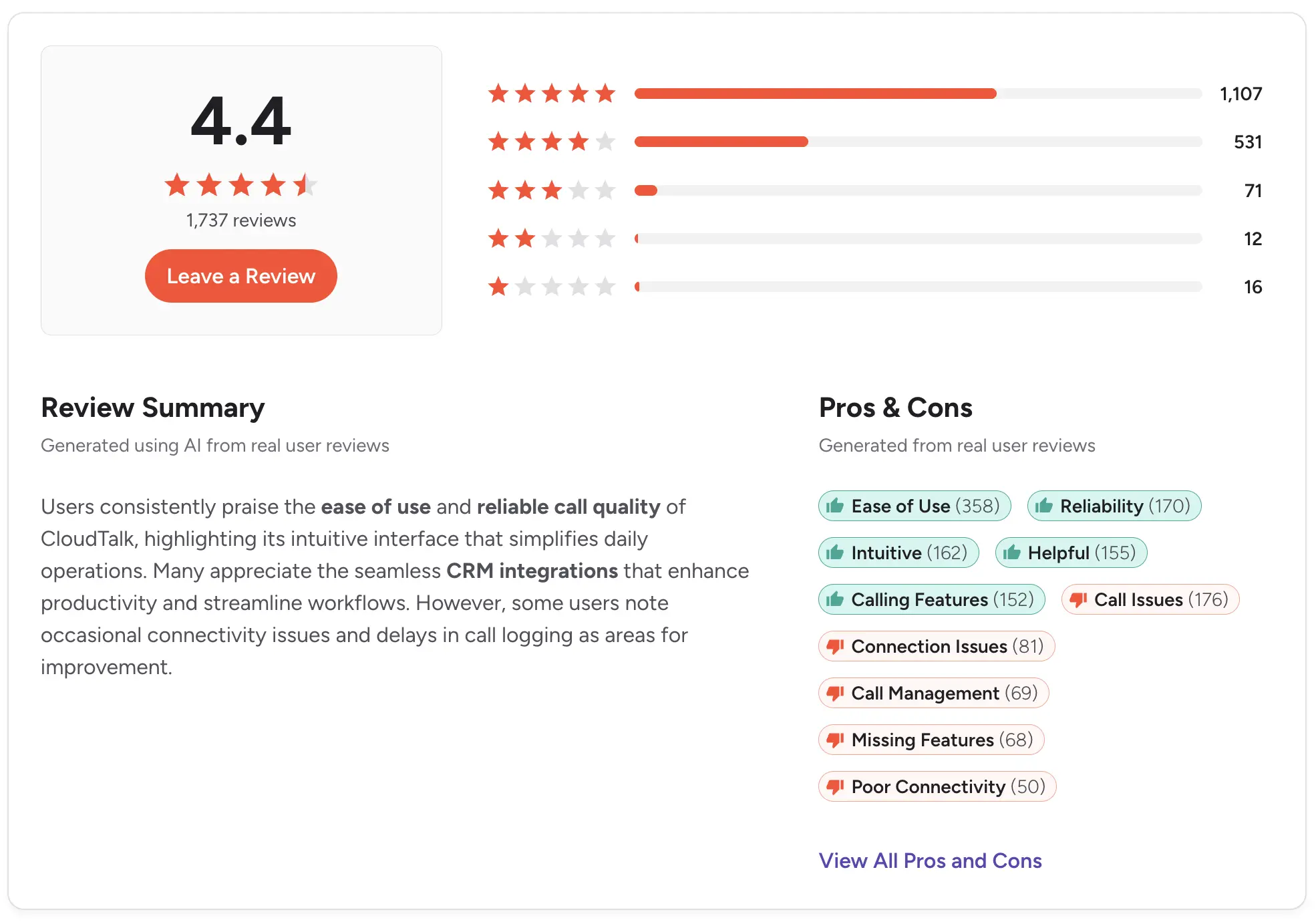
Rating: G2 4.4/5
Close - Best CRM with a built-in dialer
Best for: Small outbound teams that want a CRM and a dialer in one tool, instead of stitching two together.
Close is a CRM built for inside sales, with calling, email, and SMS native to the platform. The power dialer comes on the Growth plan, with a predictive dialer and live coaching on Scale.
Key features:
- Power dialer on Growth, predictive dialer on Scale
- Native calling, SMS, and two-way email in the CRM
- Automated workflows with voicemail drop and call recording
CRM integration: The dialer is native to Close itself, with 100-plus integrations including Zoom, Zapier, Calendly, and Segment.
Pricing: Per user, billed monthly. Solo is $19/user/month, Essentials is $49, Growth is $109, and Scale is $149. The power dialer requires Growth, and the predictive dialer and coaching require Scale.
Pros:
- Strong built-in dialer inside a full CRM
- Calling, email, and SMS in one platform
- Fast lead-to-call workflow with automatic logging
Cons:
- The power dialer requires the Growth plan ($109) or higher
- No native integration into an outside CRM, since Close is the CRM
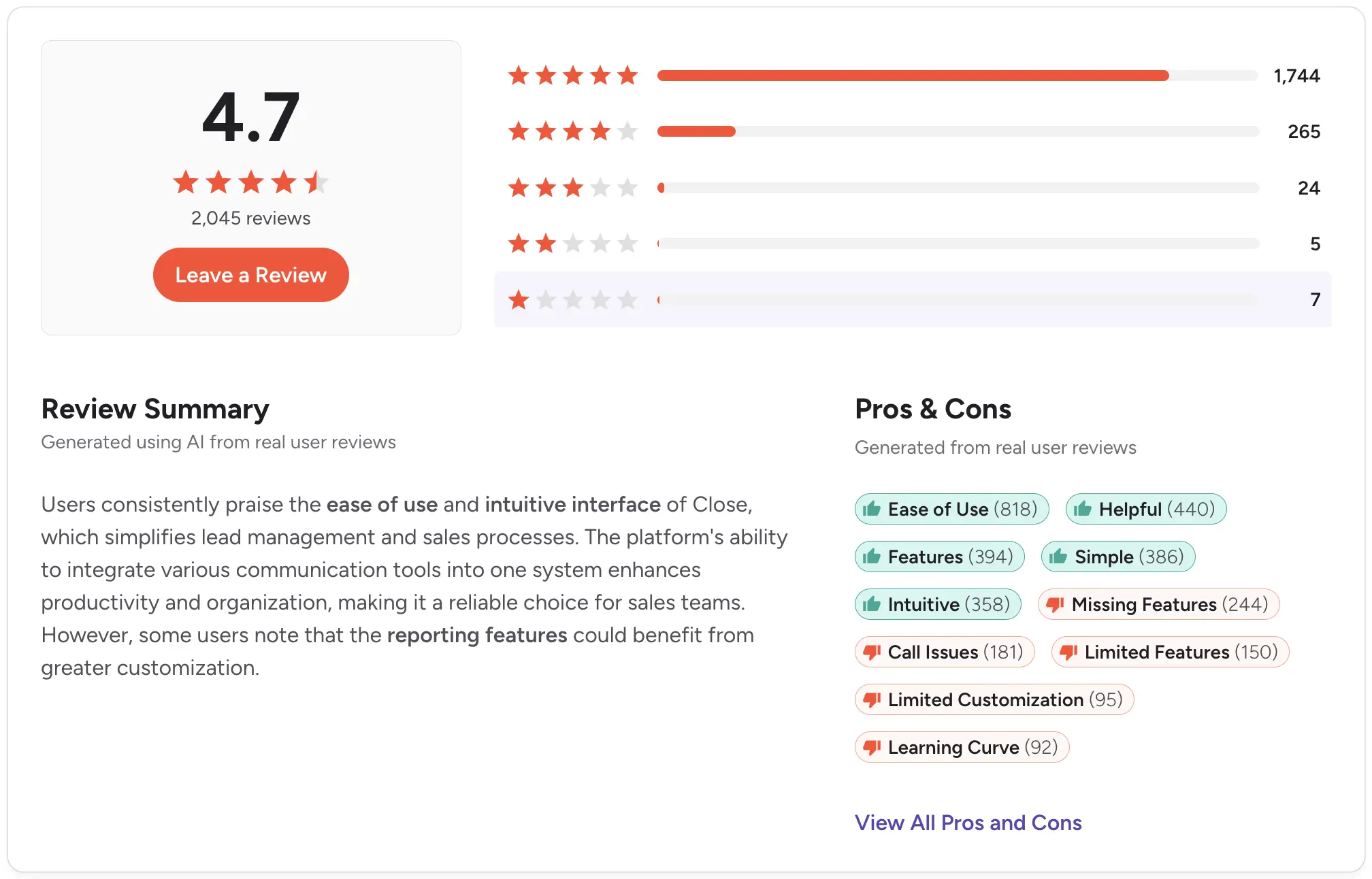
Rating: G2 4.7/5
Nooks - Best AI parallel dialer
Best for: Phone-first SDR teams that want to triple connects with parallel dialing and a virtual salesfloor.
Nooks is built around an AI parallel dialer that calls several lines at once, skips voicemails with answer detection, and connects reps only on live pickups.
Its virtual salesfloor lets reps dial together while managers listen in and whisper-coach, which makes it as much a coaching tool as a dialer. It's built for teams that live on the phone.
Key features:
- AI parallel and power dialer with answer detection
- Virtual salesfloor with live listen-in and whisper coaching
- AI coaching, call scoring, and training bots
CRM integration: Bi-directional sync with Salesforce and HubSpot, plus Outreach, Salesloft, Gong, and Apollo.
Pricing: Custom and quote-only. Nooks doesn't publish prices, so you'll need to contact sales.
Pros:
- A big jump in connects per rep from parallel dialing
- Strong coaching with the salesfloor and AI battlecards
- Deep integrations with major CRMs and sales tools
Cons:
- No published pricing, so you need a sales call to learn the cost
- Parallel dialing can introduce a slight connection lag on answered calls
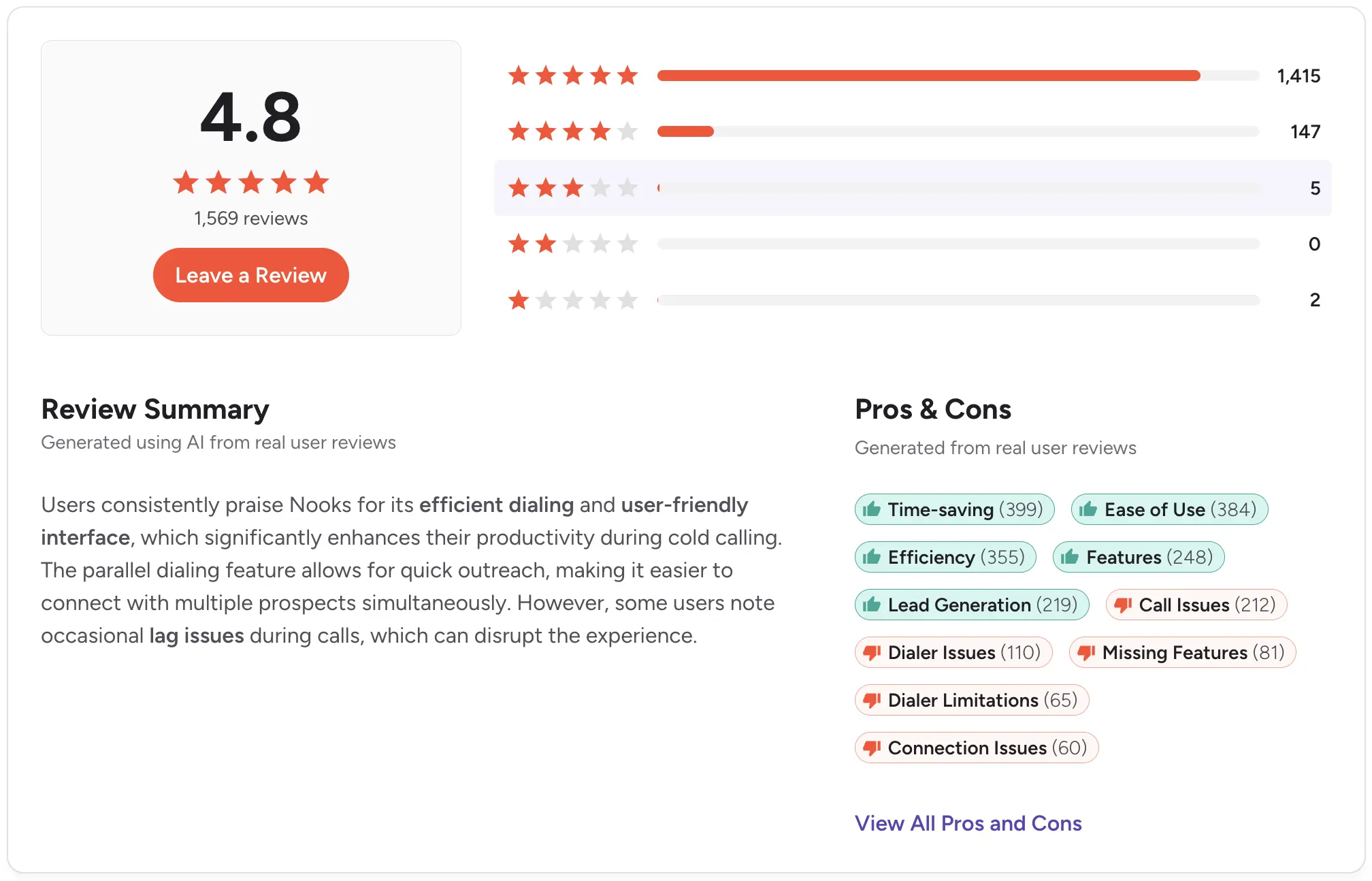
Rating: G2 4.8/5
Orum - Best for high-volume parallel dialing
Best for: SDR teams that want the most dialing lines and analytics, and already have the rest of their stack.
Orum is built for pure parallel dialing, with unlimited dials, answer detection, and data enrichment on both plans.
The entry Launch plan runs up to 5 lines, while Ascend doubles that to 10 and adds international calling, smart lists, and AI coaching. A virtual salesfloor with live listening comes on both tiers.
Key features:
- AI parallel dialer, up to 5 lines on Launch and 10 on Ascend
- Unlimited dials with answer detection and data enrichment
- Salesfloor with live listen, rooms, and Slack integration
CRM integration: Salesforce and HubSpot.
Pricing: Custom and quote-only. Orum publishes two tiers, Launch and Ascend, but not their prices, so you'll need to contact sales.
Pros:
- Up to 10 parallel lines with strong answer-rate tooling
- Salesfloor and live listen on both plans
- Unlimited dials and enrichment included
Cons:
- No published pricing, so you need a sales call to learn the cost
- Single-channel, so it's a calling tool rather than an all-in-one platform
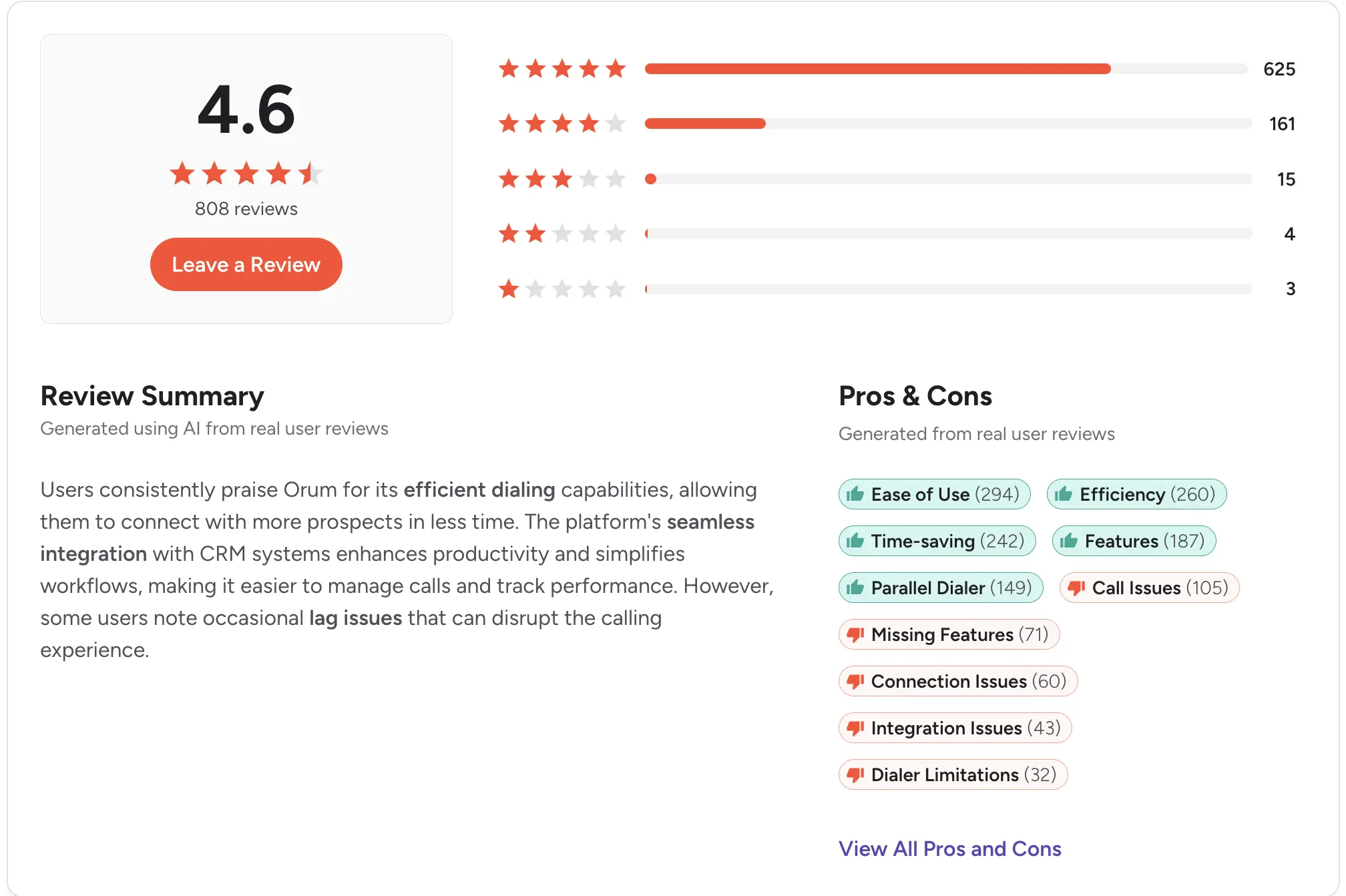
Rating: G2 4.6/5
Five9 - Best for large call centers
Best for: Enterprise contact centers with 50 or more agents that need predictive dialing and deep compliance.
Five9 is a full cloud contact center platform that blends inbound and outbound across voice, chat, email, and SMS.
Its dialer, IVR, recording, and AI agent assist are built for scale, with a choice of CRM and workforce engagement tools.
This is a platform for large operations, not small teams.
Key features:
- Blended inbound and outbound dialing with IVR
- Live transcription, AI summaries, and agent assist
- Quality and workforce management options
CRM integration: Pre-built adapters for Salesforce, ServiceNow, Microsoft Dynamics, Zendesk, and Oracle.
Pricing: Per seat, billed monthly, with a 50-seat minimum. Digital is $119/seat/month and Core is $159. The Plus, Pro, and Enterprise bundles are quote-based, and AI carries extra usage charges.
Pros:
- Enterprise-grade dialing, reliability, and compliance
- Flexible bundles across channels, adapters, and workforce tools
- Mature AI and 24/7 support
Cons:
- The 50-seat minimum rules out small teams
- Usage charges stack on top of the per-seat price
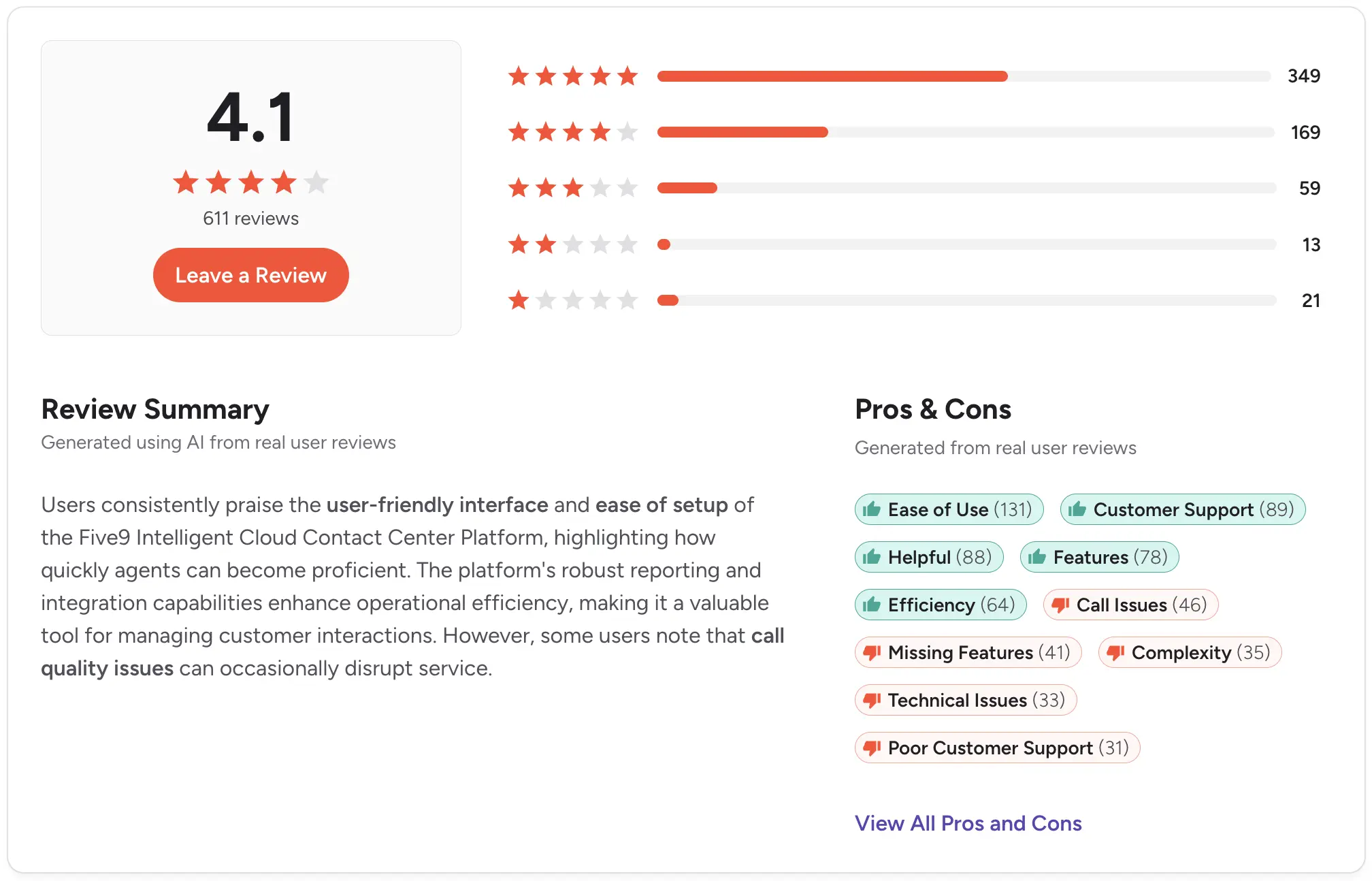
Rating: G2 4.1/5
Convoso - Best for high-volume outbound call centers
Best for: Outbound call centers with 20-plus agents in lead gen, sales, or collections.
Convoso is built for outbound performance, with power and predictive dialing, AI voicemail detection, and caller ID reputation management to push answer rates up.
Its hosted dialer has no dial-level cap, so admins can run call volume per agent as high as a campaign needs, with scheduling and restrictions to stay compliant.
Key features:
- Power and predictive dialing with no dial-level cap
- AI voicemail detection and caller ID reputation management
- Dialing schedules, time-zone controls, and compliance tools
CRM integration: Open API integrations with major CRMs and call center tools.
Pricing: Custom and quote-only. Convoso doesn't publish prices, so you'll need to contact sales.
Pros:
- Strong outbound dialing modes built for high volume
- AI voicemail detection and reputation management to raise contact rates
- Flexible dialing controls for compliance
Cons:
- No published pricing, so you need a sales call to learn the cost
- Geared to 20-plus-seat call centers, not small teams
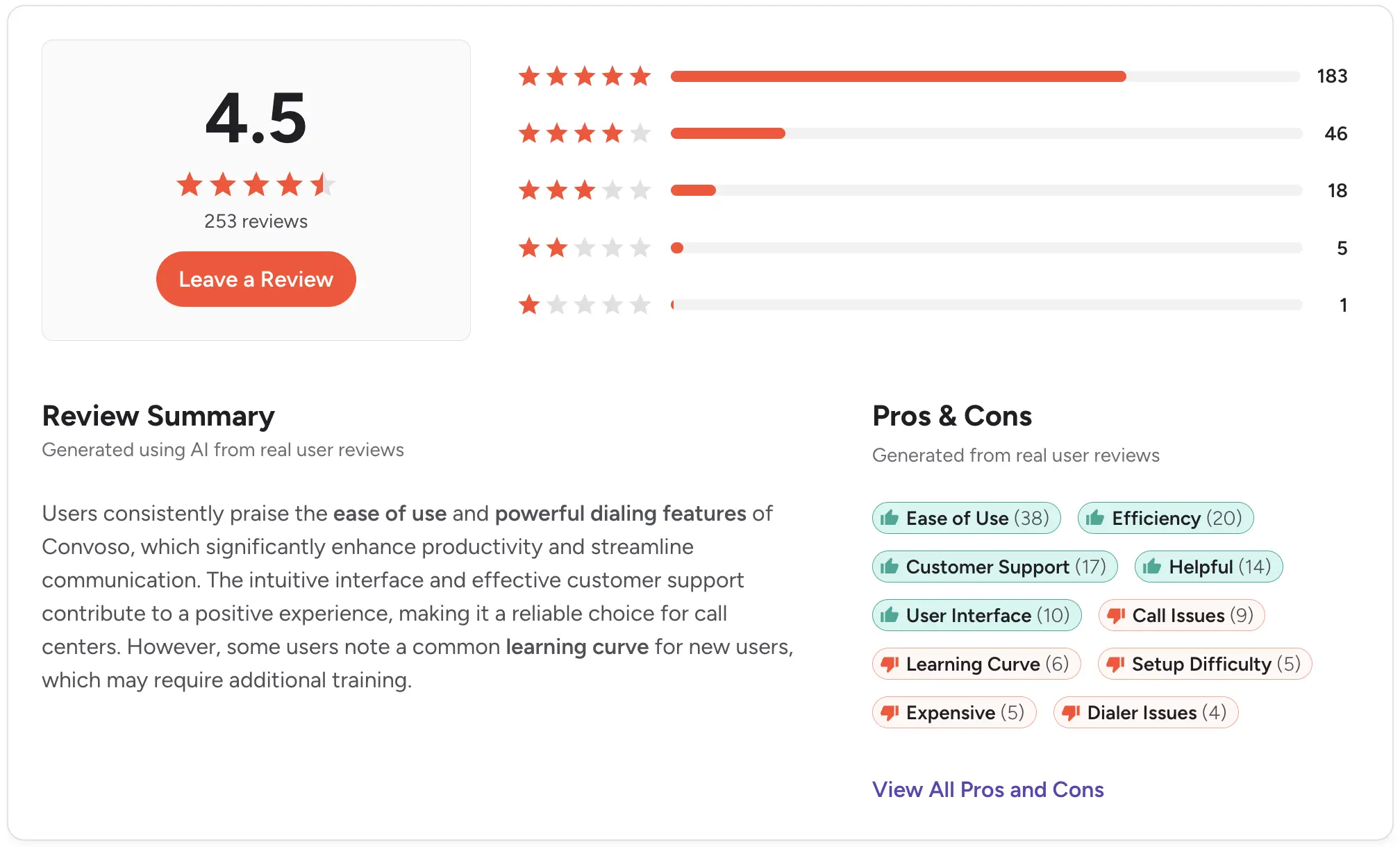
Rating: G2 4.5/5
Mojo Dialer - Best for real estate
Best for: Real estate teams doing high-volume prospecting who want triple-line dialing and built-in lead data.
Mojo is a real estate prospecting tool, known for a triple-line dialer that handles up to 300 calls per hour.
Its pricing is modular, so you start with an Agent Access license for the Lead Manager CRM, then add a dialer and whatever lead data you need.
Key features:
- Single-line and triple-line dialing with unlimited minutes
- Lead Manager CRM for contacts, notes, and activity tracking
- Real estate lead data and skip tracing built in
CRM integration: Integrates with a variety of real estate tools.
Pricing: Modular and billed monthly with no contracts. Agent Access is $10/user, then a dialer license is $89 (single line) or $139 (triple line).
Pros:
- Fast triple-line dialing built for real estate prospecting
- Built-in lead data and skip tracing in one tool
- Flexible monthly billing with no contracts
Cons:
- Modular pricing means Agent Access, a dialer, and data licenses stack up
- Triple-line dialing to cell phones raises TCPA risk
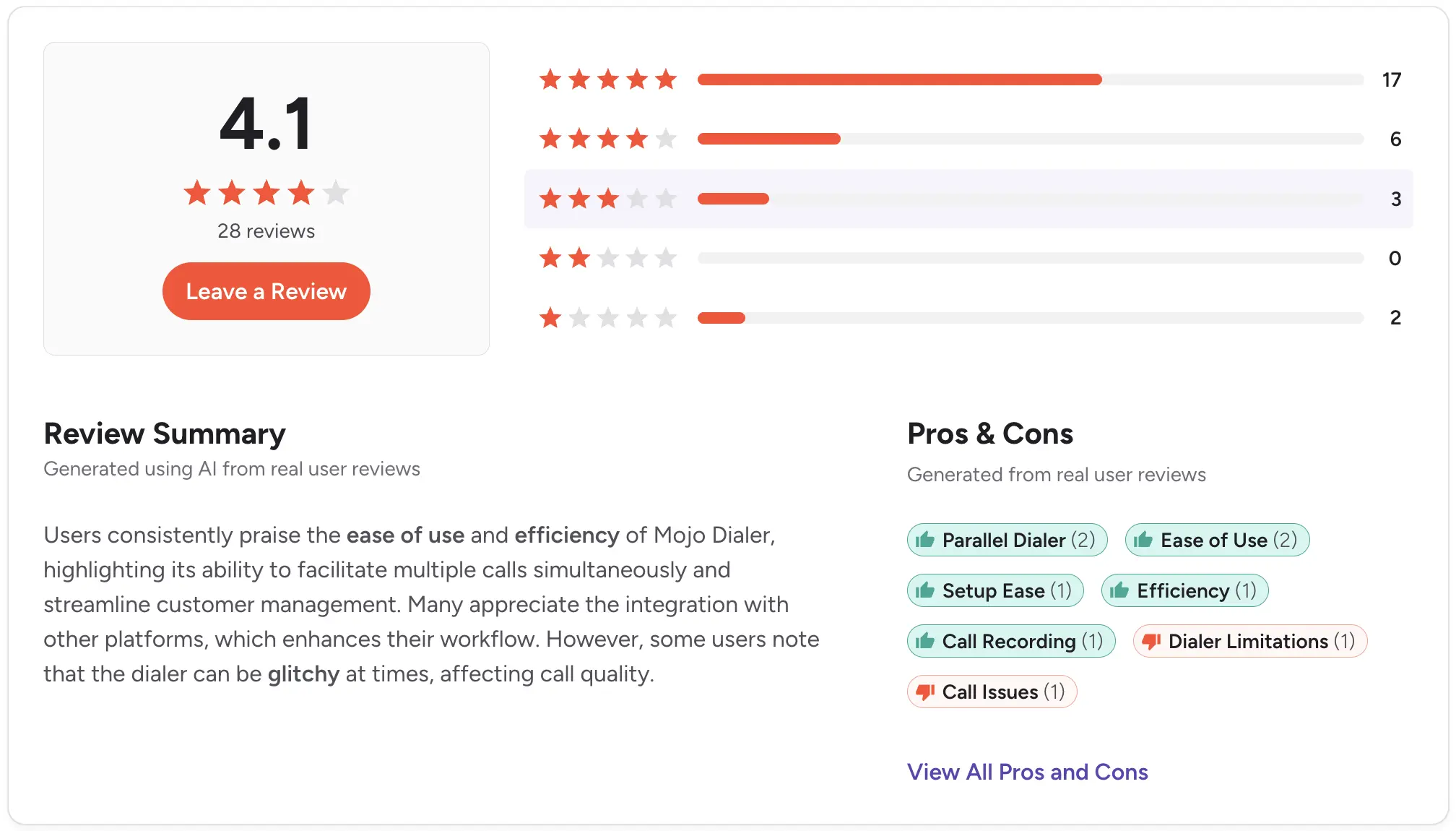
Rating: G2 4.1/5
Best power dialer by role
Different roles dial differently, so the right tool depends on the job.
Appointment setters
You show up, open a list, and call until it's done.
You want a power dialer that pulls contacts straight from your CRM and lets you pause and resume across the day. Salesmsg and Kixie both feed contacts directly from HubSpot into a dialing session.
SDRs and BDRs
You're running cold outreach and follow-up at volume.
The follow-up is where the meetings come from, so a dialer that texts and drops voicemail from the same number is more valuable than a call-only tool.
If raw connect volume is all that matters, and you have the budget, a parallel dialer like Nooks or Orum is worth a look.
Customer success teams
You're doing proactive outreach at scale, like renewals and check-ins.
Here, you want calling and texting tied to the same contact record so the next rep sees the full history. A shared inbox matters more here than call volume alone.
Best power dialer for HubSpot and Salesforce users
If you’re looking specifically for a power dialer for HubSpot or Salesforce, then you’ll want a native integration, not something that’s held together with Zapier.
For HubSpot, look at Salesmsg, Kixie, and Aircall. With Salesmsg, HubSpot builds the call list for you. When a lead hits a chosen status, a workflow adds them straight into your next Power Dialer session.
If you’re a Salesforce user, then Salesmsg, Aircall (Professional), and JustCall (Pro) all run inside the CRM.
The advantage of running voice and text from a single number becomes clear here. Salesforce teams that use both keep a consistent caller ID across channels, which improves pickup and reply rates.
How much does a power dialer cost?
Power dialers bill per seat, per minute, or per credit. Per-seat plans are the most common, and they scale with team size and features.
Here’s a rundown of what you’ll pay:
- Roughly $15 to $30 per user/month for basic dialing
- $40 to $80 per user/month once you add recording, monitoring, and CRM integration
- $100 to $300-plus per user/month for enterprise and call center plans
Per-minute and per-credit plans bill for actual talk time instead of a flat seat fee, which suits teams with uneven call volume.
Then, you have add-ons that stack on top of either model. Keep an eye on these, since they can really increase your costs:
- International minutes and extra phone numbers
- AI features like transcription, coaching, and voice agents
- 10DLC registration to text at scale in the US, about $50 one-time plus a small monthly campaign fee
Salesmsg keeps your costs simple. A Power Dialer is included at no extra cost, and you pay only 1 credit per minute for calling, with no separate dialer fee.
How to get started with a power dialer today
Here are some things to keep in mind when looking for the best power dialer for your business:
- Set your call volume and team size. If you have under 20 reps with steady volume you’ll want a power dialer, not a predictive dialer.
- Make sure the tool has a native CRM integration for HubSpot or Salesforce, not a Zapier workaround.
- Decide whether you need texting and voicemail in the same tool. If your reps follow up across channels, you’ll want single number support.
- Run the numbers on your real call volume, including minutes and add-ons.
- Start a trial and make real calls before you commit.
Calling works best when it isn't the only channel. The teams that pull ahead are the ones that call a list, then follow up by text from the same number, with the whole conversation in their CRM.
Start your 14-day free trial of Salesmsg and see what a power dialer looks like when texting and calling live in one place.
Frequently asked questions
What is a power dialer?
A power dialer is software that automatically calls through a list of contacts one after another, dialing the next number as soon as the current call ends.
It eliminates manual dialing, so reps spend more time talking while keeping one live call at a time.
What is the difference between a power dialer and a predictive dialer?
A power dialer calls one contact at a time and connects the rep to every answered call.
A predictive dialer calls several numbers at once and uses an algorithm to predict rep availability, which suits high-volume call centers but can cause dropped or delayed calls.
Most small and midsize sales teams are better served by a power dialer.
Does a power dialer work with HubSpot or Salesforce?
Some do and some don't, so check before you buy.
Salesmsg connects natively with both HubSpot and Salesforce, so you can pull contacts into a Power Dialer session and have calls, notes, and outcomes log back to your CRM automatically.
How much does power dialer software cost?
Pricing ranges widely, from per-seat monthly plans to per-minute or per-credit billing. Salesmsg does not charge extra for Power Dialer. You pay only for calling at 1 credit per minute.
Who needs a power dialer?
Roles that work a call list every day get the most value. That's appointment setters, SDRs and BDRs doing cold outreach or follow-up, and customer success teams doing proactive outreach at scale.
Can I text and call from the same tool?
Yes. Salesmsg combines two-way texting and calling on one number, so a rep can power dial a list, leave a ringless voicemail for no-answers, then follow up by text from the same number, with everything logged to the CRM.
Is a power dialer compliant?
A power dialer connects a real rep to each answered call, which distinguishes it from autodialing systems that follow stricter rules.
Compliance still depends on consent and local regulations, so look for tools that support built-in caller ID authentication, such as STIR/SHAKEN and CNAM.