How to send a mass text (and get people to actually reply)


_How%20to%20send%20a%20mass%20text.webp)

TL;DR
- iPhone: turn off Group Messaging in Settings, add every recipient to one new message, send. Each person gets it as a private thread.
- Android: in Google Messages, start a group conversation, open group settings, turn off Send as group message.
- Both methods work for lists under 20 people. Past that, carriers can silently filter unregistered numbers and messages stop arriving.
- For any business list: get written consent, register through 10DLC, use a platform with a shared inbox for replies.
- Keep messages under 100 characters and send between 10 AM and noon. Response rates roughly double vs. long messages sent in the evening.
Intro
To send a mass text from your phone: on iPhone, open Messages, add every recipient to a single new message, and turn off Group Messaging in Settings, Apps, Messages. On Android, open Google Messages, start a group conversation, and turn off Send as group message. Both methods send the same text to everyone as separate one-to-one threads.
That is the fast answer. What most guides do not cover is what happens after your list grows past 20 people, when carriers start silently filtering unregistered numbers, replies pile up in one person's inbox, and you cannot tell what worked. That is the part of this topic that costs businesses real money, and this guide covers all of it: the phone tricks, the compliance step everyone skips, real response-rate data from the 2026 State of SMS Benchmark Report, and the workflow to turn a broadcast into a two-way conversation.
What counts as a mass text (and how it is different from a group text)
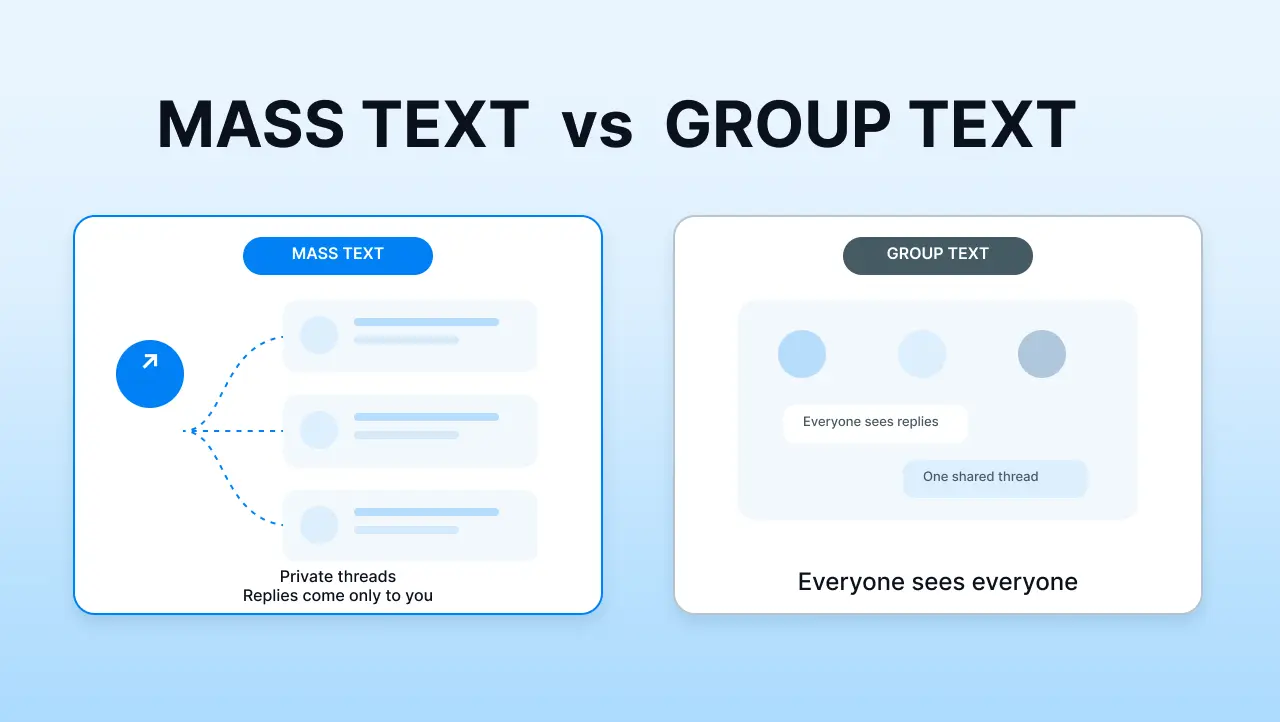
A mass text sends the same message to many recipients at once, but each person sees it as an individual thread with you. They do not see who else got it, and their reply comes back only to you. This is also sometimes called sending bulk texts individually, and it is the format any business list needs.
A group text puts every recipient into one shared thread. Everyone sees every reply. This works for a family dinner plan. It falls apart the moment you send it to customers who never agreed to be in a room together.
The difference matters because the two have completely different use cases, delivery paths, and consequences for a business.
The 3 ways to send a mass text
There are three ways to do this. Pick the one that fits your list size, not the one you already know how to use.
The rest of this guide walks each one, in order, so you can rule out the smaller options before spending money on something bigger than you need.
The quick answer for iPhone and Android
If your list is small and personal, your phone already has a built-in feature for this. Here are the exact steps for both.
iPhone (iOS 17 and later)
- Open Messages and tap the new message icon.
- Add every recipient in the To field.
- Go to Settings, Apps, Messages.
- Turn off Group Messaging.
- Return to your draft and send.
With Group Messaging off, iPhone sends the same text to each contact as a separate thread. Replies come back to you individually, not to the group.
Android (recent versions of Google Messages)
- Open Google Messages and tap Start chat.
- Choose Start group conversation and add your recipients.
- Tap the three-dot menu, then Group settings.
- Turn off Send as group message (also called SMS broadcast on some devices).
- Send.
On Android, this is often labeled Broadcast list. It behaves the same way: one message goes out, each recipient sees a one-to-one thread with you.
Two things to know before you use this at any real scale. Most carriers cap phone-based mass sends at 10 to 20 recipients before delivery gets flaky. And neither method gives you delivery confirmation, so you have no way to know if your message actually landed.
When a personal phone stops being enough
The phone method works until it does not. Here is how to tell you are past it.
Your list is bigger than 20 people. Once you cross that carrier limit, your messages start dropping without warning. You will not get a bounce or an error. They just do not arrive.
More than one person needs to see the replies. If a customer texts back and only your phone gets it, your team is blind. A shared inbox becomes non-negotiable the moment two people share the work.
You are sending anything promotional to a customer list. The rules for texting your friends about a barbecue are not the rules for texting 500 customers about a promotion. That is a different legal category, and the fine per violation is real money.
You need to know what worked. Send-and-forget from a personal phone gives you no delivery rate, no reply rate, no click-through. You cannot improve what you cannot measure.
You need to hear back, not just get delivered. A mass text is only useful if the replies come back to a place your team can actually work through. That is where a personal phone breaks down for good.
If any two of those describe your situation, keep reading. Our full breakdown of what a mass texting service does covers the same ground in more depth.
How to send a mass text without a group message (the BCC method)
If your list is still small and you just need everyone to see your message as an individual text, this is the workflow. It is sometimes called BCC texting, though technically SMS does not have a true BCC field. What you are doing is turning off the group thread so each recipient gets a one-to-one message.
On iPhone
- Compose a new message.
- Add all recipients in the To field.
- Confirm Group Messaging is off in Settings, Apps, Messages.
- Send.
On Android
- Open Google Messages, tap the compose icon.
- Select Start group conversation and add recipients.
- Open group settings and turn off Send as group message.
- Send.
The result on both devices is the same. Every recipient gets your text in a private thread. They cannot see who else received it. Their reply comes back only to you.
Is there a free way to send a mass text
Yes, for a very small list, your phone's built-in method costs nothing. If you need something more, several free apps let you send to a few hundred contacts before hitting a paywall.
Free breaks down in three places.
- Hard volume caps on daily sends.
- No 10DLC registration, so carriers can filter you.
- No shared inbox for replies.
For a list of ten close customers, free is fine. For a list of two hundred prospects, free will eventually cost you a deliverability problem you cannot see and cannot fix. If you want a realistic picture of what texting costs at different volumes before you commit, our breakdown of SMS marketing pricing walks through the actual numbers.
The step most guides skip: compliance
This is the part every top-ranking guide for this keyword leaves out. It is also the part that quietly kills more mass texting campaigns than any other single factor. Our SMS marketing compliance guide for 2026 covers the full picture; the short version is below.
Two things you have to get right.
TCPA consent. Before you send a promotional text to anyone in the US, they have to have given you written consent to receive it. Written consent can be a checkbox on a form or a text-to-join keyword they replied to. It cannot be a phone number they gave you when they bought something two years ago and forgot about. The FCC's guidance on unwanted texts and telemarketing covers the specifics from the regulator's side, and the FTC's page on spam text messages covers the enforcement side. For real-world consent language your customers will actually understand, see our SMS opt-in examples. Consult your own legal counsel for your specific consent requirements.
10DLC registration. In the US, any business sending SMS to customers has to register their phone number and their use case through a system called 10DLC. The Campaign Registry is the industry body that runs the registration process, and CTIA's messaging principles and best practices explains why carriers require it. Without registration, carriers will start filtering your messages. Sometimes silently. You send, the platform reports it delivered, and the message never actually reaches the recipient's phone.
The most common story we hear from businesses switching to Salesmsg: our texts stopped getting replies, so we assumed customers were not interested. It turned out messages had not been arriving for weeks.
Carrier filtering is invisible to the sender. That is what makes it dangerous. Salesmsg walks every customer through 10DLC registration and TCPA compliance during onboarding, so unregistered mass texts never become the reason your campaign quietly stopped working.
What actually gets a mass text read and answered
Compliance gets your text delivered. What you write determines whether it gets a reply.
This is where a lot of general advice falls apart, because it is not backed by any real data. The numbers below come from the 2026 State of SMS Benchmark Report, based on aggregated performance data across real Salesmsg accounts. Two findings stand out.
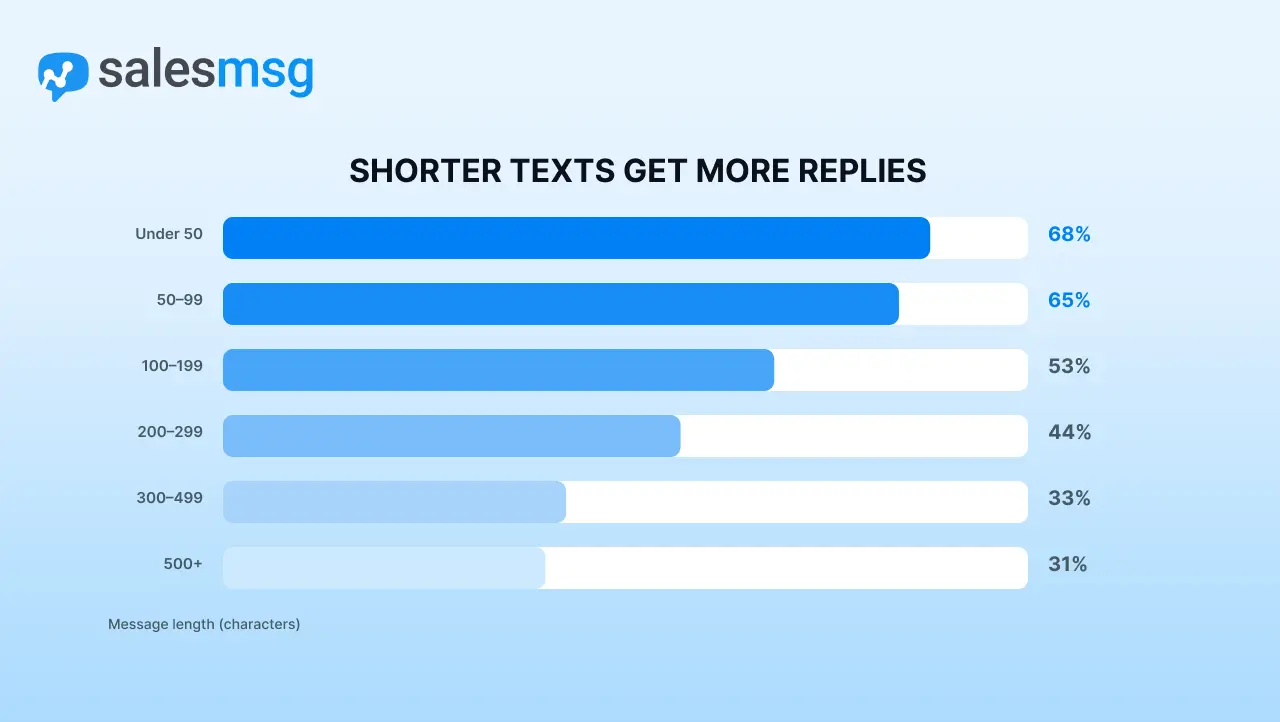
Short messages win. Every extra 100 characters costs response rate.
Texts under 100 characters get 65 to 68% response rates. Once a message crosses 300 characters, response rate drops below half of that.
The instinct to add more context to a broadcast almost always backfires. Say what you need to say. Ask one clear question. Stop. For proven short-form patterns to copy, see our business texting templates.
Send between 10 AM and 12 PM.
The 10 AM to noon window is when customers are at their desks, awake, and in a responsive mode. Response times slow sharply after 6 PM and before 9 AM. This does not mean you cannot send outside that window, it means the messages you most need a reply on should land inside it. Pew Research's mobile fact sheet helps explain why: it lines up with when people are most consistently checking their phones during the workday.
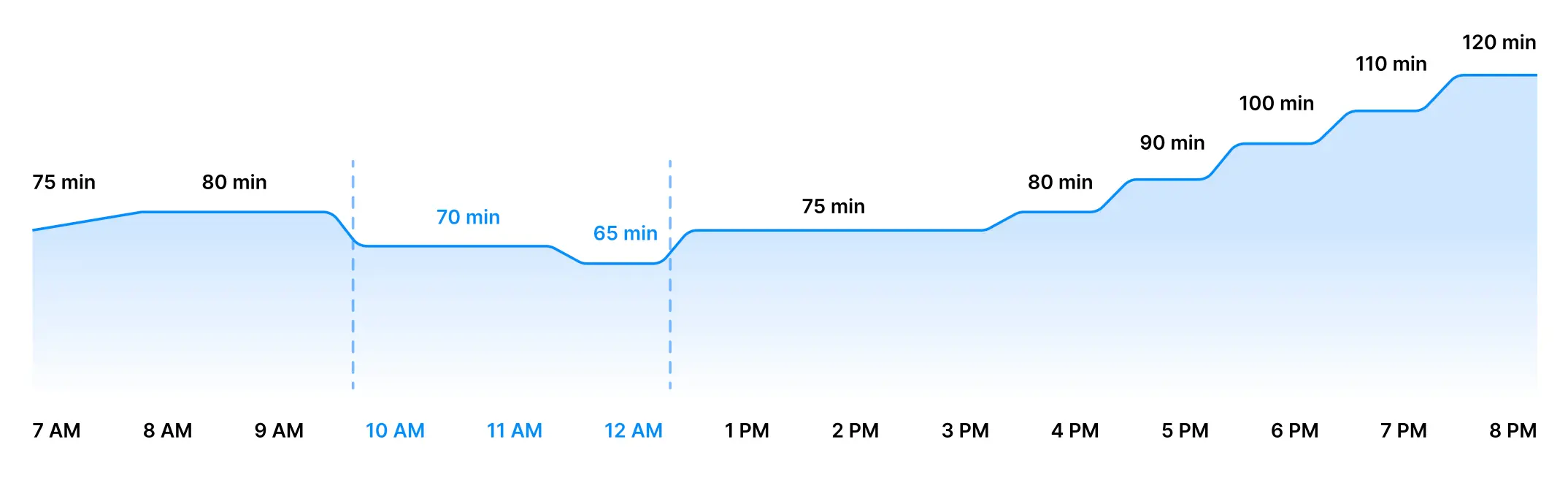
A short, specific message sent at 11 AM will outperform a long, careful one sent at 4 PM. Consistently.
There is one more finding worth naming, because it changes how you should think about a mass text at all. Accounts that pair SMS with calling see a median engagement rate of 24%, compared to 9% for text-only accounts. Mass texting is not a broadcast channel. It is the opening move in a conversation, and the businesses treating it as conversational SMS marketing are getting more than double the engagement of the ones treating it as a one-way blast. Our full list of SMS marketing best practices covers the other patterns worth copying.
How to send a mass text with Salesmsg
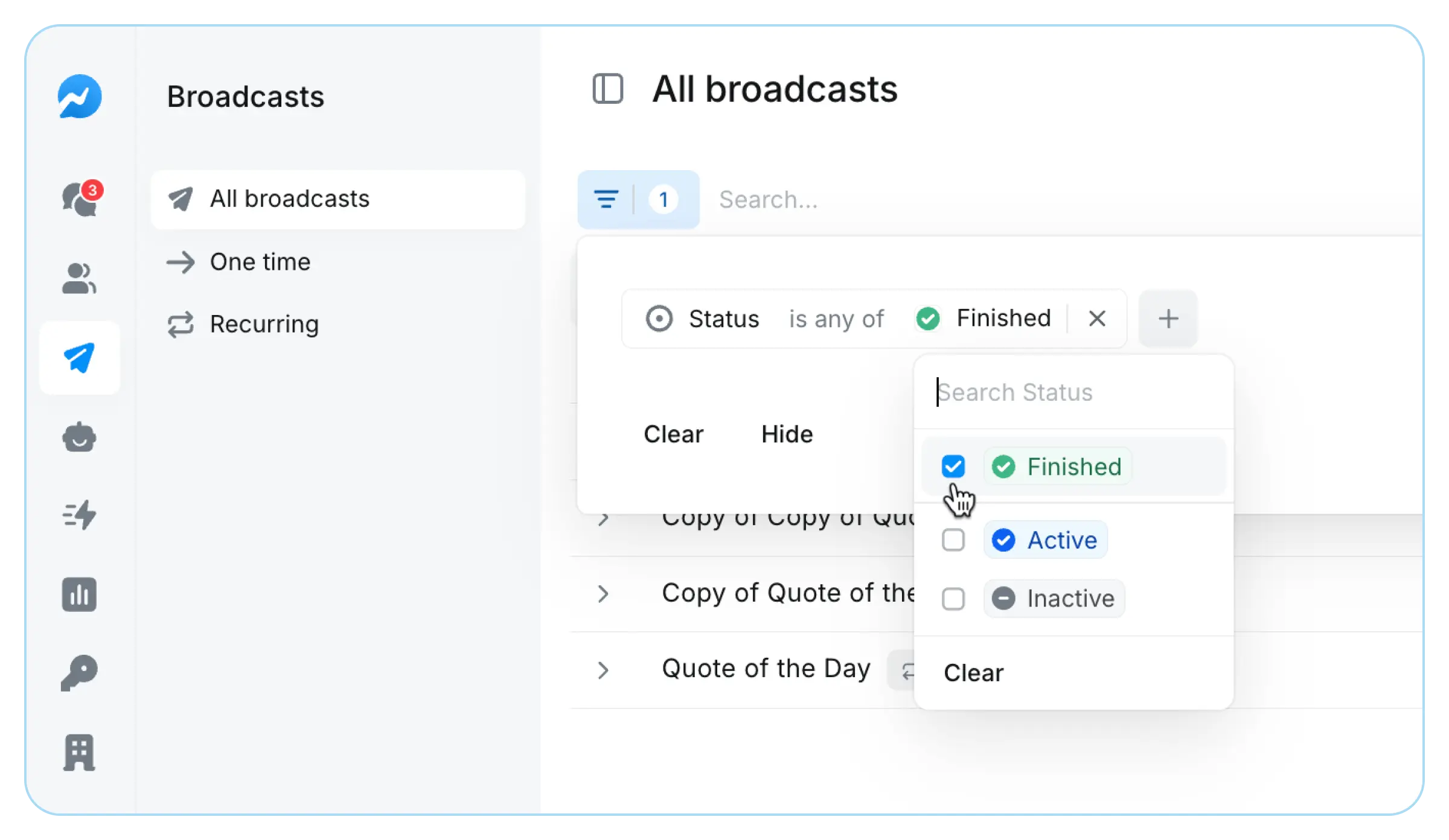
Once your list is bigger than a phone can handle and you need the replies to go somewhere your team can actually manage, the workflow looks like this in Salesmsg.

- Build a segment. Pull a list of contacts from your CRM (Salesmsg has native two-way integrations with HubSpot and Salesforce), or upload a CSV. Filter it by any field you have on the contact, so a real estate agent can send only to buyers who toured a property in the last 30 days, or a home services business can send only to customers with an appointment on the calendar this week.
- Compose the broadcast. Write one message under 100 characters, with one clear next step. Personalize it with a first name field so it does not read like a blast. This is how our SMS broadcast feature is built to work.
- Send or schedule. Send now, or schedule the broadcast to land inside the 10 AM to noon window. For repeating broadcasts, SMS marketing automation lets you set the send once and let it run for every appointment or lifecycle event.
- Manage the replies. Every reply lands in a shared inbox your whole team can see, with the CRM record attached. A rep can pick up the conversation, or an AI agent can respond within a minute, qualify the lead, and hand off to the right person.
Start sending compliant mass texts with Salesmsg. Start a free trial and set up your first broadcast in under 15 minutes.
FAQ
What is the difference between a mass text and a group text?
A mass text sends the same message to many people at once, with each person seeing it as an individual conversation. A group text puts everyone in one thread where they can see and reply to each other. For any business list, you want a mass text, not a group text.
How many people can you send a mass text to at once?
From a personal phone, most carriers cap group and mass messages at 10 to 20 recipients before delivery gets unreliable. A registered business texting platform like Salesmsg can send to thousands at once, with no cap tied to your device.
What is the right way for a business to mass text customers?
Get written consent first, then register your number through 10DLC before you send anything at volume. From there, use a platform built for two-way replies, not just delivery, and segment your list so people get messages relevant to them. Salesmsg is built around this exact workflow, from consent capture through the reply.
Is there a free way to send a mass text?
For a very small list, yes, your phone's built-in BCC or broadcast feature works at no cost. Once your list grows past a few hundred contacts or you need delivery tracking and a shared inbox, free methods run into device limits and no compliance protection.
What happens if I send mass texts without 10DLC registration?
Carriers can filter or block your messages entirely, often without telling you. This is the most common reason a business's texts stop arriving with no warning. Salesmsg walks every customer through 10DLC and TCPA compliance during onboarding so this does not happen.
What is the best time of day to send a mass text?
Data from the 2026 State of SMS Benchmark Report shows 10 AM to 12 PM gets the fastest response times, when people are most likely to see and answer a text during the workday.
Can a mass text include photos or videos?
Yes, that is called an MMS broadcast rather than a plain SMS broadcast. It costs slightly more per message but works well for promotions, event flyers, or visual product updates.
The takeaway
If your list is small and personal, your phone will handle it. If your list is a business list, or your replies matter, or you cannot afford to lose messages to a compliance filter you did not know about, a phone is not the right tool.
Pick the method that matches your list, register your number if you are sending at any volume, keep messages short, and send between 10 AM and noon. Then read what comes back, because that is where the actual value of a mass text is.
Start a free trial of Salesmsg and send your first compliant broadcast today.