6 confirmation call scripts to cut no-shows (2026 guide)



_6%20confirmation%20call%20scripts%20to%20cut%20no-shows%20(2026%20guide).webp)

TL;DR
- A confirmation call has one job: get a clear yes, no, or reschedule, and log the outcome
- Six ready-to-use scripts below: auto, healthcare and dental, home services, real estate, salon and spa, and B2B sales
- Pair every call with a voicemail script and an SMS follow-up so a missed call doesn't become a missed appointment
- Call for high-value or first-time appointments, text for routine reminders
- Automate the reminder and the reply, keep the live call and any judgment call human
- A short TCPA and 10DLC compliance checklist is included near the end
Call to confirm the appointment. State the date, time, and location. Ask one direct question: does that still work? If not, offer two specific alternative slots on the spot. Close with an outcome you can log (confirmed, rescheduled, or needs follow-up), not a vague "see you then." That's the entire job, and it takes about 30 seconds once your team has a script to work from.
The six templates below cover auto, healthcare, home services, real estate, salon and spa, and B2B sales. Each one follows the same four-part frame, so a rep can move between industries without relearning the call. After the templates you'll find a voicemail script, SMS follow-ups, four common objections with recovery lines, a no-show recovery sequence, guidance on what to automate, and a compliance checklist.
Why a confirmation call earns its 30 seconds
A demo gets scheduled with a qualified account. The rep calls at the agreed time. Nobody's there. An email goes out, a status gets updated, and the slot is gone.
The gap usually opens earlier than the missed meeting. Nobody checked whether the time still worked, whether the original contact was still the right person, or whether a small scheduling conflict had already made attendance unlikely. Treating confirmation as an afterthought instead of a scheduled step is what turns a fixable problem into a lost appointment.
A confirmation call does four jobs:
- Verify. Repeat the date, time, timezone, location or link, and appointment purpose
- Qualify. Check whether this is still the right person and whether anything has changed
- Recover. Offer a specific reschedule path the moment the original time stops working
- Log. Record the outcome somewhere your team will see it before the appointment
The same four jobs apply whether you're confirming a sales demo, a dental cleaning, or a home service visit. An appointment on a calendar doesn't create value by itself. It creates value when the right person shows up prepared and the team can use the time.
A live call also creates room for a quick correction (a wrong number, an outdated meeting link, a new decision-maker) that a one-way text or email reminder can't catch. Teams building a broader messaging workflow around this can review how SMS supports day-to-day business communication, but the underlying job stays the same regardless of channel: move the appointment from uncertain to confirmed.
Published research on appointment reminder calls consistently reports meaningful reductions in no-shows, though the exact size of the effect depends on the industry, the appointment type, and how the reminder is delivered.
The 30 to 90 second call structure
A high-performing confirmation call follows a fixed sequence: identify yourself, ask permission to continue, repeat the appointment details, ask one blocker question, offer a concrete reschedule path, and close with an outcome the rep can log without guessing.
Start with identity and permission
Skip the company description. Say who you are and why you're calling.
"Hi [First Name], this is [Rep Name] from [Company]. Is now an okay time for a quick appointment check?"
The permission question lowers resistance and gives the contact a natural way to ask for a better moment. If they're busy, offer a callback time instead of pushing through the rest of the script.
Repeat the details that prevent confusion
Use the exact information stored in the calendar, not a paraphrase.
"You're scheduled for [appointment type] on [Day, Date] at [Time] [Timezone], with [rep or provider], at [location or meeting link]. Is that still the appointment you have?"
This single question catches timezone mistakes, outdated links, duplicate bookings, and appointments the contact no longer recognizes.
Ask one blocker question
One open-ended question is enough. Don't interrogate the contact.
"Before I mark this confirmed, is there anything that could make the time difficult, or anything you need from us beforehand?"
In healthcare, the answer might surface a language preference, an insurance question, or a change in patient information. In B2B sales, it might reveal a new decision-maker or a meeting that's lost priority. Either way, you'd rather find out now than at the appointment.
Give rescheduling a concrete path
Never make the contact invent the next step.
"If that time doesn't work, I can offer [Alternative Slot One] or [Alternative Slot Two]. Which is easier?"
A specific alternative turns a cancellation into a scheduling decision instead of an open-ended maybe. Reps running this over the phone can keep the conversation and outcome connected to the rest of the pipeline with Salesmsg calling.
Close with a loggable outcome
End with language the rep can record without interpreting it.
"Great, I've marked [appointment type] as confirmed for [Day, Date] at [Time]. You'll get a [text or email] with the details. Thanks, [First Name]."
If the outcome is genuinely uncertain, don't label it confirmed. Use "needs follow-up," "reschedule requested," or "wrong contact" so the next action is visible to whoever looks at the record next.
6 confirmation call script templates by industry
Each script below follows the same frame above, adjusted for context. Use them as-is or adapt the language to match how your team talks.
1. Auto service and dealership
Use this for service appointments, test drives, and delivery confirmations. Auto customers respond well to direct, no-fluff calls.
"Hi, this is [Name] from [Dealership]. Am I speaking with [Customer]?
I'm calling to confirm your service appointment on [Day, Date] at [Time]. We have you down for [service type] on your [vehicle model].
Does that time still work for you?
If anything changes, call or text this same number and we'll get you rescheduled. See you [Day]."
2. Healthcare and dental
Medical and dental teams need scripts that stay professional, respect patient privacy, and avoid disclosing procedure details on voicemail. Keep specifics general in the opening.
"Hi, this is [Name] calling from [Practice]. Is this [Patient]?
I'm calling to confirm your appointment on [Day, Date] at [Time] with Dr. [Name].
Are you still able to make it?
If you need to reschedule, call or text us at [Number] as soon as you can so we can offer the slot to another patient. Thanks, and we'll see you [Day]."
For dental recall calls (six-month cleanings, hygiene follow-ups), the same frame works. Swap the opening line to reference the recall: "I'm calling to schedule your six-month cleaning."
3. Home services
For HVAC, plumbing, electrical, pest control, cleaning, and similar jobs. The address and technician arrival window matter as much as the time.
"Hi, this is [Name] from [Company]. Am I speaking with [Customer]?
I'm calling to confirm your [service type] visit tomorrow, [Day], between [Time window]. Our technician [Tech Name] will be at [Address].
Is that still a good time, and is the address correct?
If you need to move the appointment, just text this number back. See you tomorrow."
4. Real estate
Property showings, closings, and inspections all benefit from a live confirmation because the cost of a no-show or wrong address is high on both sides.
"Hi [Client], this is [Agent] from [Brokerage]. I wanted to confirm our showing at [Address] on [Day] at [Time].
Are we still good for that?
I'll meet you out front. If plans change, text or call me at [Number] anytime today. Talk to you [Day]."
5. Salon and spa
Salon appointments are shorter, more personal, and often booked weeks out. Keep the tone warm without stretching the call.
"Hi [Client], this is [Name] from [Salon]. Just calling to confirm your [service, e.g. color and cut] with [Stylist] on [Day] at [Time].
Still good for that time?
If you need to move it, give us a call or text at [Number]. We'll see you [Day]."
6. B2B sales demo
Sales demos fail differently than a service appointment: the buyer moves on, a new decision-maker takes over, or the meeting quietly stops being a priority. The confirmation call needs to catch those changes, not just a calendar conflict.
"Hi [First Name], this is [Rep] from [Company]. Quick check before our meeting: we have you scheduled for a [product] demo on [Day, Date] at [Time] [Timezone] with [attendees listed].
Is that still the right time, and will [decision-maker] be joining?
If the meeting needs to move, I have [Alternative Slot One] or [Alternative Slot Two]. Otherwise I'll send the calendar link over now. Talk [Day]."
If you want the same scripts as a shared team resource, our library of business texting templates pairs cleanly with these call scripts on the follow-up text side.
Ready to run confirmations without a phone tree? Salesmsg lets your team send calls and texts from the same business number, so a confirmation call and its text follow-up show up in one shared inbox. Try Salesmsg free.
Voicemail script for missed confirmation calls
Most confirmation calls reach voicemail rather than a live person. Plan for it with a separate, shorter script instead of improvising.
"Hi [First Name], this is [Company]. Please call [Callback Number] about your appointment on [Day] at [Time]. We can confirm or reschedule."
Keep the voicemail under 25 words and, for healthcare, avoid any sensitive detail about the visit itself. The voicemail's job is to identify the caller and give a way to respond, not to explain the whole appointment.
Immediately follow the voicemail with a text using the same details:
"Hi [First Name], this is [Name] from [Company]. I'm calling to confirm your appointment on [Day, Date] at [Time]. You don't need to call back, just reply YES to this text and you're all set. To reschedule, reply MOVE or call us at [Number]."
Sending the customer to a faster channel instead of asking for a return call removes a step most people won't take. Calling back just to say "yes" is friction most contacts skip entirely.
SMS follow-ups that keep the workflow moving
The call is one touch. What happens after a missed call, or after a reply like "maybe," is what actually protects the appointment. Map each outcome to a specific next step:
Three templates that match these triggers:
Same-day reminder: "Reminder, [First Name]. Your [appointment type] is today at [Time] [Timezone] with [rep or provider]. Reply YES to confirm or MOVE to reschedule."
Reply to "maybe": "No problem. Would [Option One] or [Option Two] work better? Reply 1 or 2 and we'll update your appointment."
Recovery after a no-show: "Hi [First Name], we missed you for [appointment type] today. We can help you rebook. Would [Option One] or [Option Two] work?"
Handling the four toughest objections
Most scripts assume the customer says yes. The moments that actually matter are the ones where they don't. Here are four responses your team will hear often, with a recovery line for each.
"I need to check my calendar."
Recovery: "Of course. Do you want me to hold the current time while you check, or should we look at [Alternative Slot] now?"
"I have to reschedule."
Recovery: "Easy fix. I have [Alternative Slot One] and [Alternative Slot Two] open. Which one should I reserve?"
"I'm not the right person for this anymore."
Recovery: "Thanks for catching that. Who owns this now, and would you like me to add them and send a new invite?"
"Just send me the information instead."
Recovery: "Happy to send something specific, but a generic packet won't help. What are you trying to decide, and can we keep a short slot on the calendar to answer questions once you've read it?"
The rep isn't arguing with the objection in any of these. Each line acknowledges it, then asks for a concrete next step.
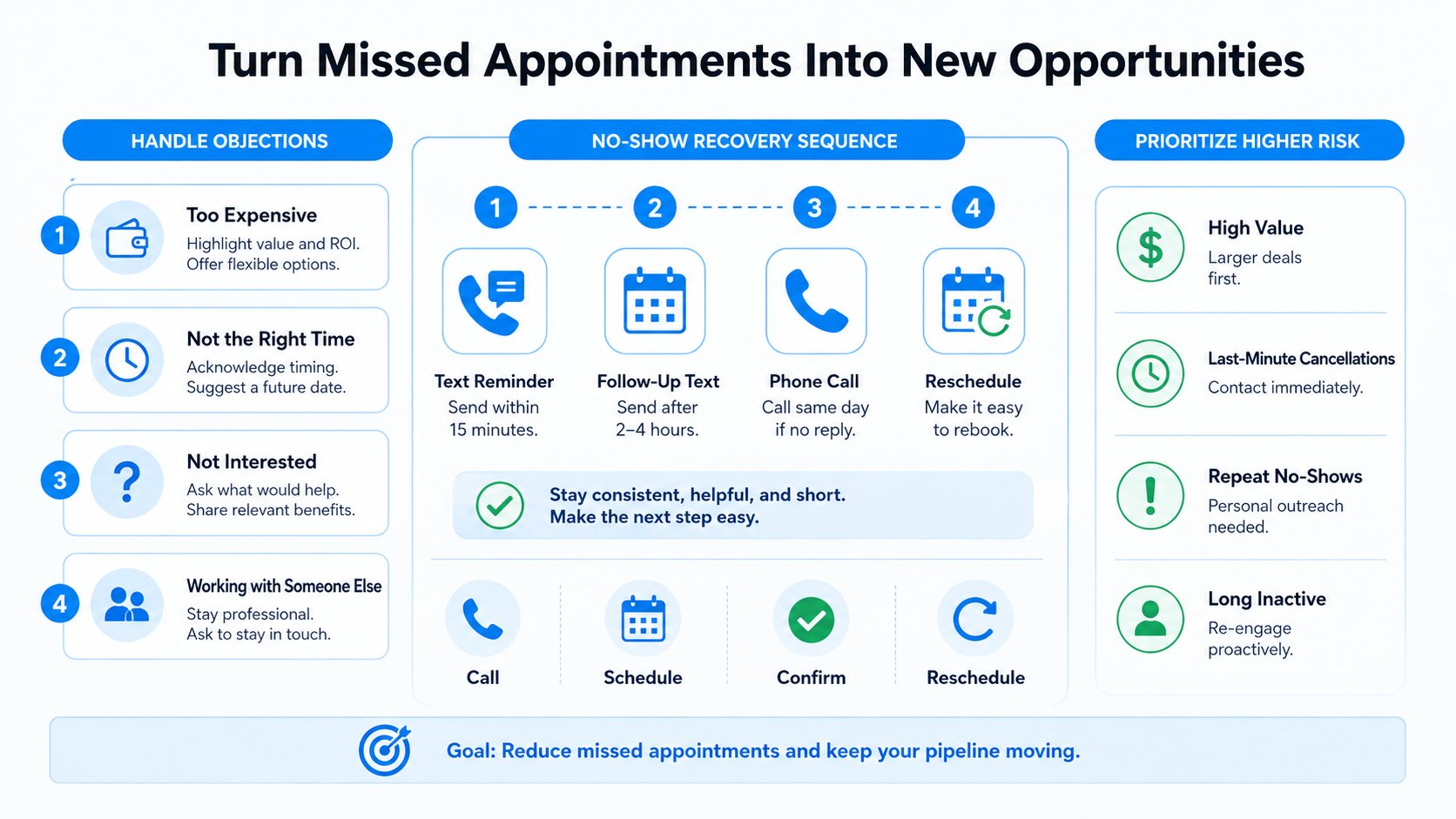
The no-show recovery sequence
Call within 30 minutes of a missed appointment if the meeting is still commercially relevant.
"Hi [First Name], we weren't able to connect for [appointment type]. I wanted to make sure everything's okay and help you find another time."
No answer, send a text:
"Hi [First Name], we missed you today. No problem, we can reschedule. Would [Option One] or [Option Two] work?"
Still nothing, send a short value-add follow-up with a specific reason to come back (an agenda item, a useful resource, a direct booking link) rather than a guilt-driven reminder. The goal is to lower the effort required to return, not to make the contact feel bad for missing the call.
Prioritize your higher-risk contacts
Not every appointment needs the same level of attention. Contacts with a history of rescheduling, short notice bookings, or first-time appointments carry more risk than a returning customer with a clean attendance record. Put your live calls where the risk is highest and let SMS carry the routine, lower-risk reminders. This keeps rep time protected without removing the human touch where it earns the most.
Call versus text: when to use each
The old default was to call for anything that mattered. That default doesn't hold up anymore. Most customers under 50 prefer text, and most people over 50 still answer a text faster than a call from a number they don't recognize.
A simple rule of thumb:
- Text for routine reminders (24 to 48 hours before)
- Call for high-value, high-risk, or first-time appointments
- Text as the follow-up when the call goes to voicemail
- Call back only if a text reminder gets no response and the appointment is high-stakes
The stakes test does most of the work here. If a no-show costs an hour and $50, a text is enough. If it costs a half day, an inventory hold, or a specialist's block of time, a call earns its place.
This is also where speed to lead thinking applies in reverse: the faster you confirm an appointment, the less likely the customer's plans have already changed by the time you reach them.
Putting it on autopilot in HubSpot or Salesforce
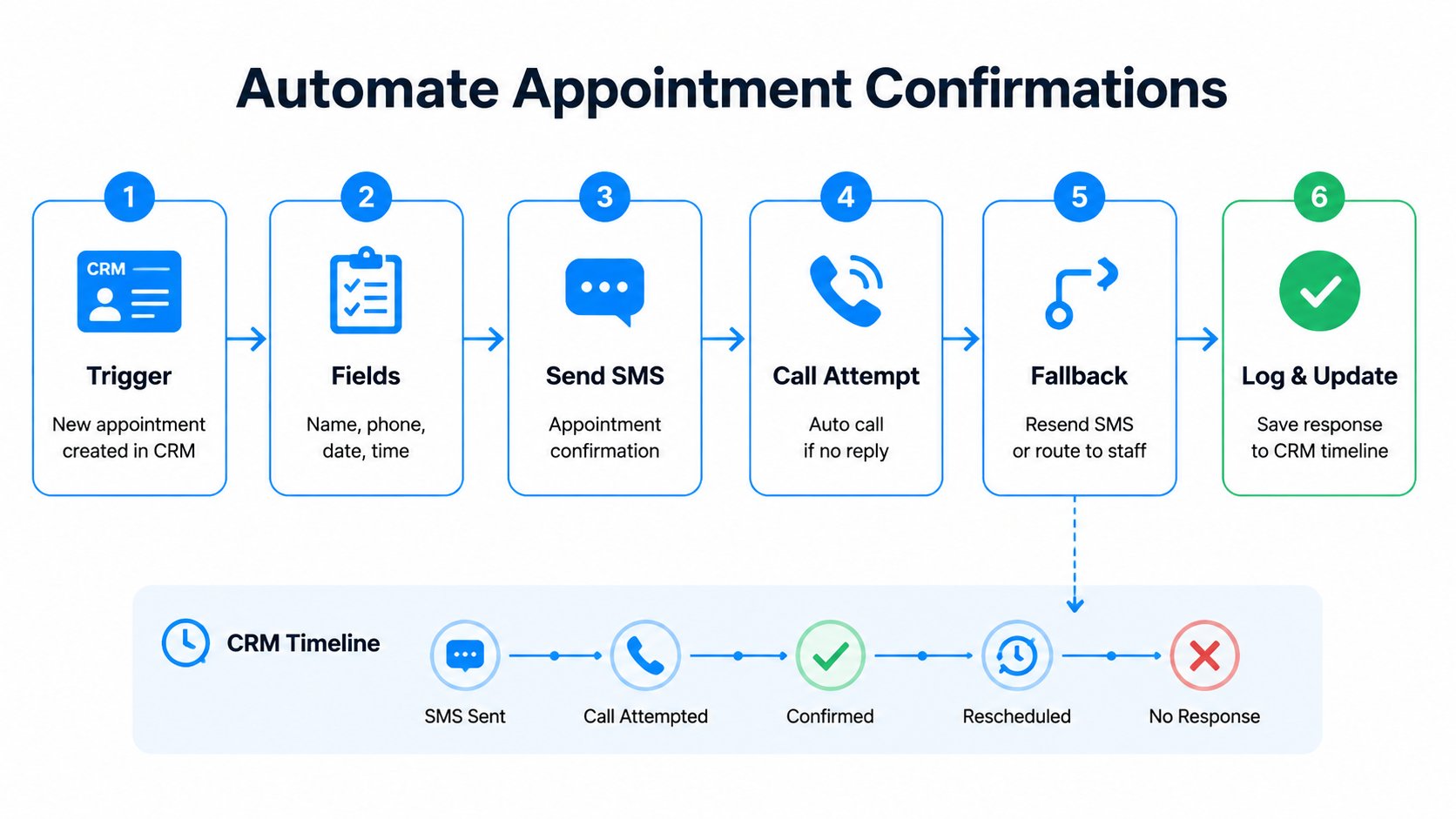
Automation should remove memory-dependent work, not remove judgment. The CRM tells the system when an appointment is booked, Salesmsg delivers the right touch at the right moment, and a rep sees every response before the appointment happens.
A practical setup sequence:
- Create the trigger. Start the workflow when a meeting, visit, or service appointment is created in HubSpot or Salesforce
- Add the fields. Store appointment type, date, time, timezone, location, owner, contact risk level, and reschedule options
- Queue the first text. Send the written confirmation at the point in the timeline that fits the workflow
- Schedule the call. Place the live confirmation call before the appointment, prioritizing high-value or high-risk records first
- Route the fallback. If the call reaches voicemail, send the matching text and label the call outcome
- Log everything. Write replies, call outcomes, reschedules, and any AI summaries back to the contact timeline
Salesmsg connects two-way SMS and business calling to CRM workflows, with native HubSpot SMS workflows, outcome logging, a shared inbox, and AI Agent handoffs for anything that needs a human decision. Salesmsg's AI Agents handle the first-touch reminders and the routine YES/NO replies, then pass anything that needs judgment to your team, in the same conversation thread, so the customer never explains themselves twice.
Start narrow. One appointment type, one script, one reschedule path, and a small set of outcome fields are enough to expose any gaps in the process. Add segmentation and after-hours handling once the team trusts the data.
TCPA and compliance basics
Confirmation workflows still have to respect consent, caller identification, and message-content rules. Treat compliance as part of script design, not a review that happens after automation is already running.
The FCC's position under the TCPA: non-emergency autodialed or prerecorded calls to cell phones generally require prior express consent, and calls with an advertising or telemarketing purpose require prior express written consent. Prerecorded messages must identify the caller at the beginning and provide a callback number or address during or after the message. See the FCC's unwanted-communications guidance for the current rules.
Checklist before your team dials or sends the first text:
- Confirm consent to call or text at the phone number on file
- Identify the business at the start of any prerecorded message
- Provide a valid callback number in every voicemail and text
- Keep clinical details out of healthcare voicemails
- Register application-to-person SMS traffic through 10DLC in the US
- Honor opt-outs on both call and text channels
- Log consent, message content, and opt-out status with the contact record
- Have your own legal or compliance lead confirm requirements for your industry and region
This is a starting point, not legal advice. Your compliance setup needs review by someone accountable for it.
Common mistakes to avoid
- Reading too fast to sound polite
- Skipping the date or time to save seconds
- Asking open-ended questions instead of yes or no
- Making the customer call back to confirm
- Calling more than twice without a reply
- Leaving procedure details on a medical voicemail
- Sending an automated reminder without a reply path
The last one carries the highest cost. An automated reminder that doesn't let the customer respond turns a two-way channel into a one-way broadcast, and the entire point of a confirmation is to get an answer back.
FAQ
What is a confirmation call script?
A confirmation call script is a short outline a team follows when calling to confirm an upcoming appointment. It covers who's calling and why, the date and time, the confirmation ask, and how to reschedule. A good one takes about 30 seconds to read aloud.
How do you write a call script to confirm an appointment?
Start with who's calling and where you're from, confirm you have the right person, state the date and time, ask for a clear yes or no, and give a fast way to reschedule. Skip small talk and don't upsell. If it takes more than 30 seconds when read aloud, it's too long.
Should you call or text to confirm an appointment?
Calls work best for high-value or first-time appointments where a real conversation matters. Texts work better for routine reminders and reach people who screen unknown calls. Salesmsg runs both from the same number, so teams can start with a text and follow up with a call if there's no reply.
What do you say in an appointment confirmation voicemail?
State the business name, the appointment date and time, and a callback number, then keep it under 20 seconds. Don't ask the customer to call back just to confirm. Send a follow-up text they can reply YES to instead. That closes the loop without adding friction.
Can confirmation calls be automated?
Reminder texts and first-touch outreach can be automated safely. A live confirmation call for a higher-stakes appointment should stay human. Salesmsg's AI Agents handle first-touch reminders and route any reply that needs judgment to your team.
How many confirmation calls should you make before a no-show?
One call plus one text follow-up is enough for most teams. Calling more than twice without a reply usually doesn't change the outcome and starts to feel like harassment. If the second attempt gets no response and the appointment is high-value, a manager can decide whether to try one more channel.
Do confirmation calls need TCPA consent?
Outbound calls and texts to a customer's phone are subject to TCPA rules in the US. If the appointment was booked with the customer's contact information, confirming it is generally covered under existing business relationship rules, but consult your own compliance setup rather than rely on a blog post for legal guidance.
Does Salesmsg integrate with HubSpot and Salesforce?
Yes. Salesmsg has native two-way integrations with both HubSpot and Salesforce, so appointments created in the CRM can trigger confirmation texts and calls automatically, and every reply logs back to the contact record without manual updates.
Pick the script, run it Monday
The scripts above aren't the point on their own. The point is that your team has one they actually use, backed by a channel that lets the customer reply on their own terms. Pick the industry template that fits, adapt a line or two to your team's voice, and run the same frame on every call this week.
If you want the call, the text follow-up, and the voicemail all running from one number and one inbox, try Salesmsg free and set it up in an afternoon. For teams already running structured outreach, our sales follow-up templates plug straight into the same workflow.

_What%20is%20conversational%20SMS.webp)