SMS Marketing Automation: Key Workflows, and Top Tools [2026]


_How%20It%20Works%2C%20Key%20Workflows%2C%20and%20Top%20Tools.webp)

SMS marketing automation sends text messages triggered by events, schedules, or contact behavior, without a person sending each one manually.
It's how teams respond to new leads in seconds, send appointment reminders without lifting a finger, and easily follow up on stalled deals.
2026 benchmark data shows that 42% of teams are using some kind of automation. No wonder. The right setup runs in the background and converts. As a result, businesses reaching leads first are winning a disproportionate share of conversations.
This guide covers how SMS automation works, the workflows worth building first, how to connect it to HubSpot, Salesforce, or another CRM, and which platforms handle it best in 2026.
What Is SMS Marketing Automation?
SMS marketing automation is the practice of sending text messages triggered by specific events, schedules, or contact behavior, without a person hitting send each time.
There are three distinct types of SMS automation workflows you should know: triggered messages, scheduled sequences, and broadcasts.
Triggered messages are sent in response to either a CRM event or a contact action.
For example, when a new lead submits a form (CRM event), a deal stage changes (CRM event), or an appointment is booked (contact action), the platform sends the right message instantly.
Scheduled sequences are automated drip campaigns that send messages at set intervals.
Like a welcome series over three days, an onboarding sequence across two weeks, or a renewal reminder thirty days before a contract ends.
Broadcasts are one-to-many messages sent to your entire list or list segment.
These are often timed but not tied to specific events or contact behaviors. Unlike triggered or scheduled workflows, these function more like mass texts, requiring manual planning and scheduling.
Triggered and scheduled automations are where the compounding lift comes from. They run in the background and convert automatically, while broadcasts depend on you remembering to hit send.
The teams that haven't built automation yet are the ones still firing off texts one at a time, missing inbound leads after hours, and watching deals stall because the follow-up never happened.
Why Automate Your SMS?
SMS Automation does three things manual texting can't: it responds in seconds instead of hours, it stays consistent across teams as you scale, and it sends every message in the window most likely to get a reply.
Here's what each one looks like in practice:
Respond in seconds, not hours
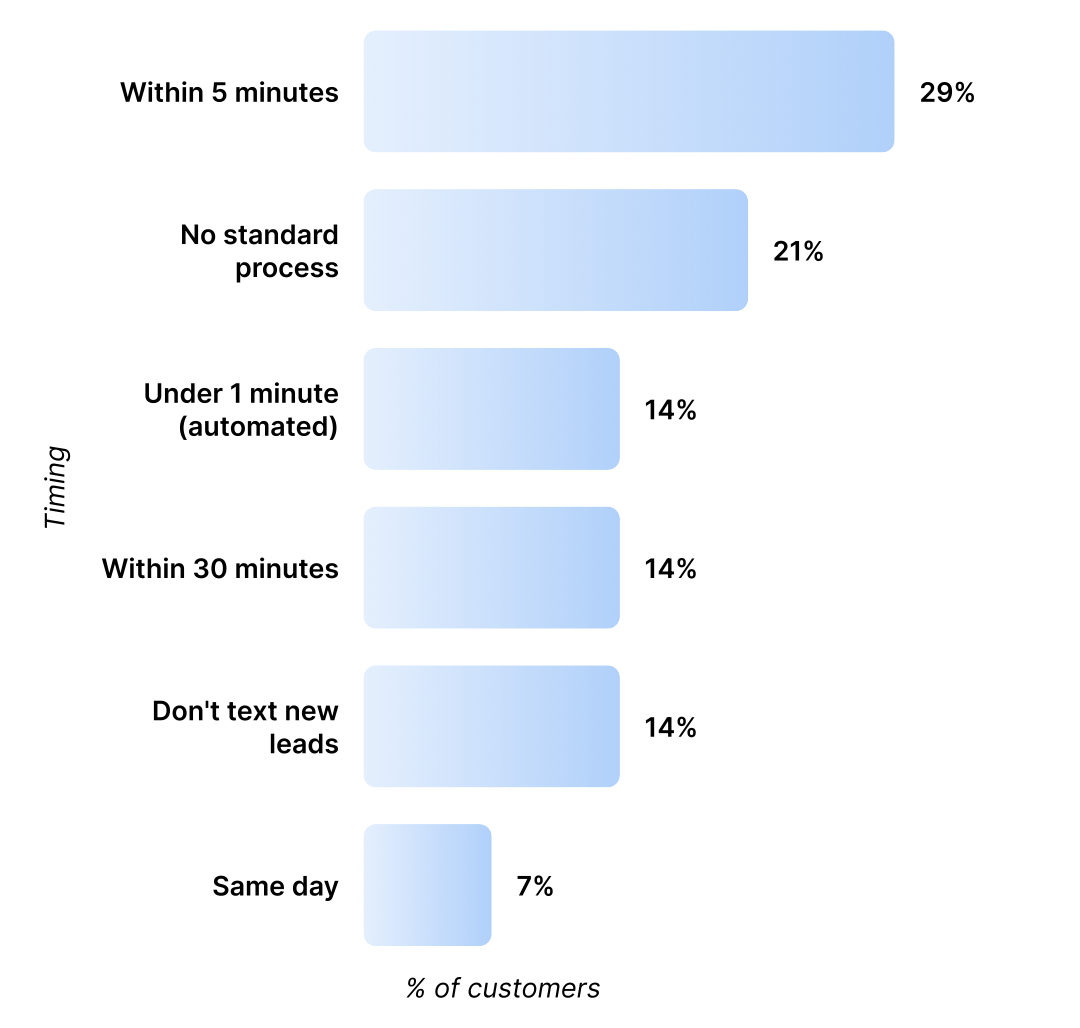
Speed to lead decides who wins. Our recent SMS marketing research found that 57% of businesses text a new lead within 30 minutes, and 14% have it fully automated to under one minute.
If your team isn't in that group, you're losing conversations before they start.
A lead who fills out a form at 9 PM gets a real answer within seconds when automation runs the first response, not a callback the next morning when they've already booked a demo with someone else.
The gap between manual and automated is even wider with AI Agents in the loop.
AI Agents respond to inbound messages in under one minute. Human reps average around 15 minutes. Teams using AI Agents see an 88% lift in response rate over manual follow-up.
Stay consistent across teams
Manual texting works until your team grows. Then reps forget to follow up, send the wrong message, or skip the reminder text entirely.
Automation removes this inconsistency.
Every lead gets the same first-touch message. Every customer gets the same appointment reminder. The work happens whether anyone is watching or not.
This matters even more when teams hand off accounts. A lead nurtured by marketing, qualified by sales, and onboarded by support shouldn't notice the change.
Pairing SMS with calling on the same platform produces a 2.6x engagement lift over text alone, which only works when the same conversation history follows the contact through every team.
Hit the right send window
The 10 AM to 12 PM window produces the fastest replies. In that window, response times run 65 to 70 minutes. After 6 PM, they stretch past two hours.
Scheduling messages to land in that window consistently improves how quickly you hear back, and you don't have to be online to do it.
Most platforms now support time-zone-aware scheduling, so a 10 AM message to a contact in California fires three hours after a 10 AM message in New York.
SMS Automation Use Cases Across Your Business
Most teams set up SMS automation for one function. The teams running it across sales, marketing, and support see the biggest gains.
Here's what it looks like in action:
Marketing workflows that move past the broadcast
The most effective marketing sequences pair email with a short SMS at moments when an open or a click matters most.
1. Lead nurture sequence
A lead nurture sequence is the easiest place to start.
Here's what triggers the message: a new contact joins your list and opts in to text.
Fire a short SMS (like the one below) a few hours after the welcome email lands.
Hi [First Name], thanks for downloading the guide. Want us to send the second part next week, or are you ready to talk now?
The outcome:
Replies route into your inbox so a rep can pick up the conversation. Cold downloads turn into qualified opportunities before they go inactive.
2. Event reminder messages
Event reminders are another high-leverage workflow.
Here's what triggers the message: a contact registers for a webinar or in-person event.
Schedule a text to land 24 hours before, plus a second one an hour out.
[First Name], your seat for tomorrow's session is locked in. Add to calendar: [link]
The outcome:
Show-up rates climb. Our data shows 29% of Salesmsg customers run automated appointment reminder sequences, making it one of the three most common automation flows alongside welcome series and lead follow-up.
3. Re-engage cold leads
For cold list re-engagement, send a single text to see who's still paying attention.
Here's what triggers the message: a contact hasn't opened an email in 90 days.
Send them a simple message like the one below.
[First Name], still want updates from us? Reply YES to keep getting them, STOP to unsubscribe.
The outcome:
A cleaner list, higher engagement on remaining contacts, and a small percentage of revived leads who get pulled back into nurture.
Sales automation that responds before your competition
Sales automation is where SMS earns the fastest payback. Speed to lead is the bottleneck, and texts get answered faster than calls or emails.
Inbound lead response is the highest-impact workflow most teams aren't running yet.
1. Form submission responses
Here's what triggers the message: a form submission hits your CRM.
Fire a text to the lead within seconds.
Hi [First Name], saw you requested a demo. I have time today at 2 PM or tomorrow at 10. Which works?
The outcome:
First-response time drops from hours to seconds. Booking rates climb. With AI Agents responding in under a minute and lifting response rates by 88%, the qualification conversation can continue automatically until a meeting is on the calendar.
2. Follow-up post-demo
Post-demo follow-up is the second one to build.
Here's what triggers the message: the demo meeting is marked complete in HubSpot, Salesforce, or another CRM.
Send a text to set the next step.
Thanks for the demo today. Want me to send the proposal now or after you've talked to your team?
The outcome:
Pipeline moves faster because the next step is set before the lead has time to cool off.
3. Stalled deal reach-out
A stalled deal nudge catches the deals that would otherwise die quietly.
Here's what triggers the message: a deal sits in the same stage for 14+ days.
Trigger a text from the deal owner to reopen the conversation.
Hey [First Name], where did we land on the pricing question? Happy to jump on a quick call.
The outcome:
Deals that would otherwise quietly die get reopened. 42% of all replies come from follow-up messages, not the first text.
Customer support automation that cuts no-shows and saves renewals
Support teams use automation to cut no-shows, smooth onboarding, and catch renewal moments before they slip past.
1. Easy onboarding
Onboarding starts the moment a customer signs.
Here's what triggers the message: a deal is marked closed-won in your CRM.
Send a welcome text the same day with the next concrete step.
Welcome aboard, [First Name]. Your kickoff call is set for [date]. Reply with any questions before then.
The outcome:
Customers feel taken care of from day one. Questions surface earlier instead of becoming churn risks later.
2. Appointment reminder messages
Appointment reminders are the workflow that most often pays for the platform on its own.
Here's what triggers the message: a scheduled meeting, demo, or service appointment is 24 hours out.
Fire an automated reminder.
Reminder: your appointment with [Practice Name] is tomorrow at [time]. Reply C to confirm or R to reschedule.
The outcome:
No-shows drop, especially for service businesses and healthcare practices.
3. Renewal check-in messages
A renewal check-in keeps account managers ahead of the contract.
Here's what triggers the message: a contract or subscription renewal is 60 days out.
Send a text from the account manager.
Hi [First Name], your plan renews on [date]. Want a quick check-in to review what's working?
The outcome:
Renewals get attention before they auto-process or lapse. Account managers walk into renewal conversations already informed.
Want to see these workflows running in a real platform? Book a demo and walk through them with our team.
How to Connect SMS Automation to Your CRM
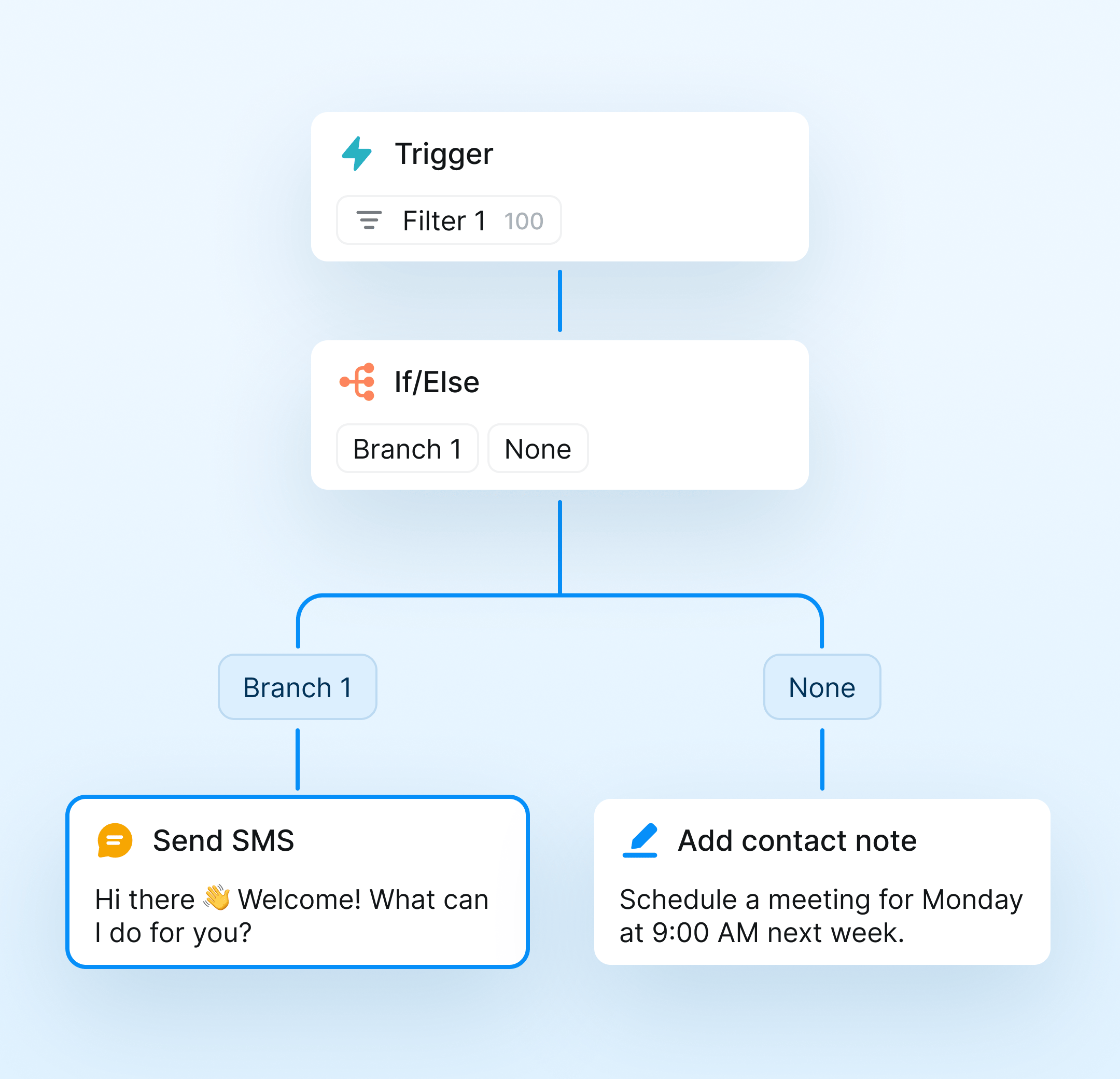
Most automation runs off CRM events like a form submission, a deal stage change, a meeting booked.
Your SMS platform needs to read those events the moment they happen and send the right message back without a human in the loop.
HubSpot
With a native HubSpot integration, you can add an SMS step to any HubSpot workflow.
It's quite simple:
- Open the workflow and click the plus button
- Scroll to integrated apps
- Select your SMS tool
- Pick the message you want to send
The workflow now sends a text whenever the trigger fires, and every message logs to the contact timeline automatically.
Common triggers include form submissions, deal stage changes, list memberships, property updates, and meeting bookings. HubSpot's workflow documentation covers the trigger options in detail.
Salesforce
Inside Salesforce, the same logic runs through Flows. A Salesforce-native SMS integration lets you add a Send Text action to any Flow, triggered by record changes on Leads, Contacts, Opportunities, or custom objects.
Messages log as activities on the relevant record, so reps see the full conversation history alongside calls, emails, and notes. Both Lightning and Classic editions are supported by most modern platforms.
The integration depth matters more than the trigger types.
A connector-based integration that requires Zapier in the middle adds latency and breakage points. A native integration sits inside your CRM as a widget and syncs both ways without a third tool in the chain.
Connect Salesmsg to your CRM in minutes and see how it works.
How to Set Up SMS Marketing Automation: Step by Step
Setting up automation isn't complicated, but the order matters. Here's the sequence that works:
1. Get explicit opt-in
TCPA requires written consent before you send marketing messages to U.S. numbers. Make sure that you build opt-in language into your forms, and capture the consent timestamp in your CRM.
Skipping this step exposes you to fines of $500 to $1,500 per message under the rules enforced by the CTIA and the FCC.
Our SMS compliance guide walks through the full opt-in requirements.
2. Map the trigger to the message
Before you build anything in software, write out the trigger event, the message you want to send, and the outcome you expect.
One trigger, one message, one CTA.
If you can't describe the workflow in one sentence, simplify it.
3. Connect your CRM
Install the SMS platform's native integration with HubSpot, Salesforce, or another CRM.
Verify that contact data syncs both ways and that messages log to the contact timeline. Then, test with a single contact before turning anything on at scale.
4. Write the message
Keep your message under 100 characters. Messages between 50 and 99 characters get a 68% response rate. Messages over 500 characters drop to 31%.
Use one merge field for personalization and one clear CTA. First name works, but pulling deal value, meeting time, or another CRM field makes the message land harder.
Don't use links unless they are the point of the message. Our guide to SMS best practices has more on what works.
5. Test and measure
Run your first workflows on a small segment of your list. Then, watch for delivery errors, opt-out spikes, and reply rates.
After two weeks of data, decide what to scale, what to revise, and what to kill.
Best SMS Marketing Automation Tools
These five platforms cover most of the SMS automation market. Here's how they compare:
Try Salesmsg free for 14 days and see why teams choose it for multi-team automation.
1. Salesmsg. Best for Businesses Managing Multiple Teams
Salesmsg is built for teams that run SMS across marketing, sales, and customer support from one shared inbox. Texts and calls log automatically to HubSpot or Salesforce records. Workflows trigger from CRM events. AI Agents respond to inbound leads in seconds, even when your team is offline.
The differentiator is breadth. Most SMS platforms force you to pick a use case. Salesmsg handles all three from a single number, with the same automation engine, shared inbox, and compliance infrastructure.
Key features: Native two-way SMS inside HubSpot and Salesforce, AI Agents for instant lead qualification, shared team inbox, calling and SMS from one number, and built-in 10DLC registration.
CRM integration: Native HubSpot, native Salesforce, native ActiveCampaign, Pipedrive, Zapier, and more.
Pricing: Starts at $25/month for 500 message credits. Scales by message volume, not seat count.
Notable limit: Advanced workflow automations may take some time to learn for new users.
G2 rating: 4.7 out of 5 (G2 reviews).
2. SlickText. Best for E-Commerce Broadcasts
SlickText is one of the most established SMS platforms on the market, with broadcast tools, drag-and-drop workflows, and strong support.
The platform leans toward marketing teams running campaigns to opted-in lists, with text-to-join keywords and out-of-the-box shortcode support.
The HubSpot integration is solid for sending SMS from workflows, though SlickText is built more for marketing automation than sales workflows or shared-inbox support cases.
Key features: Drag-and-drop workflow builder, native HubSpot and Salesforce integrations, text-to-join keywords, conversational inbox, segmentation tools.
CRM integration: Native HubSpot and Salesforce, plus Zapier for everything else.
Pricing: Starts at $29/month for 500 message credits.
Notable limit: Built primarily for marketing campaigns, with less depth on sales pipeline workflows or multi-team support inboxes.
G2 rating: 4.8 out of 5 (G2 reviews).
3. Klaviyo. Best for Email + SMS in E-Commerce
Klaviyo is the dominant email marketing tool in e-commerce, and its SMS product layers in cleanly for stores that want both channels in one platform. Automation flows tie SMS to abandoned carts, browse abandonment, post-purchase sequences, and other commerce-specific triggers.
Outside e-commerce, the fit weakens fast.
Klaviyo doesn't have a native HubSpot or Salesforce integration, and its active-profile pricing model can punish service businesses with large but inactive contact lists.
Key features: Email and SMS in one platform, deep Shopify integration, predictive analytics, and segmentation by behavior and purchase history.
CRM integration: Deep Shopify and BigCommerce. HubSpot and Salesforce are supported via Zapier or third-party connectors.
Pricing: A free tier is available for up to 250 active profiles with 150 SMS credits included. Paid plans start at $20/month for email. SMS credits are $15/month for up to 1,250 credits, bringing the starting total to $35/month for email and SMS combined.
Notable limit: Priced and built for e-commerce. Service businesses, agencies, and non-retail companies usually find a better fit elsewhere.
G2 rating: 4.6 out of 5 (G2 reviews).
4. Attentive. Best for Enterprise Retail
Attentive is an enterprise SMS and email platform built for high-volume retail brands. The product is sophisticated, the AI tooling is strong, and the account management is hands-on.
The trade-off is cost and contract terms.
Attentive doesn't publish pricing publicly. For retail brands sending 50,000+ messages a month, the model works. For most non-retail businesses, it's overkill.
Key features: SMS, RCS, and email in one platform, AI-powered campaign optimization, two-tap sign-up units, and advanced segmentation.
CRM integration: Custom integrations available, primarily focused on Shopify and e-commerce stacks.
Pricing: Custom pricing, not published publicly. Requires a sales conversation. Long-term contracts are standard.
Notable limit: Enterprise pricing and contract terms make it impractical for SMB and mid-market non-retail businesses.
G2 rating: 4.5 out of 5 (G2 reviews).
5. MessageDesk. Best for Small Local Service Businesses
MessageDesk text-enables existing landline and VoIP business phone numbers, which is useful for established local businesses that don't want to switch numbers. Pricing is flat per user, and the platform is straightforward to set up.
The limitation is integration depth. MessageDesk connects via Zapier, not native HubSpot or Salesforce widgets, so the automation possibilities are narrower than with purpose-built CRM platforms.
Key features: Text-enable existing business numbers, shared inbox, scheduled messages, automated responses, and group texting.
CRM integration: Zapier only. No native HubSpot or Salesforce widget.
Pricing: Starts at $39/month.
Notable limit: No native CRM integration, which restricts what kinds of automation you can build.
G2 rating: 4.6 out of 5 (G2 reviews).
SMS Automation Best Practices
A few rules separate the workflows that compound from the ones that get ignored. Keep these in mind as you create your workflows and messages.
- Send during business hours, in the recipient's local time zone using time-zone-aware scheduling.
- Keep messages short with one merge field, one CTA, and one question per message.
- Personalize beyond first name by pulling deal value, meeting time, or last product purchased from your CRM.
- Stay compliant by getting written consent, registering for 10DLC, and including "Reply STOP to unsubscribe" in every message.
- Build a follow-up sequence, not a single send, since structured sequences consistently outperform a single text.
- Measure what matters like delivery rate, response rate, opt-out rate, and conversion rate, not total sends.
Final Thoughts on SMS Marketing Automation
The teams getting real results from SMS automation aren't running it in one corner of the business.
They're using it for marketing nurture sequences, sales follow-up, and customer support reminders, all from the same platform, all triggered from the same CRM.
Salesmsg makes it easy.
You get two-way SMS, calling, AI Agents, native HubSpot and Salesforce integrations, and 10DLC compliance all inside one platform. So a lead nurtured by marketing, qualified by sales, and onboarded by support stays in the same conversation the whole way through.
Start a free 14-day trial and see what SMS automation looks like when one platform handles your entire business.
SMS Marketing Automation FAQs
What is SMS marketing automation?
SMS marketing automation is sending text messages triggered by an event, schedule, or contact behavior without anyone hitting send.
This means actions like a form submission, booked appointment, and a stalled deal can all trigger an automated SMS.
Can you automate SMS messages?
Yes. Most platforms let you trigger texts based on CRM events, time delays, or contact behavior.
Salesmsg connects directly to HubSpot, Salesforce, and other CRMs. So, deal stage changes, form submissions, and meeting bookings can all send a text without anyone leaving the CRM.
Is SMS marketing automation legal?
Yes, as long as you have written consent before sending. In the US, that means following TCPA rules and registering your numbers under 10DLC.
Salesmsg handles 10DLC registration during onboarding so your team doesn't have to figure it out alone.
What's the best time to send automated SMS messages?
The 10 AM to 12 PM window gets the fastest replies. For trigger-based messages like inbound lead follow-up, send them the moment the trigger hits since speed matters more than timing for those sequences.
How does SMS automation connect to HubSpot or Salesforce?
With a native integration like Salesmsg, you can trigger SMS messages directly from HubSpot workflows or Salesforce flows. When a contact moves to a new pipeline stage, a text is sent automatically, no manual action required, and everything is logged back to the record.
What kinds of businesses use SMS marketing automation?
Service businesses, healthcare providers, real estate teams, agencies, retailers, and anyone else who communicates with customers by text.
Marketing teams use it for nurture sequences, sales teams use it for lead follow-up, and support teams use it for appointment reminders and onboarding.
How long should automated SMS messages be?
Under 100 characters. Response rates drop with every additional 100 characters. Keep automated messages short, specific, and action-oriented. One question or one clear CTA per message.