Call recording software for business: the 9 best tools in 2026


_Call%20recording%20software%20for%20business.webp)

The best call recording software for business automatically saves every call, transcribes it, and logs all details in your CRM.
For US-based revenue teams that also text their contacts, the quick pick is Salesmsg. It records calls and runs two-way SMS on the same business number, native to HubSpot and other CRMs.
This guide compares nine top tools, includes tips for choosing, provides honest pricing, and outlines required US consent laws.
Quick-pick recommendations
- SME & SMB revenue teams that text and call: Salesmsg
- Enterprise revenue intelligence: Gong
- Coaching-led teams: Chorus by ZoomInfo
- Marketing attribution: CallRail
- Real-time AI during calls: Dialpad
The 9 best call recording software tools compared
Pricing reflects starting plans at the time of writing. Always confirm the vendor's pricing on the vendor’s own pricing page before you buy.
Salesmsg (best for SMB revenue teams that text and call)
.webp)
Best for: US-based SMB revenue teams that call and text the same contacts and want everything logged to HubSpot or Salesforce automatically.
Salesmsg integrates business calling and two-way SMS on one business number, making texting a built-in feature. Call recordings, transcripts, and AI summaries automatically appear in the contact record, right beside the text thread.
Your rep never opens a second tool or logs anything by hand, and the history stays on the record even after they move on to another job.
Key features:
- Automatic and on-demand recording: Every call is saved as an MP3 on the CRM record.
- AI summary and transcript: Skim the outcome instead of relistening to the whole call.
- Power Dialer: Work a call list, record each connect, log each result.
- Shared team inbox: Managers see calls and texts in one thread, per contact.
- AI Agents (texting and calling): Catch missed calls and qualify leads around the clock.
- Workflows: Trigger texts and follow-ups automatically from CRM events.
- Inbound routing: Send callers through an IVR or the shared inbox before they reach a rep.
- Built-in 10DLC and TCPA tools: Register your brand and stay compliant with texting.
In Salesmsg, the AI Agent texts the contact back to keep the conversation moving. Our benchmark report backs this up:
- 42% of replies come from follow-up messages.
- AI Agents reply in under a minute, versus roughly 15 minutes for a human rep.
- Teams using AI Agents see an 88% lift in response rate.
It fits the SMB verticals that live on fast follow-up:
- Car dealerships
- Fitness centers
- Healthcare practices
- Real estate
- Home services
- Insurance
- Recruiting
- Franchises
Pricing: Starts at $25/month for 500 message credits.
.webp)
Credit-based pricing scales with message volume, not headcount, so a growing team is not punished for adding seats.
Click here to start your free 14-day trial of Salesmsg.
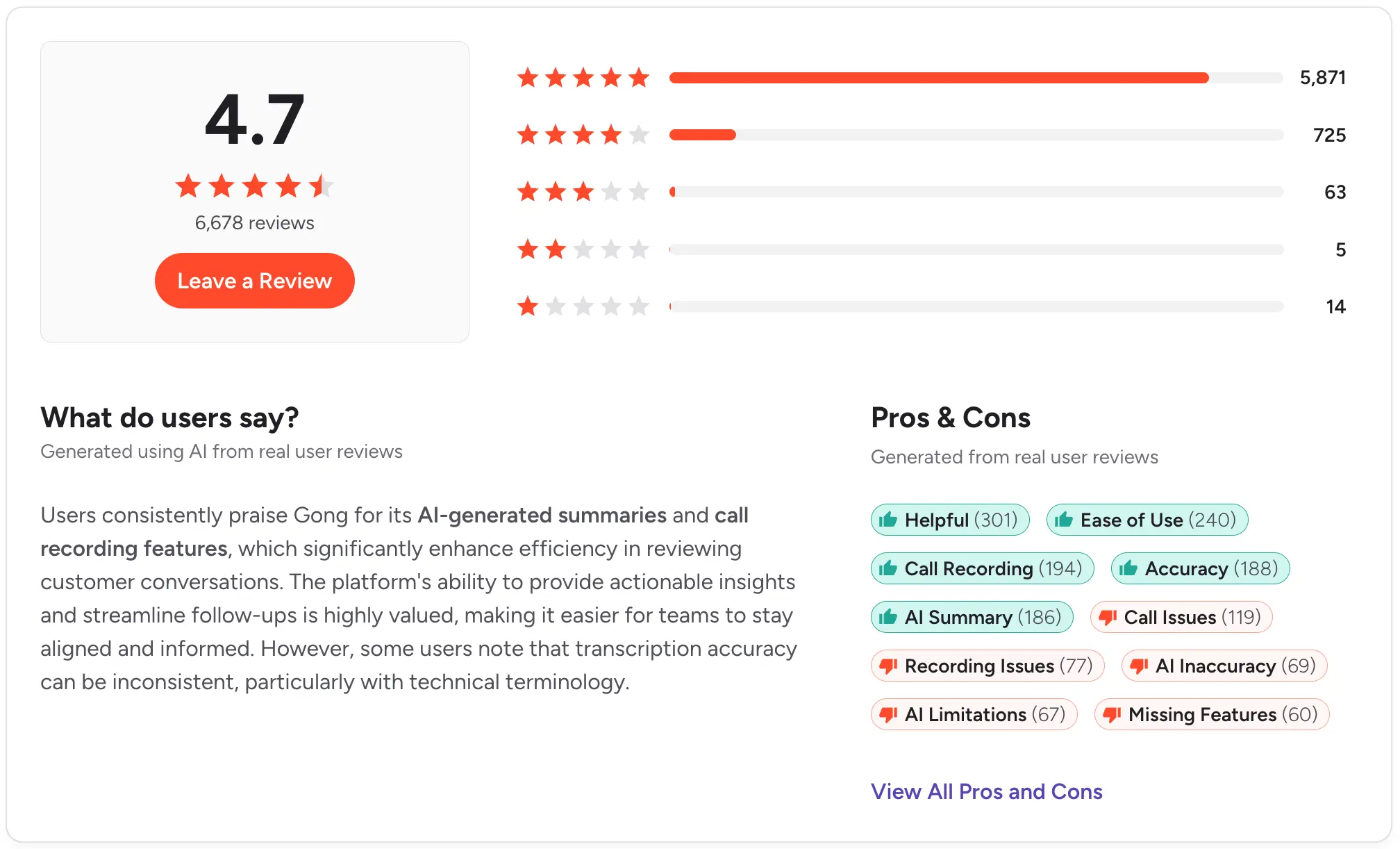
Gong (best for enterprise revenue intelligence)

Best for: Larger sales orgs that want deep deal intelligence and conversation analytics across the whole pipeline.
Gong records and analyzes calls at a level no SMB tool matches. For an org with a dedicated RevOps function and a coaching culture, the insight is hard to beat.
Strengths:
- Scores deals and flags pipeline risk automatically.
- Turns thousands of calls into a searchable pipeline signal.
- Integrates strongly with Salesforce and HubSpot.
What to watch out for:
- Quote-based enterprise pricing, with no public rates.
- Priced for enterprise budgets, which puts it out of reach for most SMB teams.
- No texting on the same number, so SMS follow-up lives elsewhere.
Pricing: Custom quote through a demo. Gong does not publish rates.
Honest take: Gong offers deeper conversation analytics and deal scoring than Salesmsg.
However, it may not suit SMB teams that need both texting and calling on a single number.
Chorus by ZoomInfo (best for coaching-led teams)

Best for: Sales teams that want deep call coaching and conversation intelligence, especially existing ZoomInfo customers.
Chorus is ZoomInfo's conversation-intelligence product. It captures and analyzes calls, meetings, and emails to surface deal risk and inform forecasting.
Strengths:
- Pulls out call moments worth reviewing and tracks competitor mentions.
- Curates call libraries and tracks adherence to methodology across the team.
- Ramps new reps without managers sitting through every call.
What to watch out for:
- Sold as a paid add-on to ZoomInfo, quote-based with no public rates.
- No SMS on the same number.
- Costs are added to an existing ZoomInfo subscription.
Pricing: Custom quote, sold as a paid add-on to ZoomInfo. No public rates.
Honest take: Chorus wins on coaching depth for enterprise teams. For an SMB team that wants recording and texting on a single CRM record, it is more platform than you need.
CallRail (best for marketing attribution and call tracking)

Best for: Marketing teams that need to know which ad, keyword, or campaign drove each inbound call.
CallRail specializes in call tracking for marketing teams, identifying which ads or keywords drive inbound calls. Its strength is attribution reporting.
Strengths:
- Ties inbound calls to the marketing source that produced them.
- Best attribution reporting on this list for marketers.
- Records calls and integrates with HubSpot and Salesforce.
What to watch out for:
- Focused on marketing ROI rather than a rep's daily dialing and texting.
- Call summaries and sentiment analysis need the higher Lead Conversion tier ($150/mo).
- Texting is capped (25 SMS a month included) and built for lead response, not a two-way sales inbox.

Pricing: Lead Tracking starts at $50/mo billed annually ($55 month to month), plus usage for extra numbers and minutes. Call recording and transcription are included at that base tier.
Premium Conversation Intelligence (summaries, sentiment, coaching) starts on the Lead Conversion plan at $150/mo. Every account gets a 14-day free trial.
Honest take: CallRail excels at marketing attribution compared to Salesmsg. It is ideal for identifying campaign-driven calls, while Salesmsg is better for teams managing calls and texts together.
Aircall (best for HubSpot-led support and sales)

Best for: Support and sales teams that mostly call, want clean HubSpot logging, and use SMS rarely.
Aircall is a cloud phone solution for support and sales teams, with reliable call recording, analytics, and CRM logging. SMS works but it's limited.
Strengths:
- 250+ integrations, including HubSpot and Salesforce.
- Solid coaching and live-monitoring tools for managers.
- Clean interface that is quick for reps to pick up.
What to watch out for:
- SMS and MMS come with the entry plan, but MMS only works for US, Canada, and Australia numbers, and texting is lighter than a conversational sales inbox.
- AI Assist (transcription, summaries, call scoring) requires the Professional plan at $70/license.
- Salesforce CTI also needs Professional, and a three-license minimum means at least $120/month.
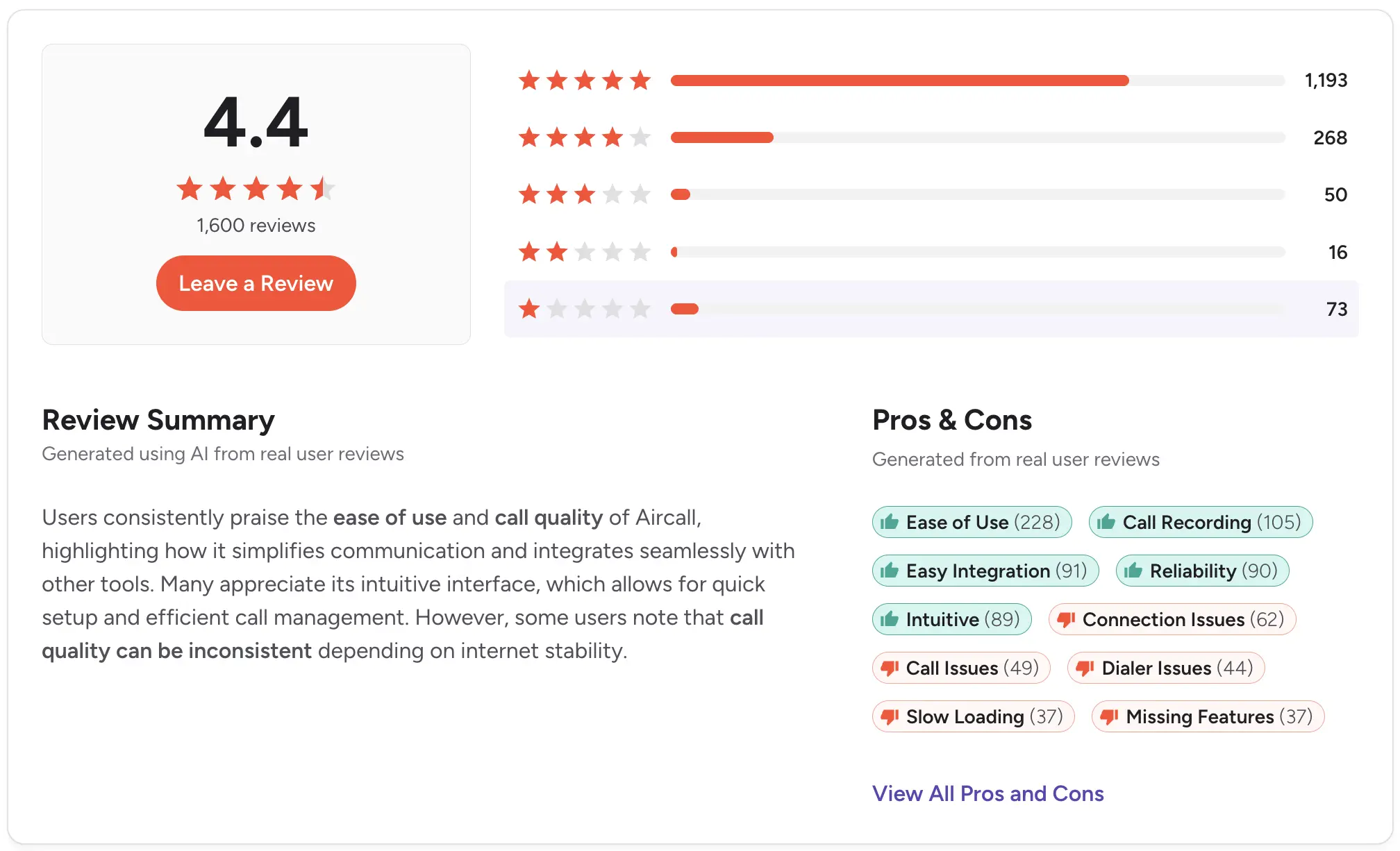
Pricing: Essentials starts at $40/license with a three-license minimum, so about $120/month to start.
AI Assist and the Salesforce CTI integration require the Professional plan at $70/license.
Honest take: Aircall is a strong, dedicated calling tool. For teams that rely heavily on texting for follow-ups, its limitations with SMS may become apparent.
Consider other options if texting is essential.
Dialpad (best for real-time AI during calls)
.webp)
Best for: Sales teams that want real-time transcription and instant call summaries in the phone system.
Dialpad has invested more in AI voice features than almost anyone here. On its Connect plan, real-time transcripts and instant call summaries are included at the entry tier.
Strengths:
- Real-time transcripts and instant call summaries on the Standard plan.
- Call recording and built-in messaging are included.
- Monitor, whisper, and barge for managers coaching reps.
What to watch out for:
- CRM integrations (HubSpot, Salesforce) require the Pro plan at $35/user/month.
- Texting is a secondary channel, not a conversational sales inbox.
- Deeper sales AI, like live coaching and playbooks, lives in the pricier Dialpad Sell product.
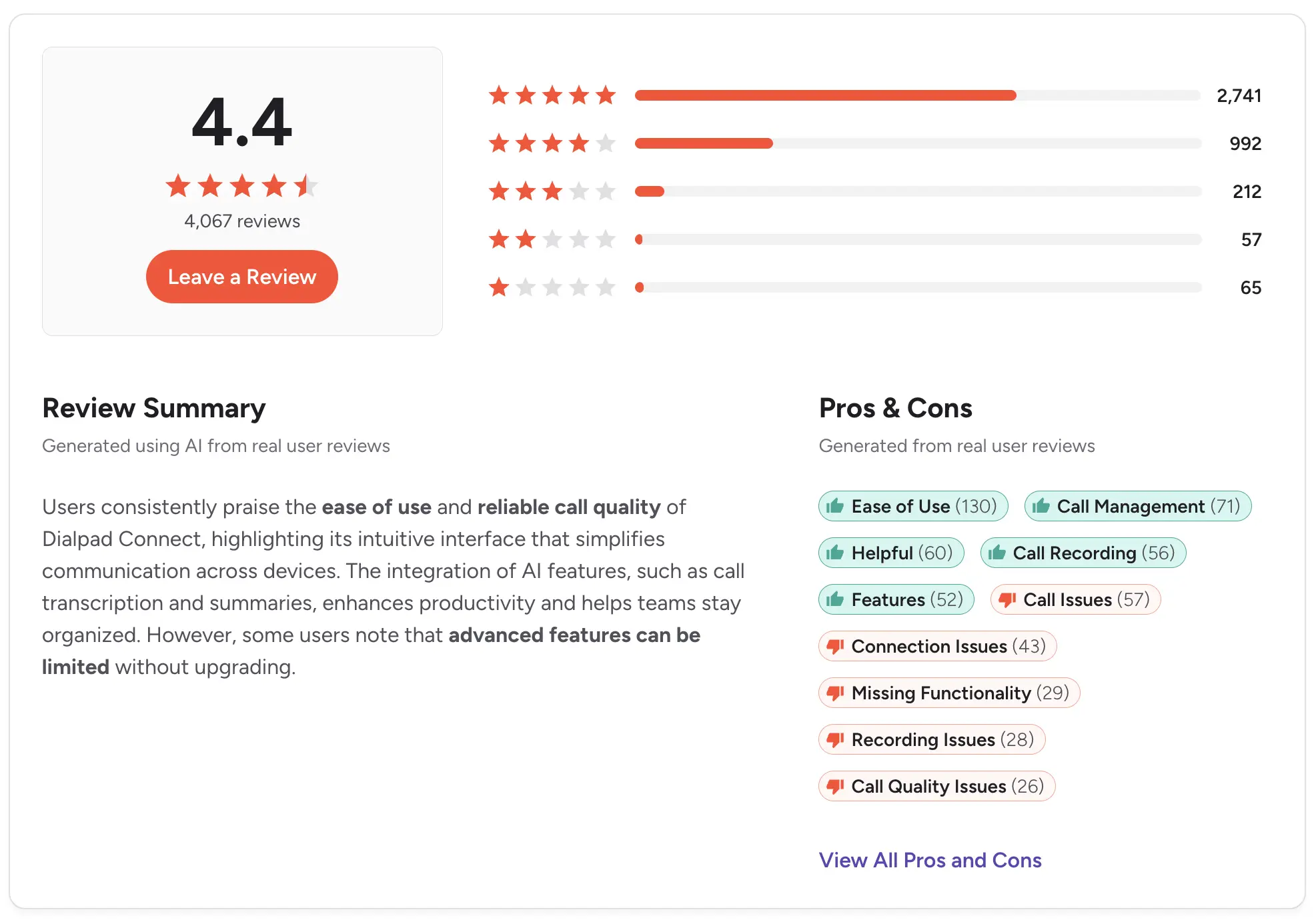
Pricing: Connect starts at $27/user/month (Standard). CRM integrations require the Pro plan at $35/user/month.
Honest take: Dialpad leads on live, in-call AI. If you also need texting and calling in a single conversation on a single number, Salesmsg covers more of the workflow.
RingCentral (best for all-in-one UCaaS)
.webp)
Best for: Larger organizations consolidating company-wide calling, video, and messaging under one vendor.
RingCentral is a unified communications platform built for enterprise needs. It offers standard call recording and scalable calling, video, and messaging.
Strengths:
- Proven reliability at enterprise scale.
- Serious compliance tooling for regulated industries.
- Wide integration library across business applications.
What to watch out for:
- SMS is capped at 25 texts per user per month on Core (100 on Advanced), so it is not a realistic texting channel.
- HubSpot and Salesforce integrations require the Advanced plan.
- Setup takes more time than the lighter tools here.

Pricing: Core starts at $30/user/month. CRM integrations require the Advanced plan at $35/user/month.
A Business SMS Booster with a shared inbox and compliance tools is a $25/month add-on.
Honest take: RingCentral is built for enterprise phone infrastructure. If you are a 10-person revenue team, then most of the platform goes unused.
CloudTalk (best for SMB call centers)
.webp)
Best for: Inbound-heavy support and sales teams that want call center routing and analytics.
As call center recording software, CloudTalk gives you smart call routing, queue management, real-time dashboards, and automatic call recording.
For a small contact center with steady inbound volume, it handles the essentials well.
Strengths:
- Strong inbound routing and queue management.
- Good call analytics for support managers.
- Strong compliance coverage (SOC 2, HIPAA, GDPR, PCI-DSS).
What to watch out for:
- AI transcription, summaries, and sentiment need the Conversation Intelligence add-on at $9/user.
- Starter ($34/mo) has no CRM integrations; HubSpot starts on Essential ($39/mo) and Salesforce on Expert ($69/mo).
- Built more for call center support than a unified calling-plus-texting sales workflow.
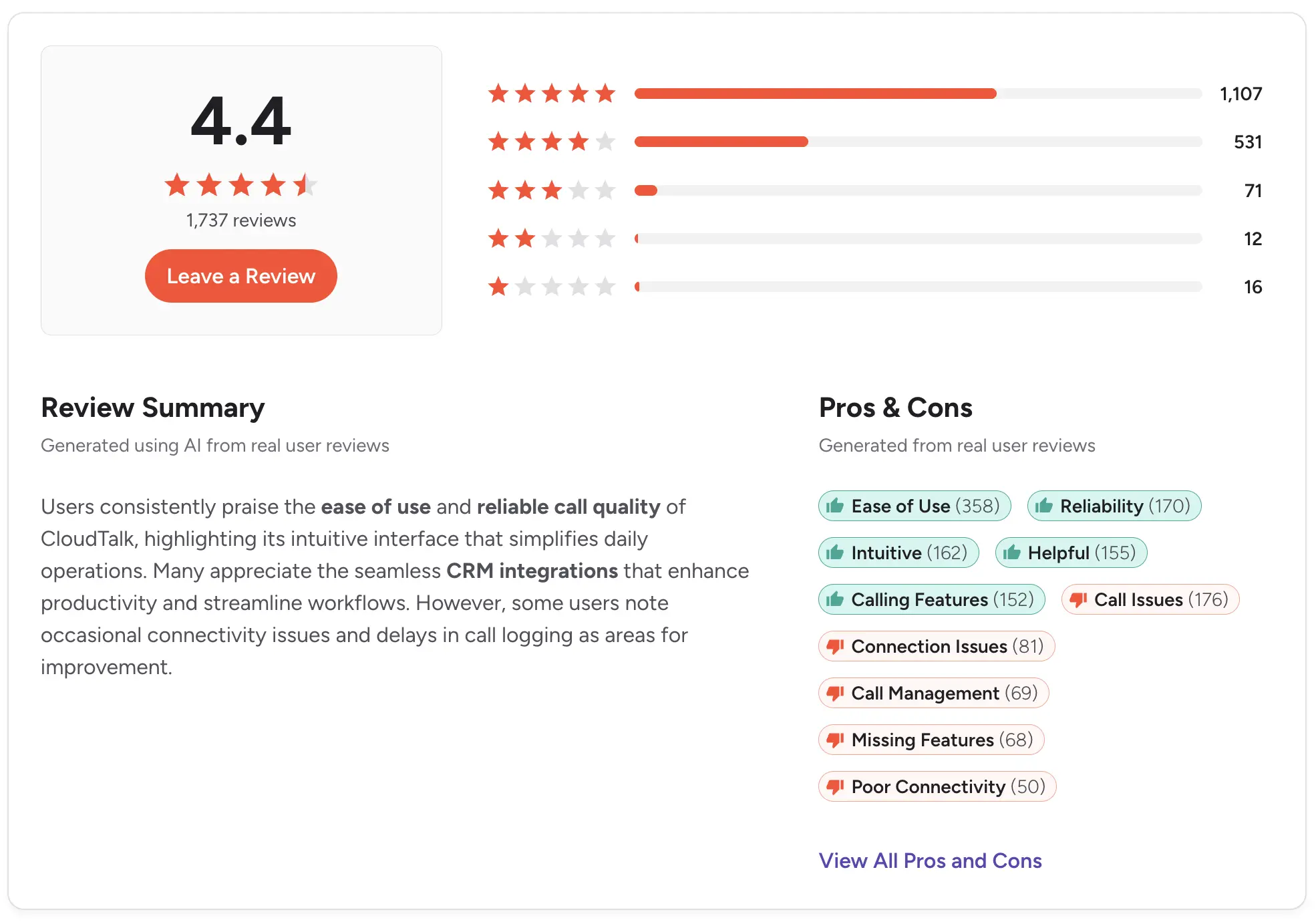
Pricing: Starter starts at $34/user/month. CRM integrations begin at $39/mo on the Essential plan, and Salesforce requires the Expert plan at $69/user/month (minimum 3 licenses).
AI transcription is a $9/user add-on.
Honest take: CloudTalk is a solid call center tool. It is not built for teams that want unified calling and texting on one number.
JustCall (best for outbound sales dialing)

Best for: Outbound-heavy sales teams that want a strong dialer with SMS in the same tool.
JustCall pairs a power dialer with native two-way SMS and call recording. For teams that make a lot of calls and want texting alongside, it's a solid choice.
Strengths:
- Unlimited call transcription is included on every plan.
- 100+ CRM integrations with automatic recording and transcript sync.
- Native two-way SMS, with bulk campaigns and workflows on Pro.
What to watch out for:
- Salesforce integration requires the Pro plan at $69/mo, nearly doubling the base cost.
- AI summaries, scoring, and coaching need Pro Plus ($109/mo) or the AI Review Assist add-on.
- The power dialer starts on Pro, and there is no predictive or dynamic dialer.
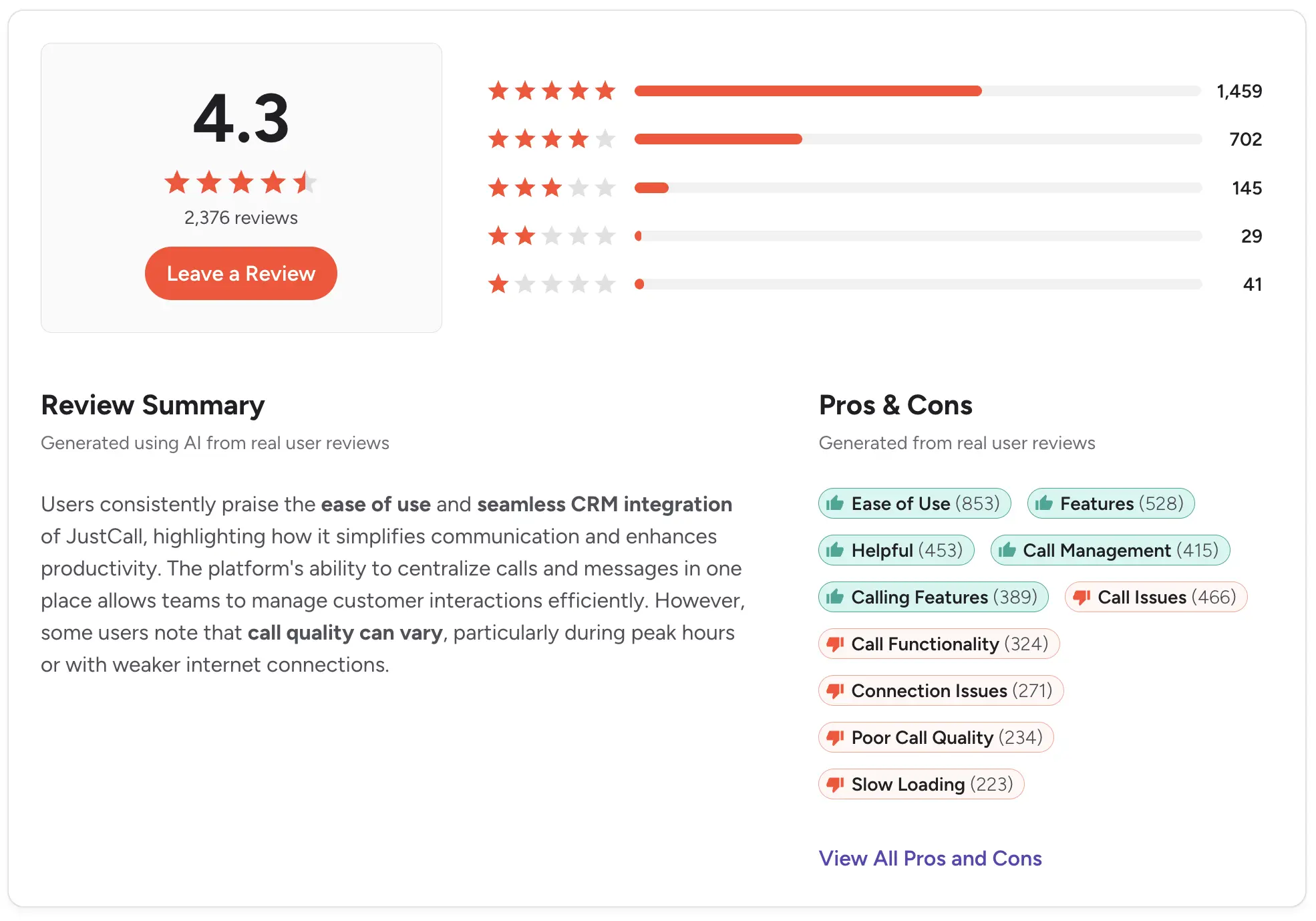
Pricing: Team starts at $39/user/month (minimum 2 licenses). Salesforce and the Power Dialer require the Pro plan at $69 per month.
Full AI coaching and scoring are on Pro Plus at $109/mo.
Honest take: JustCall is a solid outbound calling and texting tool. If SMS reliability and CRM logging are your priority, compare it against the best JustCall alternatives and Power Dialer tools.
Why SMS-only tools (SimpleTexting, SlickText, EZTexting) do not fit
Search results for call recording sometimes bring up texting platforms like SimpleTexting, SlickText, and EZTexting. They are good at what they do, but they do not answer this query.
None of them offers calling. You cannot record a call on a tool that cannot place one.
If your team needs to record conversations, coach reps, and log call context to a CRM, an SMS-only platform is the wrong category.
The tools worth comparing all support voice first, and the best of them support both voice and text on a single number.
How to choose call recording software for business
Whether you want sales call recording software or a broader cloud call recording software platform, these six things are important.
- CRM fit: Native logging to HubSpot or Salesforce, or Zapier and manual upload?
- Recording type: With VoIP call recording, do you need automatic on every call, on-demand only, or both?
- Transcription and AI summary: AI call recording software should include these, not price them as an add-on.
- Compliance features: Consent prompts, plus 10DLC and TCPA if you text.
- Pricing model: Per-seat compounds fast. Credit-based ties cost to volume.
- Unified SMS and calling: Can you call and text the same contact from one number?
Call recording only tells you what happened on the phone. If you want a fuller view of how your team spends its time across calls, texts, and other tools, team productivity analytics platforms can round out that picture.
Call recording laws by state: one-party vs two-party consent
Recording calls is legal in the US, but the rules depend on where the parties are. This is general information, not legal advice. Confirm with counsel before you set a recording policy.
Federal law sets the minimum. Under the ECPA, at least one party to a call must consent to the recording (18 U.S.C. § 2511).
Many states follow this one-party rule, which allows you to record a call you are part of. Twelve states require all parties to consent:
- California, Connecticut, Delaware, Florida
- Illinois, Maryland, Massachusetts, Montana
- New Hampshire, Oregon, Pennsylvania, Washington
A few states, like Michigan and Nevada, have hybrid rules. When a call crosses state lines, the safe practice is to follow the stricter one. The Justia 50-state recording survey is a useful reference.
The simplest way to stay clean is to disclose the recording at the start of every call and get a clear yes. An automated announcement works and removes the guesswork.
If your team also texts, two more rules apply:
- Quiet hours: TCPA restricts when you can message consumers (47 C.F.R. § 64.1200©(1)).
- Damages: TCPA violations carry statutory penalties per message (47 U.S.C. § 227(b)(3)).
You also need A2P 10DLC registration through The Campaign Registry to text from a business number.
Registration is the step that trips teams up, but most mistakes are avoidable. Our benchmark report found that 55% of business profile rejections trace to five simple documentation issues.
So, get the paperwork right before you submit. Our SMS marketing compliance guide walks through it.
How call recording works inside HubSpot and Salesforce
A recording is only useful if your team can find it later.
Native CRM sync attaches that recording to the right contact record instead of leaving it in a separate app.
With HubSpot call recording and Salesforce call recording running natively, here is what happens after a call:
- The recording saves to the contact or deal record.
- The transcript and AI summary attach alongside it.
- The call activity logs to the timeline automatically.
And here's what happens with and without native sync:
- With native sync: The next rep has the full history ready, and in Salesmsg the text thread is right there on the same number.
- Without it: Teams fall back on Zapier or manual upload, which fails the moment a rep gets busy and calls go unlogged.
Only 36% of businesses trigger SMS from CRM workflows today, per our benchmark report, so teams that run calling and texting through one CRM layer are ahead of most.
For setup details, see the HubSpot and Salesforce integration pages, or read why Salesforce teams need voice and text from one number.
Ready to get started? Click here to start your free 14-day trial or book a demo.
Frequently asked questions
What is business call recording software?
It records inbound and outbound calls, stores them securely, and often transcribes and summarizes them. This allows teams to review conversations, coach representatives, and log context to a CRM.
Is it legal to record business calls in the US?
Yes, if you have consent.
Federal law requires one-party consent, but twelve states require all parties to agree.
Announce the recording and, for calls crossing state lines, use the strictest rule. This is informational, not legal advice.
Which states require all-party (two-party) consent?
The 12 all-party states usually cited are California, Connecticut, Delaware, Florida, Illinois, Maryland, Massachusetts, Montana, New Hampshire, Oregon, Pennsylvania, and Washington.
Michigan and Nevada sit in a gray area with mixed rules, so check with a lawyer before you lock in a policy.
What is the best call recording software for sales teams?
For US-based SMB sales teams that also text, Salesmsg is the strongest fit because one number covers recorded calls and texting, and it all logs natively to HubSpot or Salesforce.
Bigger enterprise teams that live in call coaching and pipeline analytics usually go with Gong or Chorus.
Does call recording work inside HubSpot and Salesforce?
Only if the tool integrates natively.
With Salesmsg, each call, plus its transcript and summary, posts straight to the contact record in HubSpot or Salesforce, alongside the message history.
Anything without a native connection usually falls back on Zapier or a manual export.
Can one platform handle both calling and texting?
Yes. Salesmsg runs on a single number, so one team can text a lead, call them, record the call, and log it all in the CRM.
Most call-first tools cannot text from that same line.
How much does call recording software cost?
Pricing ranges widely. SMB tools start at around $25 to $75 per user per month.
Enterprise revenue-intelligence tools like Gong and Chorus keep their rates private and quote each deal individually, which usually runs into the thousands of dollars per user per year.
What is A2P 10DLC and do I need it?
A2P 10DLC is the US messaging standard that requires businesses to register their brand and campaigns with The Campaign Registry so carriers can verify messaging intent.
Carriers block SMS from unregistered 10DLC numbers. If your team also texts customers, you need it.