Business call recording: how it works, the laws, and what to look for




TL;DR
Business call recording is most useful when teams can quickly retrieve the right moment, connect it to the correct CRM record, and control consent, access, retention, and deletion. Before enabling it, businesses should establish clear policies, test the entire workflow, and choose a tool that supports searchable transcripts, role-based permissions, CRM sync, and purpose-based retention.
A prospect challenges what a rep promised on Tuesday's call. Legal asks who accessed a recording and when. A support ticket hinges on the exact wording of a refund request. In each case, whether the business has a real answer depends on what its business call recording setup actually captured, and who can find it.
That's the messy operational reality most teams face when they turn recording on. The technology captures audio in seconds. The harder work is deciding who may listen, why the recording exists, how long it stays, and what happens when someone asks for it to be deleted.
This guide covers what business call recording actually captures, the laws that shape it in the US and abroad, what to look for in a tool, and how Salesmsg handles all of it. There's a five-step setup at the end for teams ready to turn it on.
What business call recording actually captures
Before deciding anything about policy or vendors, it helps to be precise about what "a recorded call" actually is. It's rarely just an MP3.
Depending on the platform and configuration, the capture may include voice, screen activity, dual-channel audio, transcription, call metadata, dispositions, and CRM associations. It may also exclude DTMF tones, paused segments, or side conversations.
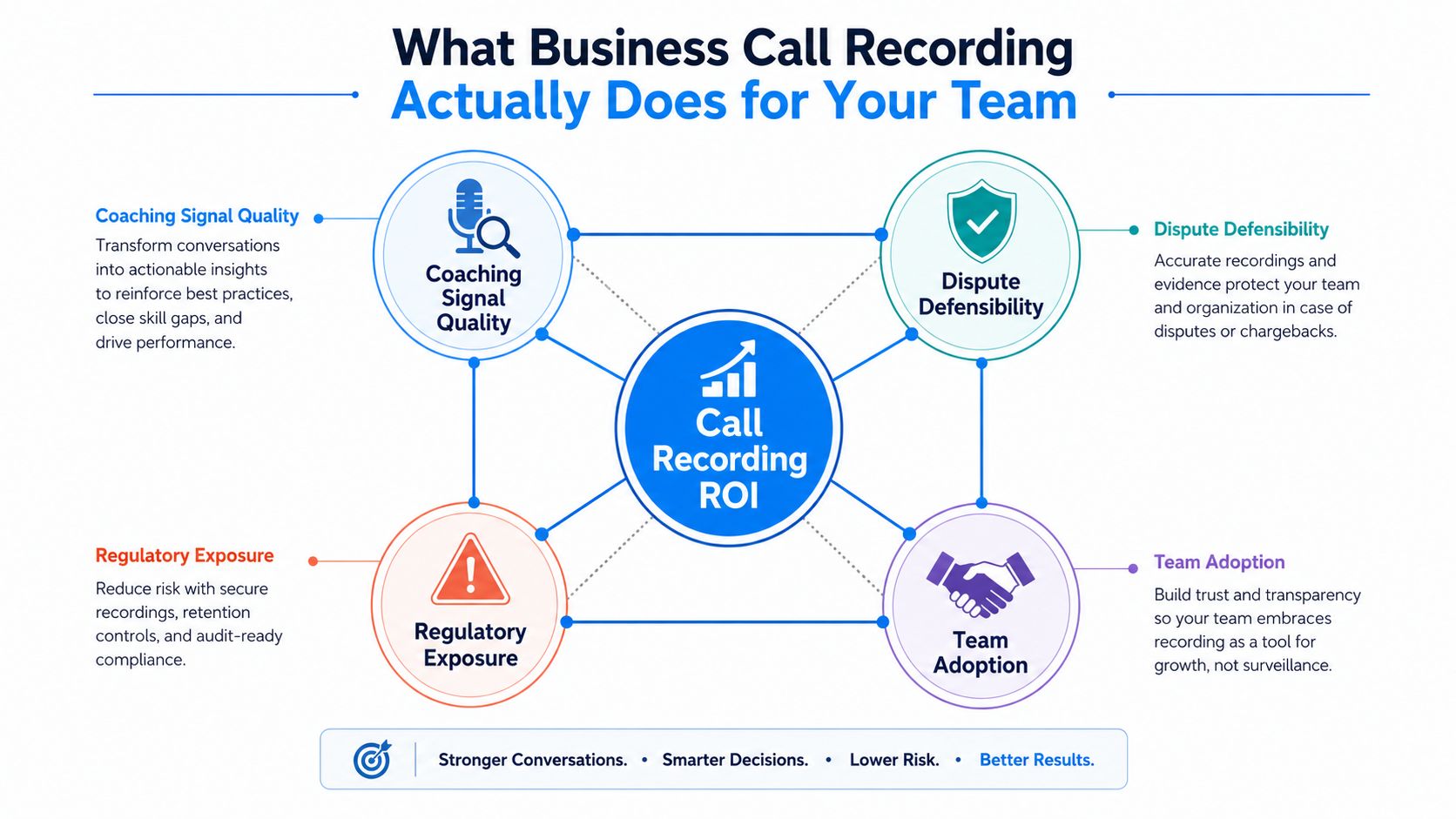
That scope turns recording into an operations decision, not a feature toggle. Four requirements have to work together:
- Coaching signal quality: managers need enough context to identify useful behavior, not isolated phrases.
- Dispute defensibility: legal and support teams may need the exact wording of a pricing, refund, or service conversation.
- Regulatory exposure: a recording is personal data. It creates consent, access, retention, and transfer obligations.
- Storage and adoption: wider capture creates more data to secure, review, index, and delete.
Contact centers had all of this figured out well before 2020. A 2014 survey found that 95% of team leaders had access to agent call recordings. A 2019 study reported that 90.3% of organizations used call-recording technology, up from 87.5% in 2017 and 85.8% in 2016, as summarized by CX Today's contact-center recording overview.
The practice supports quality assurance, coaching, and compliance. It's part of the operating infrastructure, not a premium add-on.
Decide what the system owns before you turn anything on
First-party recording runs inside the business phone or contact-center platform. Third-party capture sits beside a PBX, meeting app, or CRM and pulls the interaction through a separate integration.
The consent model can depend on that architecture, on where the participants are, and on who controls the recording. Set the operating policy before enabling capture:
- Who can listen or download?
- How long may the organization retain the recording?
- What happens when a caller requests access through a data-subject access request?
A calling tool such as Salesmsg can plug into the broader CRM workflow, but the business still owns the policy. The recording should serve a defined process, with clear access and deletion rules, rather than become an ungoverned archive.
Practical rule: if your team can't explain the recording's purpose, access path, retention period, and deletion trigger, the rollout is not ready.
A day in the life of a recorded call
The value of recording isn't visible in the tool. It shows up two days later, when someone actually needs a specific detail from a specific call.
At 10:04 on Monday morning, an SDR starts a discovery call with a B2B prospect. The rep mutes briefly to take notes, misses an offhand comment about an upcoming security audit, and finishes with a familiar summary: the prospect needs better workflow visibility and will review the proposal.
The AE replays the call on Tuesday. Thirty seconds near the middle changes the proposal direction. The buyer had said, "we're also preparing for a security audit, so anything that helps us document access and process controls will matter."
The AE uses that context in the revised pitch: "since the security audit is part of your evaluation, we'll show how the workflow supports documented ownership and review, instead of presenting this as only a productivity tool."
That's the coaching and revenue case in one moment. The recording didn't close the deal by itself. It preserved a detail the first listener missed, gave the AE exact context, and helped the team respond to the buyer's stated concern rather than sending a generic follow-up.
The same retrieval value shows up in support. A customer disputes being promised a refund. The supervisor searches the transcript, finds the exchange, listens to the surrounding audio, and confirms what the agent said. That turns a three-day back and forth into a twelve-minute resolution.
Retrieval matters more than volume
The useful unit isn't "every recording." It's the right thirty seconds when a deal, escalation, or dispute hinges on an exact phrase.
A searchable call history in Salesmsg gives teams a path from the CRM record to the interaction. But retrieval only works when titles, timestamps, participants, transcripts, and permissions stay intact.
A recording program fails when it creates a large archive nobody can search or interpret. It works when the call connects to the opportunity, ticket, or customer timeline, and the right person can review the relevant section without opening the entire archive.
How business call recording actually works, from capture to deletion
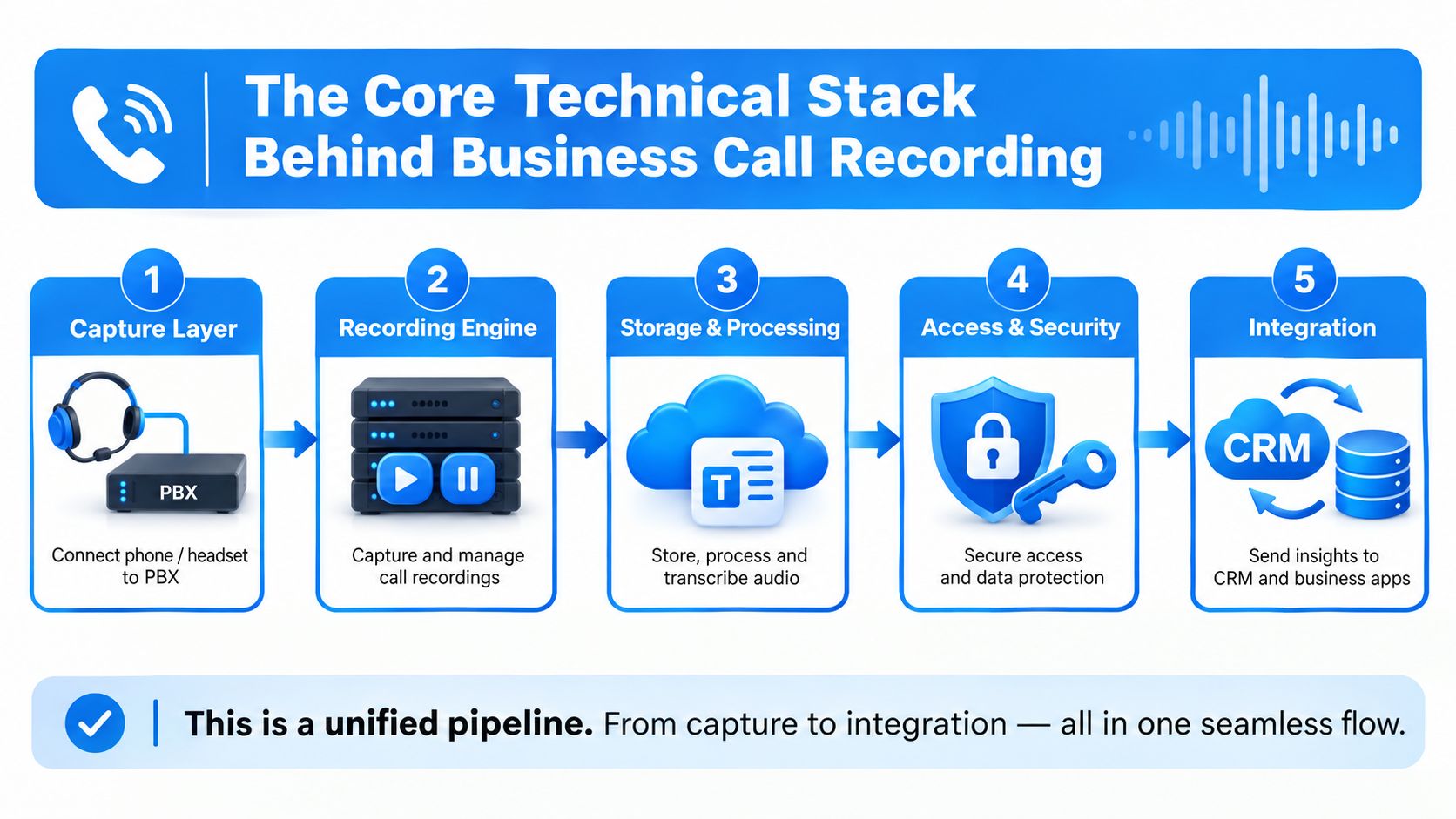
A recording platform is a pipeline, not a single feature. Treating it as one hides the failure points between capture, processing, storage, identity, and CRM logging. This section walks through each stage.
Capture and recording
The capture layer may involve a session border controller, PBX, cloud phone system, or contact-center platform. These systems don't all hand off audio the same way.
The implementation team should test inbound calls, outbound calls, transfers, holds, conference participants, and recording pauses before rollout.
Dual-channel recording usually earns the extra setup effort for sales teams because it separates the rep and buyer tracks. That makes talk-time review, transcription correction, and dispute analysis easier. Support teams may prioritize reliable capture across transfers and queues instead, because the customer journey can span several agents.
Transcription, storage, and identity
Transcription accuracy varies with accents, background noise, overlapping speech, terminology, and microphone quality. Live coaching needs low latency. Post-call summaries can tolerate more processing time.
Hosted speech-to-text reduces infrastructure work. Self-hosted processing may offer more control over residency and model handling, at the cost of more operational responsibility.
Storage design should separate frequently accessed recordings from long-term archives. Encrypt data in transit and at rest, choose residency deliberately, and connect access to identity rather than shared folders. Managers, coaches, legal reviewers, and admins don't need identical permissions.
Design principle: the person who can administer the recording system shouldn't automatically be able to browse every customer conversation.
CRM write-back
This is where many rollouts lose operational value. The call object, transcript snippet, sentiment tag, and disposition need to land on the right contact, account, opportunity, or ticket, without triggering duplicate tasks or corrupting automation.
Use a test matrix before launch:
- Capture test: confirm both inbound and outbound audio is present.
- Metadata test: verify participants, timestamps, direction, and disposition.
- Transcript test: check searchability and handling of sensitive terms.
- Permission test: confirm a manager can't see legal-only recordings.
- CRM test: ensure the call attaches to the correct record and doesn't create duplicate workflow actions.
A developer-facing integration layer, like Salesmsg's public API and developer resources, matters when the calling workflow has to exchange structured events with the CRM and other systems.
Retention, deletion, and access controls
A single retention period is convenient, but it treats every recording as if it serves the same purpose. A coaching sample, a regulated financial interaction, and a customer dispute have very different compliance and evidentiary profiles.
A purpose-based matrix makes that difference visible. Treat it as a starting framework, not a fixed rule, and confirm specific retention requirements with legal or compliance before finalizing anything:
Longer retention can increase evidentiary value. It also expands the period during which the organization has to protect, locate, disclose, and justify the data.
A defensible deletion process should record:
- The trigger: which purpose or retention rule caused deletion?
- The scope: which audio, transcript, export, and derivative files were included?
- The timing: when did the deletion job run, and did it meet the internal service level?
- The exception: was a legal hold applied before deletion?
- The proof: can compliance show completion without exposing the deleted content?
Access controls need the same discipline. Give coaches review access, managers operational access, and legal teams controlled investigation access. Watermark downloads, log exports, and route break-glass access into a separate audit trail owned by compliance rather than engineering.
A platform's documented security posture, like Salesmsg's security page, is one input into vendor review. It doesn't replace the customer's own role design, retention matrix, or deletion testing.
AI transcription and the new disclosure bar
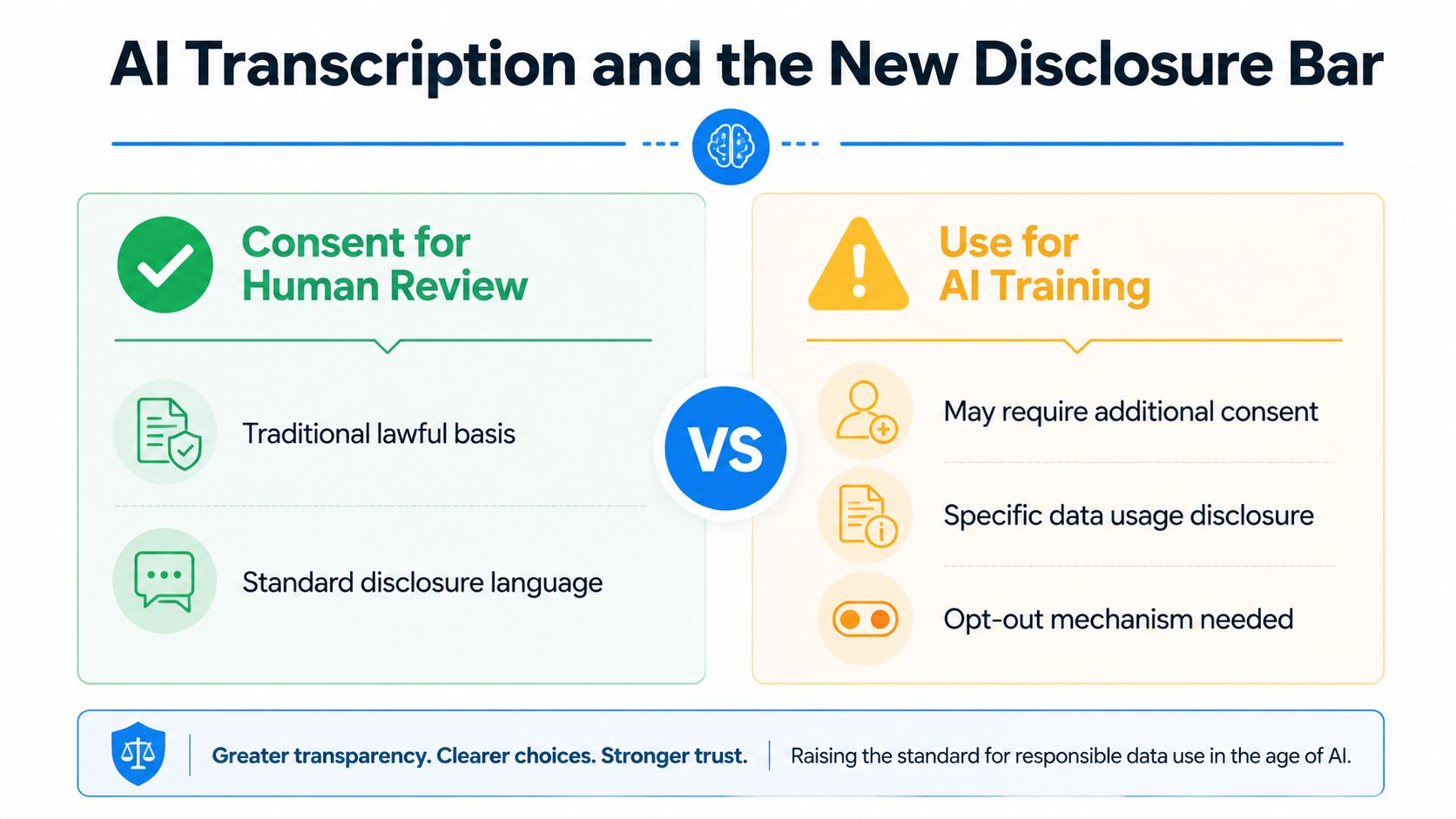
A caller may agree to human review for quality assurance without agreeing to every later use of the voice data. AI summarization, sentiment analysis, training-data reuse, voice cloning, and automated coaching can each be a separate purpose.
Treat the consent model, retention matrix, and AI disclosures as one operating workflow, not separate feature decisions.
UK guidance in this area increasingly points to AI-use disclosure, privacy by design, data minimization, and a Legitimate Interest Assessment as practical steps, on top of the base recording consent.
"Calls may be recorded" no longer explains what happens after capture. The notice should state the recording purpose, describe relevant AI processing, identify third-party processors where required, and offer an opt-out or alternative path.
Document which AI call transcript and calling card features are enabled, which vendor receives the data, and which teams can view the results.
Keep AI-derived artifacts separate from the original recording. A transcript, summary, sentiment tag, embedding, or coaching label may need its own retention and deletion behavior. If a caller requests deletion, the business should be able to locate those derivatives without removing records covered by a valid legal hold.
Operational test: would the original notice still make sense if the caller knew the audio would be transcribed, summarized, scored, stored with a vendor, and used to train a coaching workflow? If not, broaden the disclosure.
Is it legal to record a business call in the US?
Recording is legal in the US as long as consent is handled correctly, but "correctly" depends on where the parties are. This is general information, not legal advice, always confirm the current rule for your state and industry with counsel.
US call-recording law has a federal one-party-consent baseline. State law can require consent from everyone involved. The Justia 50-state recording survey lays out that division.
Twelve states are commonly classified as all-party consent: California, Connecticut, Delaware, Florida, Illinois, Maryland, Massachusetts, Montana, New Hampshire, Oregon, Pennsylvania, and Washington.
Published lists disagree on the exact count. Several states apply different rules to phone calls versus in-person conversations, or carve out exceptions for participants. Michigan and Nevada show up on some all-party lists and not others for exactly this reason.
Why national policies usually go with the strictest standard
Per-state branching is hard to train and maintain. It breaks during travel, transfers, and conference calls, when a rep, a caller, and a manager can all be in different states at once.
One clear disclosure script is easier to audit than a decision tree that changes for each call.
The operational decision should tie the consent model to the retention matrix and disclosure workflow. The system needs to identify relevant call locations, play or display the notice before recording, store the consent event, and apply the correct access and deletion rules.
A recording feature without those controls leaves reps making legal judgments during live conversations. That's not a position sales, support, or compliance wants to be in.
Criminal exposure under a state wiretap statute is also separate from whether a recording can support a contract or dispute. Treating those questions as the same creates false confidence. A file may look useful as evidence while the method used to obtain it creates a second legal problem.
How the rules differ in Canada, the UK, and the EU
A sales team calling across borders can use one operating model, but not one legal setting. Canada, the UK, and EU jurisdictions may all require notice and a defensible purpose. Consent standards, lawful basis, retention, and transfer controls differ.
Under PIPEDA, Canadian businesses have to address recording requirements for customer calls no matter which side starts the conversation. Canadian privacy guidance emphasizes informing callers, seeking consent, using information for the stated purpose, and limiting recording to purposes a reasonable person would consider appropriate.
The UK commonly permits a one-party-consent approach for ordinary business calls. That doesn't remove the need for clear disclosure, a documented lawful basis, secure handling, or purpose-based retention.
EU processing under GDPR requires a lawful basis, transparency, defined retention, and controls for access, backups, exports, and transfers. Under GDPR's storage limitation principle, keeping recordings beyond the period needed for their stated purpose becomes difficult to justify without a specific legal need, like litigation or regulation.
Build one policy with regional controls
A remote-first team can keep one global lifecycle policy while changing the disclosure, lawful-basis record, storage region, and access process by market. The call workflow should identify the relevant location, present the notice before recording, log the consent or lawful-basis event, and apply the matching retention and deletion rules.
That workflow matters more than a policy document sitting in a knowledge base. Reps should not have to make legal judgments during a live sales or support call.
The policy should define the purpose before recording starts. Quality review, dispute handling, regulated workflows, and AI analysis should each get their own retention and access settings, even when they share an audio source.
What to look for in a business call recording tool
Most vendor pages read the same. These are the questions worth asking before you pay for a seat, whether you're evaluating Salesmsg or one of the alternatives.
- Auto vs. on-demand recording: does it record every call by default, or only when a rep hits a button? Most teams want both, so they can catch everything without losing the option to pause a sensitive call.
- Transcript and AI summary quality: are these built in or a paid add-on? A summary with speaker labels, action items, and next steps beats a raw transcript for retrieval.
- Native CRM sync: does the recording and transcript land on the HubSpot or Salesforce contact record automatically, or does it rely on a Zapier workaround?
- Same-number texting: can the same tool text the same contact from the same number, or is texting a separate line? A split channel means split context.
- Consent handling: does the tool play a disclosure automatically, or is that on the rep? Automated notices are auditable.
- Retention controls: can you set different windows for coaching, dispute handling, and regulated calls? A one-size retention policy is a compliance risk.
- Access controls by role: can you give coaches review-only access without opening every call to every admin?
- Compliance certifications: if you're in healthcare or a regulated industry, does the tool support HIPAA under a signed BAA, and what's the SOC 2 posture?
If a vendor can't answer these clearly, that's data too.
How Salesmsg handles call recording
Everything above applies no matter which platform records the call. Here's specifically what Salesmsg does, so you can map the general principles to a real setup.
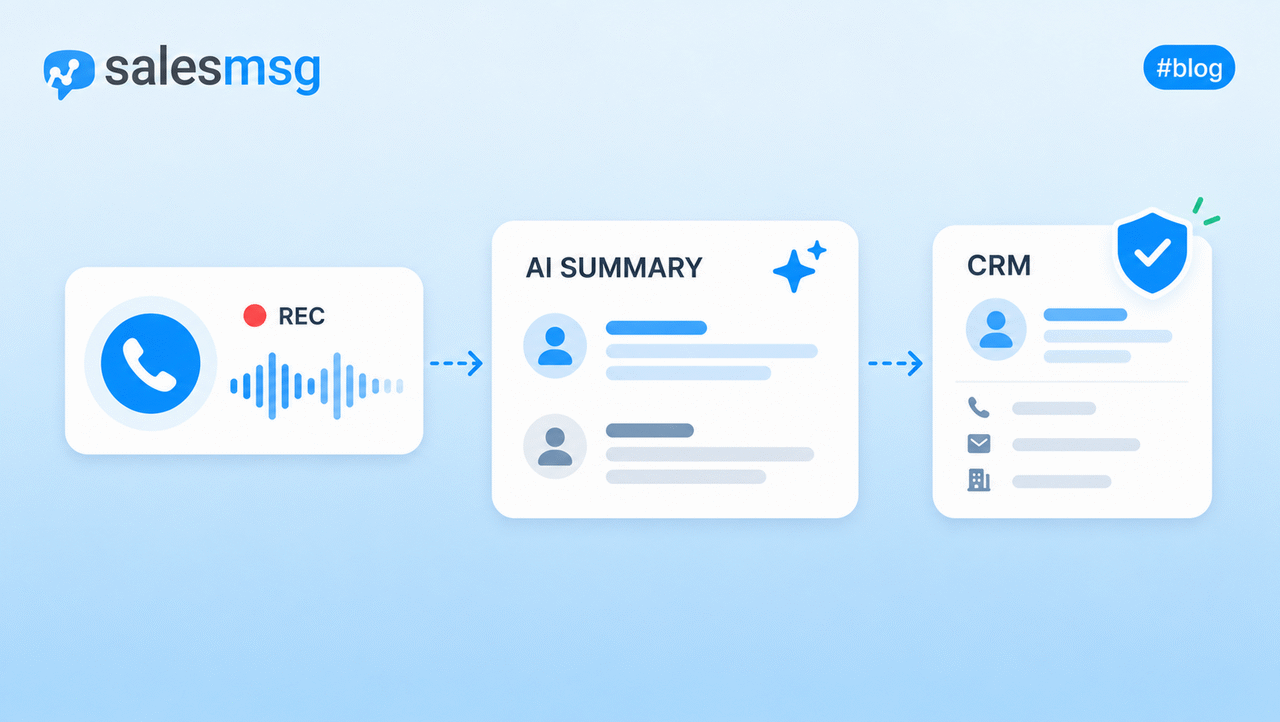
Salesmsg records every inbound and outbound call automatically and saves it as an MP3. On-demand recording is available too, for calls where a rep wants to start recording only after the conversation gets serious.
Every recording comes with:
- An AI summary with key points, next steps, and speaker labels
- A transcript attached to the same contact record as the audio
- Call metadata, including disposition, direction, timestamp, and the associated deal
- A link to any voicemail drop or ringless voicemail tied to the contact
All of that lands on the same contact timeline that holds the person's text history. Salesmsg runs calling and texting on one business number, so a rep opening a contact sees calls, voicemails, texts, and notes in one thread instead of stitching them together from two tools.
Native CRM integration means:
- HubSpot: every call, transcript, and summary logs to the Contact, Deal, or Ticket timeline automatically. See the HubSpot integration page for setup.
- Salesforce: the same sync applies to Contacts, Leads, Opportunities, and Cases, with mid-call widgets in both Lightning and Classic. Details on the Salesforce integration page.
On top of that, a few pieces that matter operationally rather than for consent alone:
- Routing: round-robin, HubSpot owner assignment, or a custom IVR phone tree, so recorded calls reach the right rep before they start.
- Deliverability: STIR/SHAKEN, CNAM, and a registered Business Profile are built in, so recorded outbound calls don't get flagged as "spam likely" before the customer picks up.
- Access by role: coaches, managers, and admins don't have to share one permission tier.
- Compliance: HIPAA mode is available for healthcare teams under a signed BAA, with end-to-end encryption, mandatory 2FA, and anonymized push notifications.
The practical upside maps onto how Salesmsg treats a customer interaction end to end: capture what happened on the call, then connect it to the record the next rep, manager, or support agent will actually open. A recording that lives in a silo doesn't do either job.
How to turn on call recording in five steps
Turning on call recording doesn't take long, but each step deserves a beat of thought rather than a default toggle. The order below works whether you're setting this up in Salesmsg or in another tool.
- Decide automatic or on-demand. Automatic covers every call by default. On-demand only starts when someone triggers it. Most sales and support teams default to automatic for consistency and keep on-demand available for edge cases.
- Write and test a disclosure line. Keep it short and clear, something like "this call may be recorded for quality and training." Play it back to confirm it's audible and not clipped.
- Set access by role. Give coaches review access, managers operational access, and keep legal or compliance access separate and logged.
- Confirm the CRM connection. Place a test call and check that the recording, transcript, and disposition land on the right contact record in HubSpot or Salesforce.
- Set the retention window. Match it to the purpose, coaching, dispute handling, or a regulated workflow, rather than leaving every recording on one default clock.
Pre-launch checklist
The week before launch should look less like a feature activation and more like a controlled production release. Legal, IT, operations, and the calling-team owner all need to validate the same workflow from consent through deletion.
Legal and compliance:
- Finalize the disclosure and get legal sign-off for inbound, outbound, transferred, and conference calls.
- Map jurisdictions: document the locations of numbers, remote employees, customers, and likely call participants.
- Review vendors: DPA, subprocessors, residency, security controls, AI uses, export behavior.
- Configure retention per purpose tag, then test each deletion window.
- Prepare requests for access, deletion, correction, objection, and legal-hold handling.
Operations and communication:
- Assign roles with separate permissions for managers, QA, legal, admins, and support.
- Validate CRM write-back so audio, transcripts, metadata, and dispositions reach the right record without breaking automations.
- Train the team on the disclosure language and what to do when a caller objects.
- Run silent test calls covering audio channels, transcription, timestamps, pause behavior, notices, storage region, and CRM association.
- Document go-live approval with a signed attestation from legal, IT, and the calling-team owner.
The final test shouldn't be "can we hear the call?" It should be "can the authorized person retrieve it, can the unauthorized person be blocked, can the CRM use it correctly, and can the business prove deletion when the purpose ends?"
FAQ
These come from the questions People Also Ask show for this keyword, plus what teams typically ask when they're evaluating recording for the first time.
Is it legal to record a business call?
In most US states, yes, as long as one party, which can be you, consents. About a dozen states require every party to consent instead. This is general information, not legal advice, confirm your state's specific rule before you rely on it.
Which US states require all-party consent?
Sources vary slightly on the exact list because a few states have hybrid or contested rules. California, Connecticut, Delaware, Florida, Illinois, Maryland, Massachusetts, Montana, New Hampshire, Oregon, Pennsylvania, and Washington are commonly classified as all-party consent states. Treat any state your call touches as all-party if there's real doubt.
Do I need to tell customers I'm recording the call?
Even in one-party consent states, a short disclosure line at the start of the call is good practice. It's also the simplest way to stay compliant if a call unexpectedly crosses into an all-party state.
How long should a business keep call recordings?
It depends on the purpose. Coaching samples can usually be deleted in weeks, a dispute-related call might need to be kept around six months, and a regulated financial or healthcare interaction can require years. Match the retention window to the reason the recording exists, not one default setting.
Does call recording work with HubSpot or Salesforce?
With Salesmsg, yes. Calls, transcripts, and AI summaries sync natively to the contact or deal record in both CRMs, right alongside the text message history.
Can I record calls and text customers from the same number?
Yes, with Salesmsg. Calling and texting run on one business number, so a customer's call history and text history live in one place instead of being split across two tools.
Does AI transcription change the consent requirements?
It adds a layer on top of them. Consenting to record a call doesn't automatically cover every later use of that recording, like AI summarization or using the audio to train a coaching model. Disclose what the AI processing involves, separately from the base recording consent.
Turning recording into a real operating advantage
The teams that get the most out of business call recording aren't the ones with the most audio. They're the ones who can pull the right thirty seconds when a deal or dispute hinges on it, keep the recording tied to the contact record, and prove deletion when the purpose ends.
Salesmsg records every inbound and outbound call automatically, syncs the audio, transcript, and AI summary straight to HubSpot or Salesforce, and keeps everything on the same timeline as the customer's text history. Start a free 14-day trial to see it running in your own calling workflow, or read the full comparison of nine business call recording tools if you're weighing options first.