RCS vs SMS: Differences and What to Use for Business in 2026


.png)

RCS vs SMS comes down to three things: reach, features, and reliability. SMS works on every phone in the world over a cellular signal, with a 160-character limit and no rich media. RCS adds read receipts, typing indicators, suggested actions, and full-size images, but only works on supported devices over data or Wi-Fi.
For most businesses, SMS is still the safer choice. It reaches every contact, it delivers consistently, and it costs a fraction of what RCS does. RCS is interesting for specific campaigns, but it is not ready to replace SMS for sales, marketing, or support at scale.
Below is a side-by-side look at how each works, where each wins, and how to think about both inside a real CRM workflow.
Key takeaways
- SMS works on every phone over cellular, with a 160-character limit. RCS adds rich media, read receipts, and interactive buttons but requires data or Wi-Fi and a supported device.
- For most business messaging in 2026, SMS is the primary channel: it reaches every contact, costs less at scale, and integrates with CRM workflows out of the box.
- RCS is a good fit for branded campaigns with rich media on confirmed RCS-capable audiences, not a replacement for SMS.
- Teams that combine SMS with calling see 24% median engagement vs. 9% for text-only (2026 Salesmsg Benchmark Report).
What is SMS and what is RCS
Let's take a detailed look at RCS and SMS messaging, so you can understand these two messaging technologies and which makes the most sense for your business.
What is SMS?
SMS stands for Short Message Service. It is the original text protocol, runs over cellular signal, and works on every mobile phone made in the last 30 years.
The key specs:
- 160-character limit per message segment
- Plain text only, no rich media
- Cellular only, no Wi-Fi or data required
- Universal device compatibility
MMS is a close cousin. Same network, but adds images, video, GIFs, and longer text. Most business platforms, Salesmsg included, send images and attachments as MMS while keeping the rest as SMS.
The reason SMS still wins on reach is simple. Even when an RCS or iMessage fails to send, the message falls back to SMS. It is the universal failsafe of mobile messaging, and it is why SMS deliverability rates are higher than any other channel.
What is RCS?
RCS stands for Rich Communication Service. It is the modern successor to SMS, designed to bring chat-app features to the default messaging inbox.
What RCS adds:
- No character limit on messages
- High-resolution images and video
- Read receipts and typing indicators
- Suggested replies and tappable action buttons
- Verified sender branding for business messages
- End-to-end encryption on supported devices
The catch: RCS needs data or Wi-Fi and a supported device on both ends. Android phones have supported RCS natively for years. iPhones got RCS support starting with iOS 18 in late 2024, and by 2026 the majority of US iPhones in active use have it on.
For business messaging, RCS adoption is still climbing. Carrier support varies, sender registration is required, and pricing runs significantly higher than SMS. Most business texting platforms either do not support RCS yet, or treat it as a premium add-on.
.webp)
RCS vs SMS at a glance
Why Businesses Still Rely on SMS
Three reasons SMS still wins for most business use cases in 2026.
It reaches every contact, every time. SMS works on any mobile phone, on any carrier, without data or Wi-Fi. If a lead's RCS or iMessage fails, the message falls back to SMS automatically. No other messaging channel has this reach.
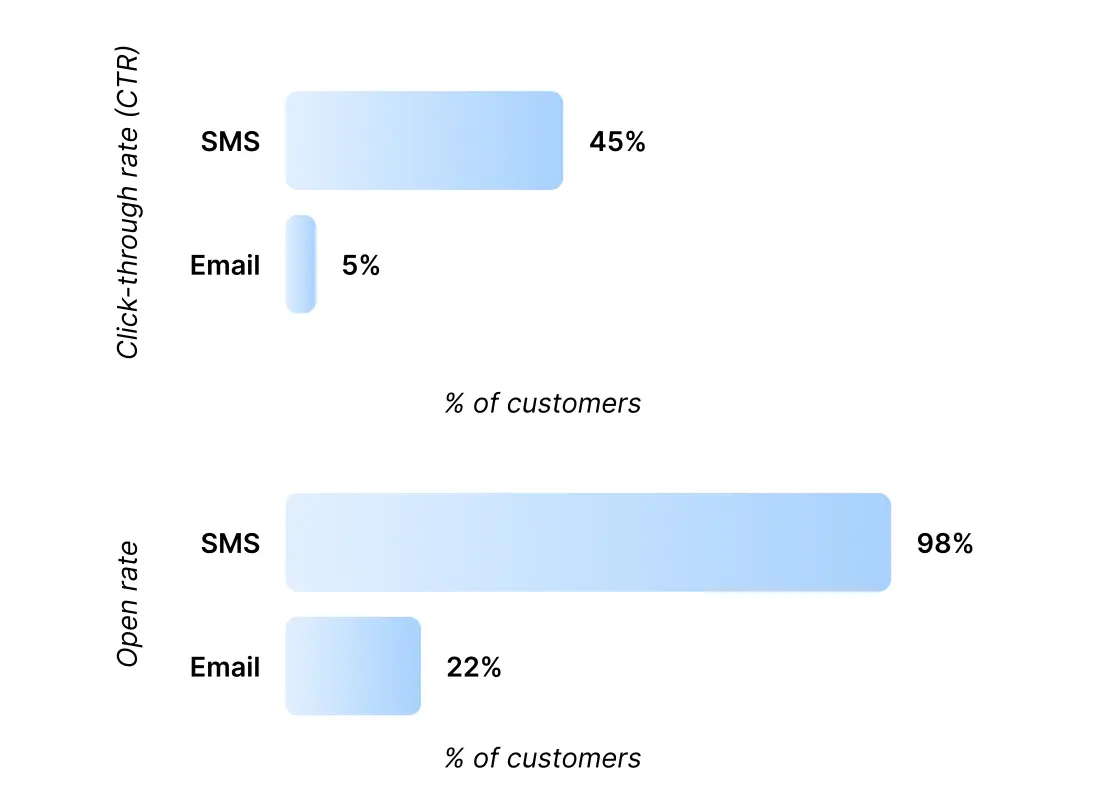
Customers open it. Our 2026 State of SMS Benchmark Report found SMS open rates at 98%, with 90% of messages read within three minutes. Email sits at 22%. There is no comparison.
What real users say about SMS vs RCS for business. The Reddit threads ranking for "rcs vs sms" surface a consistent pattern from real users and small business operators: most say they do not care about read receipts or rich media for day-to-day customer communication — they care about the message landing, every time, on every phone. Several threads note that RCS looks like a consumer feature, not a business one: for marketing campaigns with images, fine; for appointment reminders and follow-ups, SMS does the job. Cost is a recurring concern too — paying more per message for RCS features they do not need is a hard sell when SMS already delivers 98% open rates.
The platform is built around it. Carrier infrastructure, compliance frameworks (TCPA, CTIA, 10DLC), CRM integrations, and business texting platforms all run on SMS as the baseline. RCS adds features on top, but the rails are still SMS.
That is why 3,500+ businesses on Salesmsg run their sales, marketing, and support texting on SMS as the primary channel.
Check out the video below for more details on how to send SMS with Salesmsg.
SMS costs less than RCS at scale
SMS costs less per message, and that gap gets wider the more you send.
RCS Business Messaging is priced per message at multiples of standard SMS rates, varies by carrier, and requires a separate sender registration process. For a team sending thousands of appointment reminders or broadcast campaigns per month, the cost difference adds up fast.
There is also a production cost. RCS messages with carousels, images, or interactive buttons take more time to build than a plain-text SMS. That time cost matters when you are running campaigns weekly.
SMS keeps things simple: one message, one send, one price. See Salesmsg pricing for per-message cost details.
.webp)
When to use SMS vs RCS for business
The right channel depends on what you are sending and who you are sending to.
Use SMS for:
- Speed-to-lead follow-up on new inbound leads
- Appointment reminders and confirmations
- Two-way conversations between reps and prospects
- Bulk broadcasts to opted-in lists
- Order confirmations, payment reminders, and account alerts
- Any time-sensitive message that needs to land
Use RCS for:
- Branded marketing campaigns where verified-sender trust matters
- Product launches with high-resolution images or video
- Interactive flows with tappable replies (carousel browsing, booking)
- Audiences confirmed to be on RCS-capable devices
.webp)
Use both: send RCS first, fall back to SMS
For most businesses, the answer is not SMS or RCS. It is both.
The approach is called cascade routing: send RCS to devices that support it, and fall back to SMS automatically when RCS is not available. The recipient gets the richest experience their device can handle, and your message still lands on every contact.
This is how high-volume messaging works in practice. You do not segment your list by device capability and run two campaigns. Your platform handles the routing. The sender sees one send; the recipients see the format their phone supports.
Salesmsg builds this fallback in by default. See how RCS messaging in Salesmsg handles routing alongside your existing SMS and calling workflow.
Use-case decision matrix
The honest read for 2026: most teams should start with SMS for everything and add RCS only when a specific use case needs rich features and the audience is confirmed to support it.
A car dealership running monthly service reminders to thousands of customers wants SMS. The same dealership announcing a new vehicle lineup with photos to a known iPhone-on-iOS-18 segment of VIP customers might test RCS. The first one has to land. The second one earns the upgrade.
SMS vs MMS vs RCS: how they fit together
SMS, MMS, and RCS are three layers of mobile messaging, not three separate channels.
Inside a business texting platform like Salesmsg, sending a message with an image attached automatically uses MMS. Sending just text uses SMS. Neither requires you to think about it. RCS, when supported, is selected as a separate channel.
If you want a deeper look at how these three connect across business use cases, the SMS deliverability guide covers what carriers do with each format and why message type can affect delivery rates.
What this looks like in your CRM
For sales, marketing, and support teams, the SMS vs RCS question is rarely about the protocol. It is about whether the channel plugs into the workflow you already run.
Here is how SMS shows up in a real CRM:
- A lead fills out a form in HubSpot or Salesforce. A text goes out within one minute.
- A deal moves to "negotiation" in the pipeline. A check-in text fires automatically.
- A demo gets booked. A reminder text lands the morning of the call.
- A reply comes in. It logs on the contact record, where the rep can pick it up or an AI agent handles it.
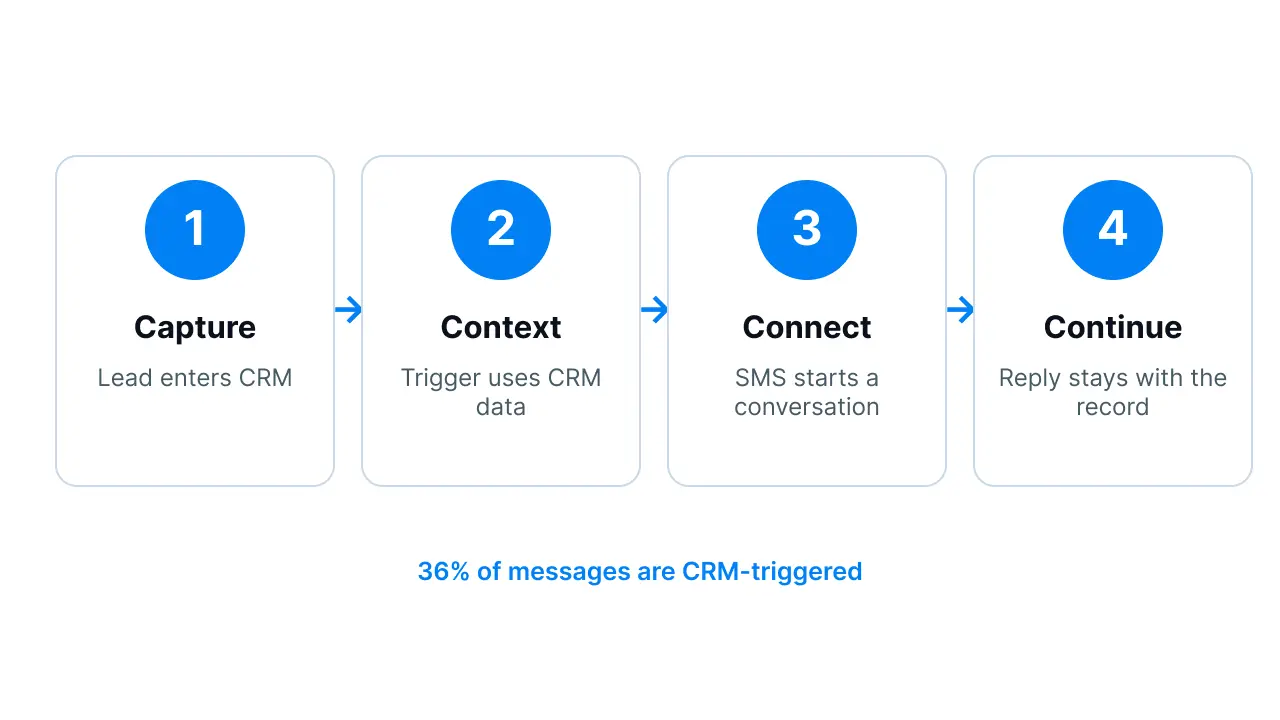
According to the 2026 Benchmark Report, 36% of businesses now have SMS triggered from CRM workflows. Teams that combine SMS with calling see 24% median engagement compared to 9% for text-only, a 2.6x lift. AI agents handling inbound first-response lift reply rates by 88%.
If your team is choosing between SMS and RCS, the more useful question is whether your SMS is connected to your CRM at all. For more on what works, see our breakdown of SMS marketing best practices.
Where RCS is headed
RCS adoption picked up sharply when Apple added support in iOS 18 at the end of 2024. By 2026, the majority of US iPhones in active use can send and receive RCS, putting the protocol on track to be the default for person-to-person messaging across both major platforms.
For business messaging, the curve is slower. Carriers each handle RCS Business Messaging (RBM) registration separately. Sender verification takes weeks. Per-message pricing is multiples of SMS. And the major business texting platforms either do not support RCS yet or treat it as a premium tier.
The realistic 2026 picture:
- P2P messaging (friend-to-friend chat) is increasingly RCS-first on Android, with iPhone catching up
- B2C messaging (business-to-customer) is still SMS-first, with RCS used for select brand campaigns
- Bulk transactional traffic (appointment reminders, OTPs, alerts) continues on SMS for cost and reliability reasons
One area to watch: AI-powered conversation handling. Today, Salesmsg AI agents handle inbound first-response and lead qualification over SMS, lifting reply rates by 88% according to the 2026 Benchmark Report. As RCS adoption grows, AI agents that respond with rich cards, suggested replies, and interactive buttons will create a faster, more visual conversation flow. The combination of AI handling and RCS formatting is where business messaging is headed, but the AI foundation has to be built on SMS first, because that is where the volume and CRM integration live today.
RCS will keep growing. SMS will keep doing the heavy lifting. Most business teams in 2026 do not need to pick one over the other — they need SMS working well and the option to layer RCS in when the use case justifies it.
How Salesmsg handles RCS for business
Salesmsg supports RCS messaging with SMS fallback built in. Here is how it works in practice:
- RCS Compliance: messages go through carrier approval before sending, so every message meets network requirements without extra setup on your end.
- Branded templates: the RCS Configurator lets you build templates with your logo, colors, and media. Messages arrive with your verified sender profile, not a random number.
- RCS Broadcasts: run rich, clickable broadcast campaigns from the same workflow you use for standard SMS. No separate tool or list management.
- Automatic SMS fallback: if a contact's device does not support RCS, the message sends as SMS automatically. You do not manage the routing; the platform does.
- Coming soon: RCS in Campaigns, Triggers, Workflows, and AI Agents for automated, personalized RCS at scale.
Learn more about RCS in Salesmsg or book a demo to see it alongside your SMS workflow.
If Salesmsg disappeared tomorrow, we'd be freaking out. It would be like constant all day, every day. A total breakdown of what we do.
— Kellie Barker, American Diesel Training Centers
Frequently Asked Questions
What is the difference between RCS and SMS?
SMS sends 160-character plain-text messages over cellular and works on every mobile phone. RCS sends longer, richer messages with read receipts, typing indicators, and interactive buttons, but needs data or Wi-Fi and a supported device. SMS reaches everyone. RCS adds features.
Do all devices support RCS?
RCS works on Android phones natively and on iPhones starting with iOS 18, released in late 2024. Older iPhones, basic phones, and some carriers still do not support it. SMS works on every mobile phone made in the last 30 years, with no exceptions.
Is RCS replacing SMS?
Not in 2026. RCS is the default chat protocol for person-to-person messaging on most modern phones, but SMS still handles the majority of business messaging because of reach, cost, and platform support. The two coexist: RCS adds features on supported devices, SMS is the universal failsafe.
Which is better for businesses: RCS or SMS?
SMS is the stronger channel for most business use cases in 2026: speed-to-lead follow-up, appointment reminders, two-way conversations, bulk sends, and anything that needs to reach every contact. RCS is worth testing for branded campaigns with rich media when the audience is known to support it. Most teams should start with SMS and add RCS for specific campaigns later.
Is RCS messaging safe?
RCS supports end-to-end encryption on Android-to-Android chats through Google Messages and, with iOS 26, on iPhone-to-iPhone chats. Cross-platform RCS (Android to iPhone) does not currently use full end-to-end encryption, though that is on the GSMA roadmap. SMS is not encrypted but is sent over carrier networks with their own security.
What are the benefits of RCS?
RCS adds features SMS does not have: no character limit, high-resolution images and video, read receipts, typing indicators, suggested replies, tappable action buttons, verified sender branding, and end-to-end encryption on supported devices. For consumer chat, this matters. For business messaging, the value depends on whether the campaign actually needs those features.
Does RCS cost more than SMS?
Yes. RCS Business Messaging is priced per message at multiples of standard SMS rates, varies by carrier, and requires additional sender registration. For bulk sends and high-volume use cases, the cost gap is significant. SMS remains the lower-cost option for any campaign sent at scale.
How do I choose a business texting platform that supports SMS and RCS?
Look for a platform that runs SMS as the primary channel with native CRM integration (HubSpot, Salesforce), supports two-way texting and calling on the same number, handles compliance (10DLC, TCPA), and has a clear path to adding RCS as adoption grows. The platform should route messages automatically based on device capability so you do not manage two separate campaigns. Book a Salesmsg demo to see how CRM-connected SMS works in practice.
The bottom line: SMS for business in 2026
SMS still does the work for most business messaging. It reaches every contact, it costs less, it delivers reliably, and it plugs into the CRM workflows sales, marketing, and support teams already run.
RCS is worth watching, and worth testing for specific campaigns where rich media and interactive features actually change the outcome. For everything else, the channel that lands the message is the one to use.
If your team is texting from personal phones, blasting through a generic tool, or running SMS disconnected from your CRM, the bigger lift is not RCS — it is fixing the SMS setup. Salesmsg gives sales, marketing, and support teams two-way texting, calling, AI agents, and native HubSpot and Salesforce integration in one place.
Book a demo to see how a real CRM-connected SMS workflow runs, or start a free 14-day trial and try it yourself.