What Is SMS? The Complete Guide to Short Message Service


.png)

SMS stands for Short Message Service. It is the technology behind every plain text message sent between mobile devices: no internet connection required, no app needed, just a cellular network and a phone number.
It is the most-read communication channel available. Texts have a 98% open rate. Most are read within three minutes. For businesses, that makes SMS something worth understanding properly.
This guide covers how SMS works, how it differs from MMS and RCS, and why businesses across healthcare, real estate, home services, and sales use it as their primary channel for reaching customers.
What Is SMS?
Simple question. Simple answer.
What is SMS?
SMS is a text message. Plain text, up to 160 characters, sent over your mobile carrier's network. No internet connection required. No app. Any phone can receive one.
The simple definition: it’s a text message.
Note that there are some services that allow for messages to be up to 1,600 characters.
But in most cases, it’s 160 characters max.
Hence the name, Short Message Service.
When larger messages are sent, they’re broken down into smaller segments with each segment being 153 characters long.
If, for example, you send an SMS message that’s 200 characters, it would be split into two messages.
The first message would be 153 characters and the second message would be 47.
Initially, only phones that used the Global System for Mobile (GSM) communication could send SMS messages, but now it’s supported by all major cell phone systems.
Up until fairly recently, SMS was primarily used for personal communication between family and friends.
But the applications have evolved dramatically, and it can now be used by businesses for a wide range of marketing purposes, to send everything from info on promotions and sales to tips and advice to feedback requests.
How Does SMS Work?
I’m by no means a technical wizard who understands the complete underpinnings of SMS.
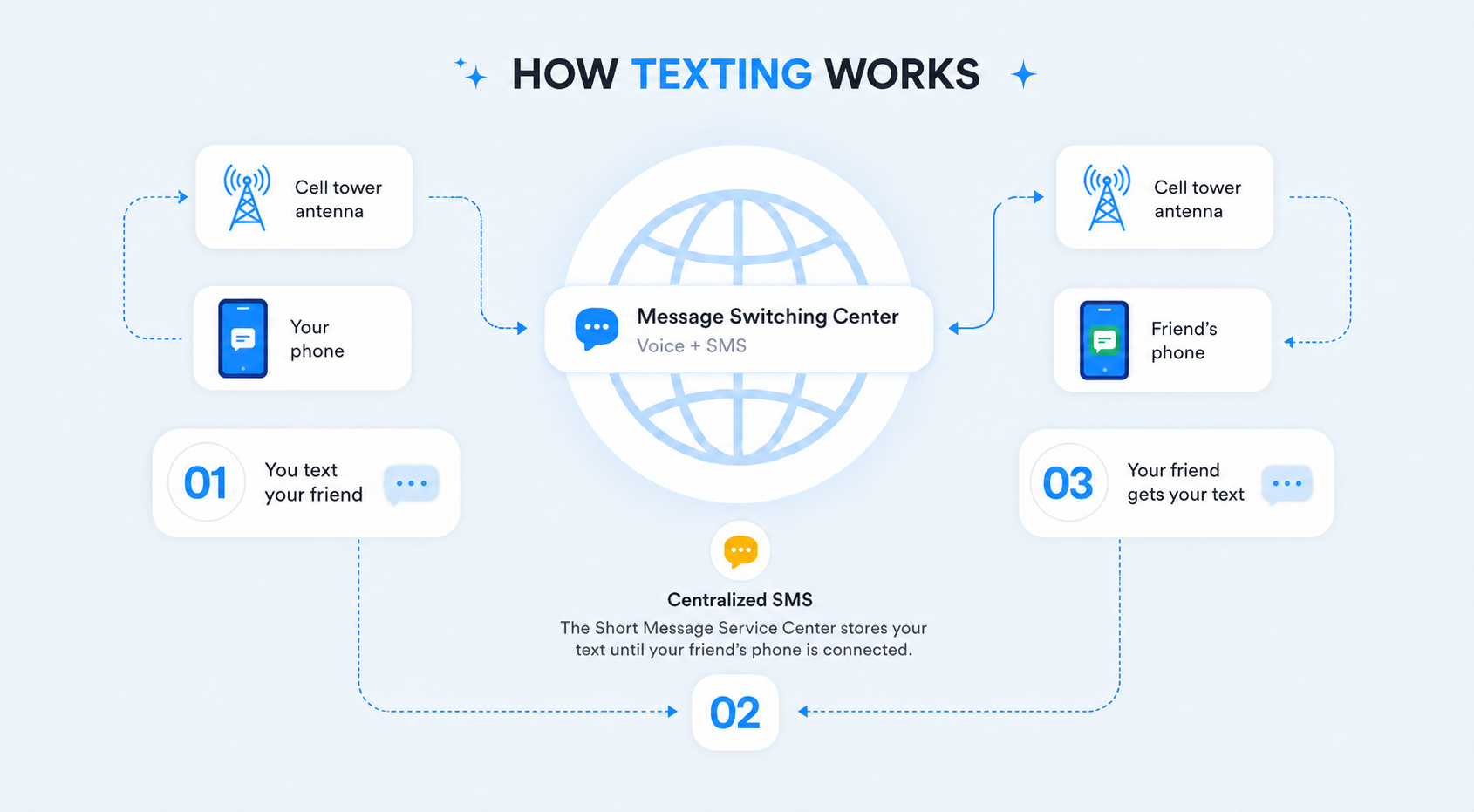
But here’s a basic overview of the process:
- You create a message from your mobile device
- The message is translated into data packets featuring a combination of 0s and 1s
- The data is sent across a sophisticated series of interconnected networks
- The message searches to find the most expedient path to the recipient you’re sending it to
- Finally, the data is translated back into a message and delivered to the recipient’s device
What’s amazing is that everything happens within just milliseconds.
As long as the contact’s phone is turned on and they’re within range of a cell tower, the whole process is nearly instantaneous.
Here’s a simple illustration of what takes place when an SMS message is sent.
Is There a Difference Between SMS and Texts?
Nope.
They’re the exact same thing, and the terms SMS and text message are used interchangeably.
There is, however, a difference between SMS and MMS — another term you may have heard thrown around.
MMS vs. SMS
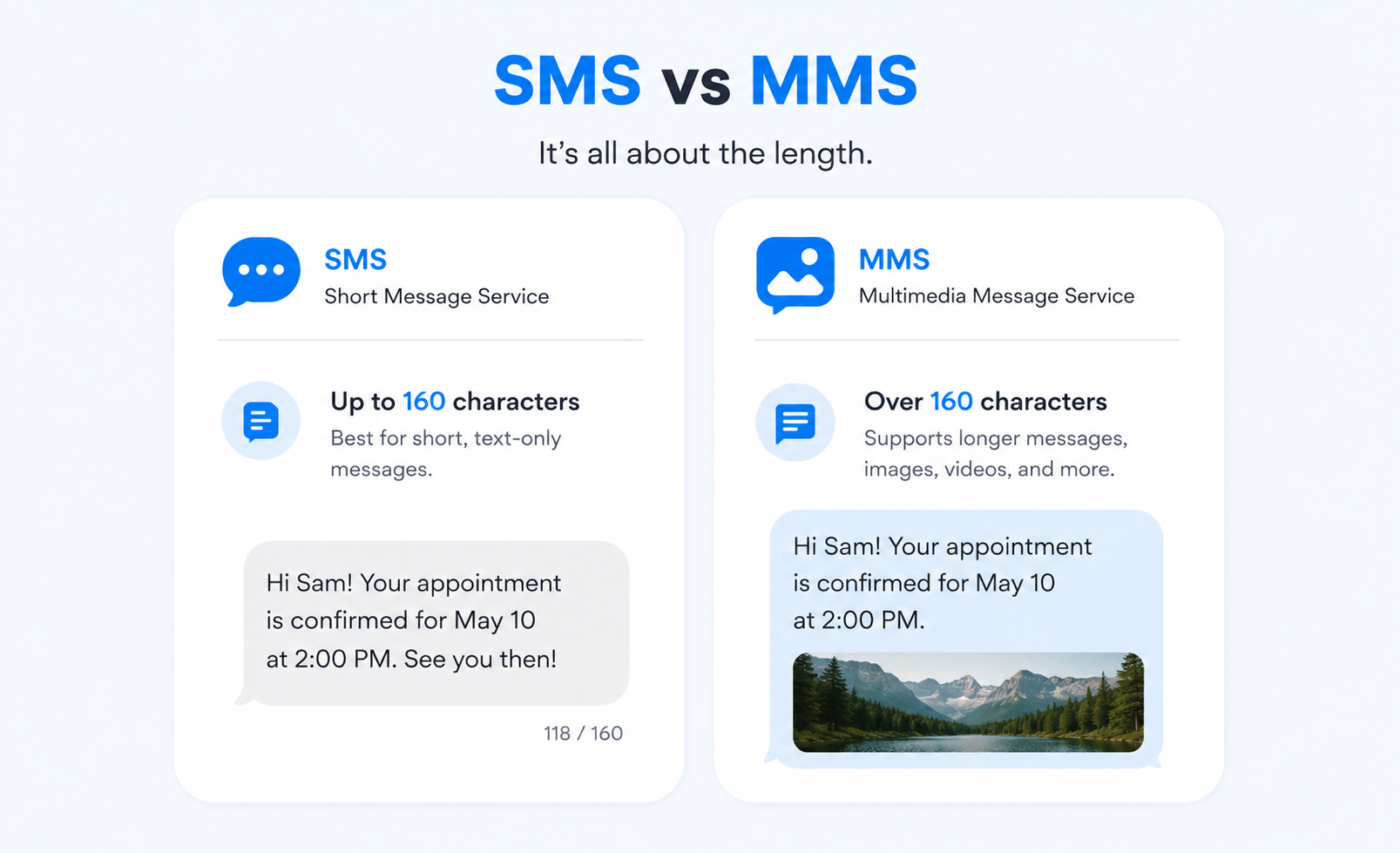
MMS is short for Multimedia Messaging Service, which as its name implies, is used to send multimedia like images, videos, and audio.
MMS is designed for sending large files, mostly media like pictures or videos, whereas SMS is designed strictly for text communication.
Here’s a side by side comparison of an SMS and MMS message so you can see what I’m talking about.
For a full breakdown of when to use each one, see SMS vs. MMS: which one is best for your business.
SMS vs. RCS: what is changing?
RCS stands for Rich Communication Services. It is a messaging standard that carriers and Google have been building to eventually replace SMS.
The main difference is infrastructure. SMS runs over your carrier's cellular network and reaches any phone, anywhere, without an internet connection. RCS requires internet and depends on both the sender's and recipient's carrier and device supporting it. Right now, that support is uneven.
What RCS adds over SMS: read receipts, typing indicators, high-resolution images and video, longer messages, and group chats with richer controls. If you have used iMessage on an Apple device, RCS is Google's equivalent for Android.
For businesses, SMS remains the standard for one reason: universal delivery. A reminder text, a follow-up after a demo, a booking confirmation needs to reach the customer reliably. SMS does that on any device, any carrier, any signal level. RCS is growing, but you cannot build a business communication workflow on a channel that does not work for every contact in your list.
To understand where RCS is headed and what it means for your team, see RCS vs. SMS: what's the difference.
When Did SMS Begin?
It’s nice to know a little bit of the back story to understand how SMS has gotten to where it is today.
It all started back in 1984 when two engineers, Friedhelm Hillebrand and Bernard Ghillebaert, were looking to improve telecommunications.
More specifically, their goal was to develop a framework that would enable them to send text-based messages through the existing telephone network using the GSM standards I mentioned earlier.
After a ton of research and trial and error, the world’s first SMS was sent through the UK’s Vodafone GSM network on December 3, 1992.
“One year later in 1993, Nokia introduced an SMS feature with a distinctive ‘beep’ to signal an incoming message.”
Since then, SMS has steadily evolved to become the sophisticated, globally used technology that it is today.
How Many SMS Messages Are Sent?
It’s also interesting to see how the use of SMS has spiked dramatically over time.
In 2005, Americans alone sent 81 billion SMS messages, which is quite a few.
In 2019, that number skyrocketed to over 2 trillion!
Here’s what that looks like visually.
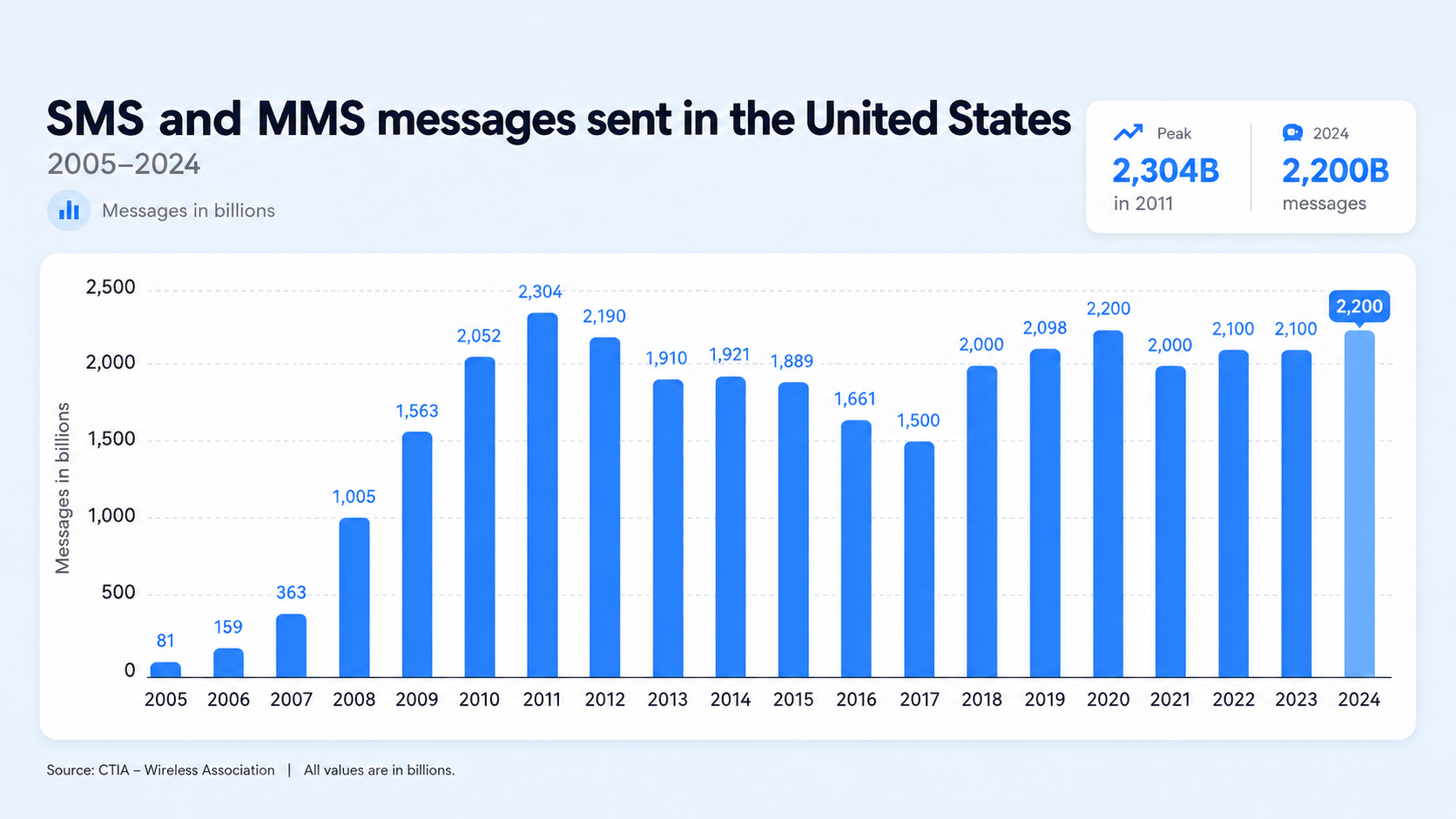
By 2024, Americans were sending 2.2 trillion texts a year, up from 2.1 trillion in 2022 and 2023, and holding steady near the all-time peak of 2.3 trillion set in 2011.
As you can see, SMS went from being used by just a handful of the US population to nearly everyone.
In fact, research has found that 97% of American adults text weekly, and they text twice as much as they call.
Texting is now the norm and the preferred means of communication for all ages.
(Adults 50-69 even prefer texting over email, according to AARP.)
SMS is not just used for every day communication. It’s a powerful marketing channel, too, as I’ll discuss later on.
SMS is not just a personal communication channel. Businesses across sales, marketing, customer service, and operations use it as a direct line to customers, one that actually gets read and answered.
Given that SMS quick, easy, and cheap, it’s easy to see why it’s caught on like it has.

Why SMS works for businesses
Like any type of medium that provides a framework for mass communication, SMS is perfect for marketing purposes.
And it’s something most consumers are highly receptive to.
Here are a few stats that provide perspective:
- “78% of people wish they could have a text conversation with a business
- 90% of leads prefer to be texted, compared to called
- 64% of consumers are likely to have a positive perception of companies that offer communication via text”
And when it comes to customer satisfaction, SMS is the number one rated contact method at 90%, with phone second at 77%, and Facebook third at 66%.
SMS engagement: what the numbers show
One of the most vital metrics for determining the success of a marketing campaign is engagement.
And SMS marketing has that in spades.
For starters, texts have an open rate of around 98%, which completely blows email marketing out of the water at just 20%.
Although email marketing can certainly be effective, it’s far easier for content to get lost in the sea of overflowing inboxes.
But nearly every single person you send a text message to will at least open it — and really quickly.
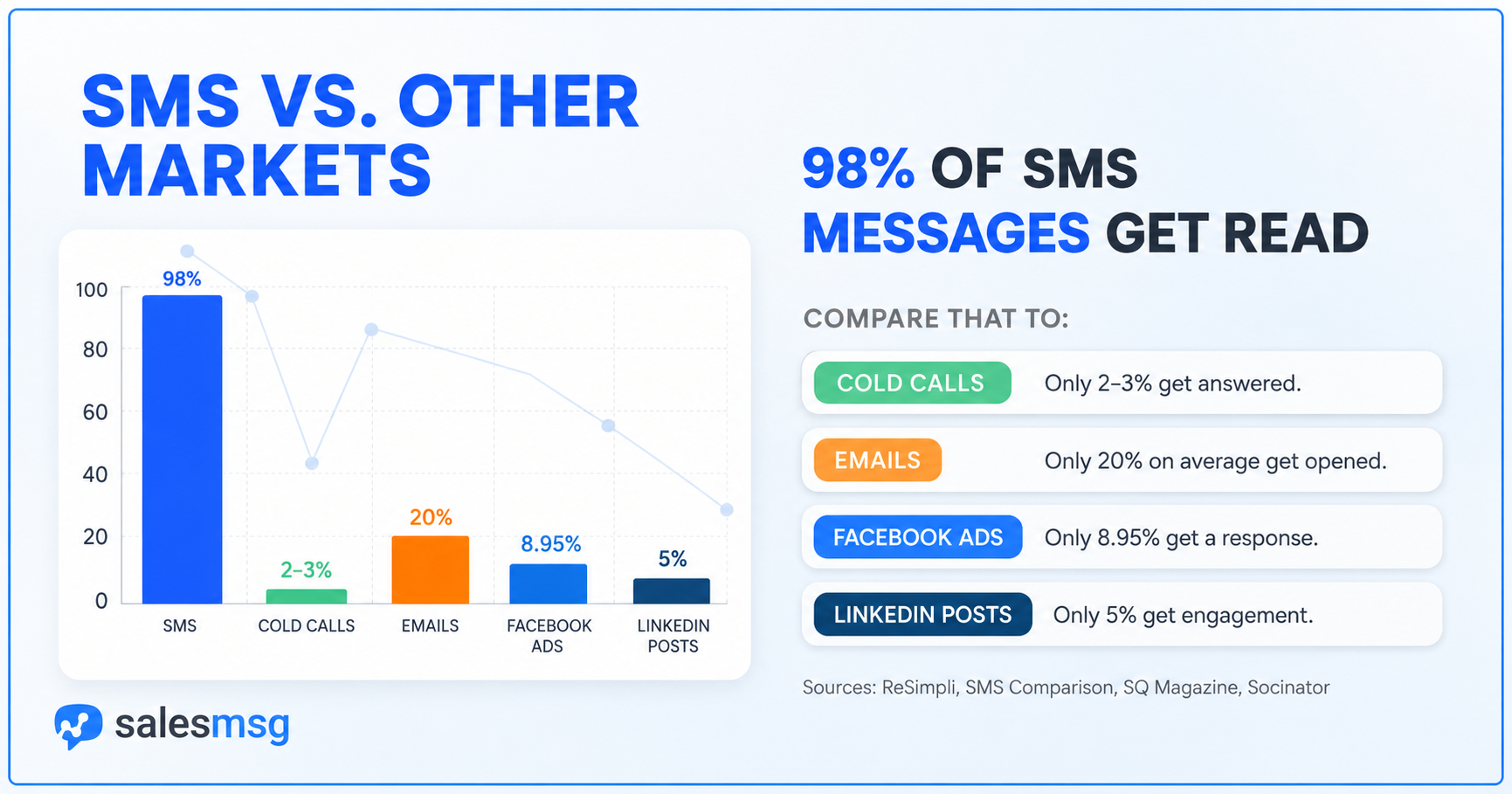
In fact, 90% of texts are read within just 3 minutes after being sent.
So, leads aren’t just engaging with SMS messages, they’re doing it right away.
Further, texts have a 45% response rate, which is 8x more than email.
That’s pretty mind-boggling when you stop and think about it.
Email may linger around in someone’s inbox for hours or days before they get around to opening it (if they ever do).
And only a third of those that open it will ever respond.
With SMS, however, a staggering 98 out of 100 people will view it, and over half will read it and respond.
The numbers speak for themselves, and you can see why more and more companies are chomping at the bit to start SMS marketing.
And of those that currently use it, 56% plan on increasing their SMS marketing budgets.
This brings me to my next point.
The businesses that rely on SMS most tend to have one thing in common: they need a fast response and a short path to a booked appointment or closed deal. That includes healthcare practices sending appointment reminders, real estate agents pushing new listing alerts the moment a property hits the market, home service companies confirming technician arrival windows, fitness studios sending class reminders and waitlist updates, and sales teams following up after demos before the lead goes cold.
According to the 2026 Salesmsg SMS Benchmark Report, businesses using AI-assisted SMS see 88% higher response rates than manual outreach alone. And 42% of all replies come from follow-up messages, not the first text sent.
How Do You Get Started with SMS Marketing?
First of all, let me say that it’s never been easier to inject SMS into your marketing campaign.
You don’t have to be a tech guru to figure it out, and it’s a strategy that’s available to businesses of all sizes.
And there are plenty of platforms available to make SMS marketing straightforward and accessible, even if you’re brand new to the game.
Salesmsg, for instance, offers simple, scalable, two-way business texting that allows you to easily send, receive, and manage text message conversations online.
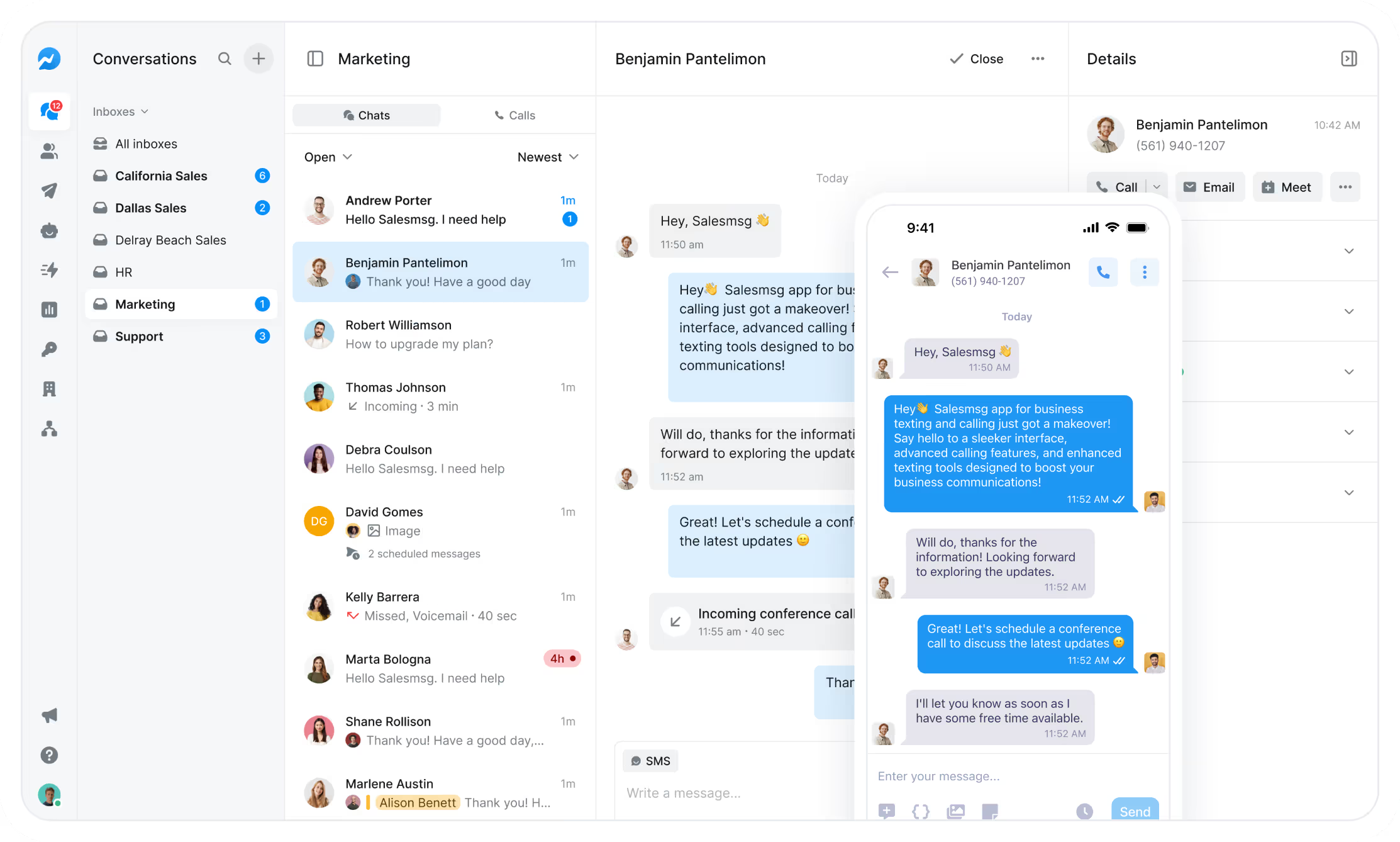
You can upload contacts, personalize messages, and send to multiple contacts at once.

You can use canned responses such as predefined messages to commonly asked sales queries and FAQs to automate much of the process.
And because you run your SMS campaign on a computer, you don’t have to deal with small screens and cramped thumbs.
In the words of one of Salesmsg's customers, "Salesmsg saved my thumbs."
If you've spent a long time texting individual customers on a phone, I'm sure you can sympathize entirely.

A Look at SMS Marketing Features
Here are some of the specific things you can do with Salesmsg.
- Import contacts - Conveniently import existing contacts into your Salesmsg app using a CSV file so you don’t have to deal with tedious, manual input
- SMS Broadcasts – Send a single text to thousands of people at once, and watch replies come back in real time
- SMS message scheduling - Set messages to be sent to a contact at a later time, where you choose the day and hour
- Shared inbox - This makes for silky smooth collaboration where all conversations are managed from just one inbox
- Workflows & automation - Send automated texts, follow-ups, and CRM-triggered messages so nothing slips through the cracks
- Opt-out management - Allow your contacts to unsubscribe so they’ll no longer receive texts with no hassle or drama
- Search contacts - Quickly find the chat history with specific contacts without having to sift through mountains of conversations manually
- Tag segmentation - Easily create groups of smaller segments for streamlined organization
- Multimedia texts - Send GIFs, images, PDFs, and videos so your texts grab attention and get responses
- Branded short links - Share trackable links (with your branding) inside your texts so you can measure clicks and engagement without cluttering your message
- AI Assistant - Get writing help built right in so you can send better texts in less time
- International texting - Reach customers and leads across 200+ countries with the same simplicity as sending a local text
See how teams set up SMS marketing automation workflows to follow up without manual work.
Also, note that Salesmsg integrates with over 1,000 third-party apps, including Zapier, Salesforce, and HubSpot to help you take your SMS marketing to the next level.
Salesmsg is built for exactly this: two-way SMS and calling from one inbox, with native HubSpot and Salesforce integration.

Plus, Extras Our Customers Requested
We’ve been building Salesmsg since 2017 with one simple playbook: listen to our customers and give them what they ask for.
That’s how we’ve grown from a texting app into a full messaging platform. Every week we’re rolling out new features and improvements—while keeping our 99.9% uptime steady in the background.
For example, customers told us they were tired of juggling separate tools for calls and texts. So, we built calling right into Salesmsg. Same inbox, same team, one platform.
Here's a few of the features we added beyond just SMS:
- Calling platform - Make and receive calls alongside your texts, without switching tools
- Power Dialer - Rapid-fire calling that lets your sales team connect with more leads in less time
- IVR & Call Routing - Auto-route inbound calls with menus, queues, and hold music so every caller reaches the right person
- Ringless Voicemail - Drop a voicemail straight into inboxes—without the phone ever ringing
- Text-to-Join Keywords - Let customers opt-in to your SMS list instantly by texting a simple keyword to your number
- Analytics & reporting - Track deliverability, replies, and team performance so you always know where you stand
- AI Agents - Why do all the texting yourself, when AI Agents can text for you? Our platform now has built-in AI Agents to automatically text to qualify leads, book demos, answer FAQs, and more.
Sales teams use it differently. See the SMS for sales guide.

SMS compliance: what businesses need to know
There’s one last thing I should mention.
Mass texting laws are in place that regulate the way businesses send SMS messages to prevent spam and abuse.
These were pretty basic about 10 years back, but as texting has become mainstream, the regulations have picked up.
So you need to be compliant with those laws to prevent fines or penalties.
Our 10DLC blueprint provides a nice overview of SMS compliance guidelines.
A2P 10DLC, for example, which is short for application-to-person 10-digit long code (it’s a mouthful, I know), is the standard for text messaging in the U.S. The mobile carriers require businesses to register for 10DLC with The Campaign Registry to ensure their text messages meet their standards.
Otherwise, you run the risk of heavy filtering and extra fees.
It's a straightforward process and Salesmsg walks you through every step when you sign up. When you sign up with Salesmsg, we’ll walk you through the process to make sure you’re registered and fully compliant with all the 10DLC regulations. We even use AI inside our Salesmsg platform to make registering for 10DLC as easy as possible.
Regulations like A2P 10 DLC are simply there to protect consumers and create a higher level of trust and transparency.
And by getting onboard, it has several major benefits for your business, including increased throughput with your messages, higher deliverability, and more engagement.
For a full compliance checklist, see our SMS marketing compliance guide.

What is SMS FAQs
What is SMS?
SMS stands for Short Message Service. It is the technology behind plain text messages sent between mobile devices over a cellular network. Messages are limited to 160 characters and work on any phone without an internet connection or a specific app installed.
Is SMS the same thing as a text message?
Yes. SMS and text message mean the same thing and are used interchangeably. Both refer to plain-text messages sent over a cellular network rather than over the internet.
How long has SMS been around?
Development of the standard started in 1984. The first SMS was sent in December 1992 over Vodafone's UK network. It has been the dominant text messaging standard globally ever since.
What is the difference between SMS and MMS?
SMS carries plain text up to 160 characters. MMS (Multimedia Messaging Service) supports images, GIFs, video, and audio files. Both travel over a cellular network without requiring internet. Most business texting platforms, including Salesmsg, support both formats from the same inbox.
What is the difference between SMS and RCS?
RCS (Rich Communication Services) is a newer messaging standard that adds read receipts, typing indicators, and rich media support. Unlike SMS, RCS requires an internet connection and is not universally supported across all carriers and devices. SMS reaches any phone, anywhere, which is why it remains the default for business messaging.
What does SMS mean when you send a text?
When your phone labels a sent message as SMS, it means the message was delivered as a standard text over the cellular network, not as an iMessage or a message through a data-based app. SMS delivery does not depend on the recipient having an internet connection or a specific app, which makes it more reliable for reaching people in areas with poor data coverage.
How do you get started with SMS marketing?
You need a business texting platform that lets your team send, receive, and manage conversations at scale. Salesmsg handles two-way SMS and calling from one inbox, integrates natively with HubSpot and Salesforce, and includes built-in compliance tools for 10DLC registration. See how to use SMS for marketing for a practical starting point.
_SMS%20Marketing%20Compliance.webp)

_SMS%20Marketing%20Best%20Practices_%2014%20Rules%20Backed%20by%20Real%20Data.webp)